Top 50 JavaScript
interview questions
Closures, the event loop, promises, prototypes and modules. Open a question to read the answer.
01Explain var let const in the context of JavaScript.
var, let and const all declare variables, but they differ in scope, hoisting behaviour and reassignment. var is the pre-ES2015 form; let and const arrived with ES2015 and are the ones used in modern code.
| Aspect | var | let | const |
|---|---|---|---|
| Scope | Function (or global) | Block | Block |
| Redeclare in same scope | Allowed | SyntaxError | SyntaxError |
| Reassign | Allowed | Allowed | Not allowed |
| Access before declaration | undefined | ReferenceError (TDZ) | ReferenceError (TDZ) |
| Global declaration | Becomes window property | Does not | Does not |
const freezes the binding, not the value: an object held in a | const can still be mutated. |
for (var i = 0; i < 3; i++) setTimeout(() => console.log("var", i));
for (let j = 0; j < 3; j++) setTimeout(() => console.log("let", j));
// var 3, var 3, var 3  -- one shared binding
// let 0, let 1, let 2  -- fresh binding per iteration

const cfg = { retries: 3 };
cfg.retries = 5;      // fine: mutating the object
// cfg = {};          // TypeError: Assignment to constant variable
The loop example is the classic difference: let creates a new binding per iteration, so closures capture distinct values.
Interview takeaway: default to const, use let when reassignment is genuinely needed, and treat var as legacy.
02In a real project using JavaScript, how would you apply, test, or troubleshoot var let const?
Apply. In a Node.js order-processing service I enforce const by default and let only for accumulators and loop counters, with no-var and prefer-const ESLint rules set to error so the choice is made by tooling, not by code review. Module-level configuration objects are declared with const and additionally passed through Object.freeze so a stray assignment to config.timeout fails loudly rather than silently changing behaviour for the whole process.
Test. Lint runs in CI and blocks the merge. For behaviour, I write unit tests around any code that creates closures in loops (event handlers registered per row, retry callbacks per request) asserting that each callback sees its own value; these are exactly the places where a var regression would surface. A test that calls an exported function before module initialisation completes catches accidental reliance on var hoisting.
Troubleshoot. A typical symptom is “every callback logs the last id” or a global leaking onto window in a browser bundle built from old scripts. I search the bundle for var at top level, check window in DevTools for unexpected properties, and convert to block scoping. const mutation bugs show up as a config object that changes mid-run; freezing it turns the silent write into a TypeError in strict mode, which pinpoints the writer in the stack trace.
One consideration: const protects only the binding, so immutability of nested data still needs Object.freeze or an immutable data pattern.
03Explain hoisting and temporal dead zone in the context of JavaScript.
Hoisting is the behaviour where declarations are processed when their enclosing scope is entered, before any code in that scope runs. What differs between declaration forms is what the engine does with the binding at that moment.
vardeclarations are hoisted and initialised toundefined, so reading one early yieldsundefined, not an error.- Function declarations are hoisted with their full body, so they can be called before the line that defines them.
let,constandclassare hoisted too, but left uninitialised. The region from the start of the scope to the declaration is the temporal dead zone (TDZ); any access there throws aReferenceError.- Function expressions and arrow functions assigned to variables follow the rules of the variable, not of function declarations.
console.log(a);      // undefined (var hoisted and initialised)
greet();             // "hi" (function declaration fully hoisted)
console.log(b);      // ReferenceError: Cannot access 'b' before initialization

var a = 1;
function greet() { console.log("hi"); }
let b = 2;
The TDZ is temporal, not positional: a function defined above a let may still read it safely if it is called after the initialisation runs. typeof on a TDZ variable also throws, unlike typeof on an undeclared name, which returns "undefined".
04In a real project using JavaScript, how would you apply, test, or troubleshoot hoisting and temporal dead zone?
Apply. In a React/Node codebase I rely on function-declaration hoisting deliberately in one place only: module files where small helpers are defined at the bottom so the exported, high-level function reads first. Everything else is declared before use. Circular imports between ES modules are the main production case where the TDZ bites, because module A can evaluate code that touches a const exported from module B before B’s body has run; I break those cycles or move the shared value into a third module.
Test. ESLint no-use-before-define (with functions: false to allow the hoisted helper style) runs in CI. For the circular-import risk I add import/no-cycle and a smoke test that imports every entry module in isolation, which fails immediately with the TDZ ReferenceError if an evaluation-order dependency exists.
Troubleshoot. The symptom is ReferenceError: Cannot access 'X' before initialization only in a particular build or test order, which points at module evaluation order rather than a syntax mistake. I run node --trace-warnings, or madge --circular src/ to print the cycle, then look at which module’s top level dereferences the import. A second symptom is a var -based script where a value is unexpectedly undefined; converting it to let turns the silent bug into a hard error at the real location.
The important trade-off: the TDZ exists to surface bugs early, so “fixing” it by downgrading to var hides the ordering problem instead of solving it.
05Explain primitive versus reference types in the context of JavaScript.
JavaScript has seven primitive types — string, number, bigint, boolean, undefined, symbol and null — and one reference type family, Object (which includes arrays, functions, dates, maps and so on). The distinction is about what a variable holds.
- A primitive variable holds the value itself. Assignment copies the value; two equal primitives are indistinguishable and comparison is by value. Primitives are immutable:
"abc".toUpperCase()returns a new string. - A reference variable holds a pointer to an object on the heap. Assignment copies the pointer, so two variables can refer to the same object and a change through one is visible through the other. Comparison with
===checks identity, not contents. - Function arguments follow the same rule: the pointer is passed by value, so a function can mutate the caller’s object but cannot rebind the caller’s variable.
let a = 10, b = a;  b++;             // a is still 10
const u1 = { name: "Ana" }, u2 = u1;
u2.name = "Bo";                      // u1.name is now "Bo"
console.log({} === {});              // false: different objects
console.log("x" === "x");            // true: same value
Primitives appear to have methods because the engine temporarily wraps them in String, Number or Boolean objects when a property is accessed.
06In a real project using JavaScript, how would you apply, test, or troubleshoot primitive versus reference types?
Apply. In a Redux-style front end the entire change-detection model depends on reference semantics: a reducer must return a new object when state changes so that === comparisons in selectors and React.memo detect it. I write reducers with spread copies or structuredClone for deep copies, and I keep API request options as frozen objects so a shared defaults object is never mutated by one caller and seen by another.
Test. Unit tests assert both directions: expect(next).not.toBe(prev) when a change happened, and expect(next).toBe(prev) when the action was a no-op, which protects memoised selectors. For functions that receive objects, a test passes an object, calls the function, and asserts with toEqual against a snapshot taken before the call to prove there was no mutation. Property-based tests with random objects catch accidental shallow copies of nested arrays.
Troubleshoot. The usual symptom is “the UI does not update although the store changed” (mutation in place, same reference) or the opposite, “a component re-renders on every tick” (a new object created on every render, often an inline {} or [] prop). React DevTools’ profiler shows which prop changed identity; Object.freeze in development throws on the illegal mutation and gives a stack trace. In Node services, a shared module-level options object that mysteriously changes between requests is the same bug in server clothing.
Key consideration: spread and Object.assign copy only one level, so nested objects are still shared unless cloned explicitly.
07Explain == versus === in the context of JavaScript.
=== (strict equality) returns true only when both operands have the same type and the same value. == (loose equality) first coerces operands of different types using the Abstract Equality algorithm, then compares. For same-type operands the two operators are identical, which is why the real difference is coercion.
| Comparison | == | === |
|---|---|---|
0 == "0" | true (string to number) | false |
null == undefined | true (special rule) | false |
false == "0" | true (both to number) | false |
[] == "" | true (array to primitive) | false |
NaN == NaN | false | false |
Loose equality rules worth knowing: null and undefined are equal only to each other and to nothing else; objects are converted via valueOf / toString when compared with primitives; two objects are compared by reference under both operators.
console.log("1" == 1, "1" === 1);      // true false
console.log(null == 0, null == undefined); // false true
console.log([1] == 1, [1] === 1);        // true false
The one idiomatic use of == is x == null, which checks for both null and undefined in a single expression. Object.is is a third option that differs from === only for NaN (equal to itself) and +0 / -0 (not equal).
08In a real project using JavaScript, how would you apply, test, or troubleshoot == versus ===?
Apply. The team standard is === everywhere, enforced by ESLint eqeqeq with the "always", { null: "ignore" } option so the deliberate value == null nullish check stays legal. In a payments API that reads query strings, the parsing layer converts "42" to a number once, at the boundary, so comparison code deeper in the service never has to rely on coercion. For NaN checks I use Number.isNaN, and for set membership Array.prototype.includes or Set.has, which use SameValueZero and therefore find NaN.
Test. Table-driven unit tests cover the boundary parser with inputs such as "0", "", "abc", null, and undefined, asserting the exact typed result. A lint step in CI fails on any new == outside the null idiom. Contract tests against the API fixture confirm that a status of 0 is not treated as “missing”.
Troubleshoot. The classic production symptom is a filter that silently drops legitimate zero values or treats "false" from a form as truthy. I reproduce it in the Node REPL with the exact runtime values and their typeof, then trace where a string from process.env, a URL, or localStorage entered numeric or boolean logic. Fixing the conversion at the boundary removes the whole class of bug rather than patching one comparison.
The key consideration is that === on objects compares identity, so “equal but different object” still needs a deep-equality helper or a structural comparison in tests.
09Explain closures and lexical scope in the context of JavaScript.
Lexical scope means a function’s accessible variables are determined by where the function is written in the source, not by where it is called. A closure is a function together with the live environment it was created in: when the inner function outlives the outer one, it keeps the outer variables alive and can read and update them.
Every function in JavaScript is a closure over its defining scope; the term is usually applied when that fact is exploited deliberately.
function makeCounter(start = 0) {
  let count = start;                 // private to this closure
  return {
    inc: () => ++count,
    value: () => count,
  };
}
const c1 = makeCounter(), c2 = makeCounter(10);
c1.inc(); c1.inc();
console.log(c1.value(), c2.value());  // 2 10
Each call to makeCounter creates a fresh count, so c1 and c2 are independent; nothing outside can reach count except through the returned functions.
Typical uses are data privacy and module patterns, factory functions that pre-bind configuration (makeLogger("payments")), memoisation caches, and event handlers that remember the element or id they were created for. The closure holds a reference to the variable, not a copy, which is why var in a loop produced the well-known “all callbacks see the final value” problem that block-scoped let fixes.
10In a real project using JavaScript, how would you apply, test, or troubleshoot closures and lexical scope?
Apply. In an Express service I use closures as the main dependency-injection mechanism: createOrderHandler({ db, logger }) returns the route handler, which closes over its dependencies instead of importing singletons. The same pattern gives a per-tenant rate limiter (makeLimiter(limit) returning a function with a private token bucket) and a memoised price lookup whose cache lives in the closure. React hooks are closures too; useEffect and useCallback capture the render’s variables, which is why the dependency array matters.
Test. Because dependencies are injected via the factory, unit tests pass fakes with no mocking framework and assert on the fake’s calls. For the memoiser I assert the expensive function is invoked once for repeated input and again after the cache is cleared. For React, a test using Testing Library drives a prop change and asserts the handler sees the new value, which catches stale-closure bugs the react-hooks/exhaustive-deps lint rule missed.
Troubleshoot. Two symptoms dominate. A stale closure: a timer or event handler keeps logging an old value because it captured a previous render’s variable; the fix is a useRef holding the latest value or correct effect dependencies. A leak: memory grows because a long-lived closure (an interval, a global event listener, a cache) retains a large object. In Chrome DevTools I take two heap snapshots, compare retained size, and follow the retainer chain to the closure’s context.
One consideration: closures keep the entire referenced scope alive, so a small callback can pin a large object nobody uses.
11Explain this binding in the context of JavaScript.
this is not lexically fixed for regular functions; its value is decided at call time by how the function is invoked. The rules, in order of precedence:
newbinding —new F()setsthisto the freshly created object.- Explicit binding —
f.call(obj),f.apply(obj, args)orf.bind(obj)setthistoobj;bindreturns a permanently bound function. - Implicit binding —
obj.method()setsthistoobj, the object left of the dot. Detaching the method (const m = obj.method; m()) loses it. - Default binding — a plain call
f()givesundefinedin strict mode (modules and classes are always strict) or the global object in sloppy mode.
Arrow functions do not have their own this; they capture it lexically from the enclosing function, and call / bind cannot change it.
const timer = {
  seconds: 0,
  start() {
    setInterval(() => this.seconds++, 1000);     // arrow: this = timer
    // setInterval(function () { this.seconds++ }) would fail: this = undefined
  },
};
Class fields also give a lexical option: handleClick = () => {...} inside a class body binds the method per instance, which is why that idiom became common for event handlers.
12In a real project using JavaScript, how would you apply, test, or troubleshoot this binding?
Apply. In a browser dashboard that uses class-based components and plain DOM listeners, every method passed as a callback is either an arrow class field or bound once in the constructor (this.onResize = this.onResize.bind(this)) so the same reference can later be removed with removeEventListener. In Node libraries I avoid this in exported APIs where possible, preferring closures and plain functions; when a fluent API needs it, methods return this explicitly and documentation states that destructuring the client (const { get } = client) is unsupported.
Test. Unit tests call each public method in the detached form — const fn = instance.method; fn() — to make sure it either works or throws a clear error rather than reading undefined.property. For event handlers I dispatch a synthetic event with Testing Library and assert the instance state changed, which fails if this fell back to undefined. TypeScript’s noImplicitThis option is enabled in CI.
Troubleshoot. The symptom is almost always TypeError: Cannot read properties of undefined (reading 'x') inside a callback. The stack trace shows the method name; I look at how it was passed (to setTimeout, .map, addEventListener, or a framework prop) and confirm it was detached. The fix is an arrow wrapper or bind. In sloppy-mode legacy scripts the same bug silently writes to window, which "use strict" converts into an error.
The main consideration is that bind creates a new function object, so binding inside render loops defeats reference equality and listener removal.
13Explain arrow versus regular functions in the context of JavaScript.
Arrow functions (ES2015) are a shorter syntax with different semantics, not just shorter syntax. The differences that matter:
| Aspect | Regular function | Arrow function |
|---|---|---|
this | Dynamic, set by call site | Lexical, from the enclosing scope |
arguments object | Own arguments | None; use rest parameters |
| Constructor | Usable with new, has prototype | new throws TypeError |
| Hoisting | Declarations fully hoisted | Follows the variable’s rules |
| Generators | Can be function* | Cannot be generators |
| Methods | Correct this as object method | Wrong this, no super |
Arrow bodies may be a single expression that is returned implicitly; returning an object literal needs parentheses: () => ({ ok: true }).
const nums = [1, 2, 3];
const doubled = nums.map(n => n * 2);              // concise callback

const api = {
  base: "/v1",
  path(p) { return `${this.base}/${p}`; },         // regular: this = api
  bad: (p) => `${this.base}/${p}`,                 // this is not api
};
console.log(api.path("users"));   // "/v1/users"
console.log(api.bad("users"));    // "undefined/users" in a module
The practical rule: use arrows for callbacks and small inline functions where lexical this is wanted; use regular functions or method shorthand for object methods, prototypes and anything that needs arguments or new.
14In a real project using JavaScript, how would you apply, test, or troubleshoot arrow versus regular functions?
Apply. The codebase convention in a React and Node monorepo is: arrows for callbacks, array methods, promise chains and class-field event handlers; function declarations for top-level named functions (better stack traces, hoisting, easier to find with search), method shorthand inside objects and classes, and anywhere this, arguments or new is required. Mongoose schemas and jQuery-style plugins are the notable places where a regular function is mandatory because the library sets this for you. ESLint prefer-arrow-callback and func-style encode the convention.
Test. Every exported class method used as a callback gets a detached-call test (see the this binding question). For middleware factories I test that the returned handler has the expected arity, because Express decides error-middleware status by fn.length === 4, and an arrow with rest parameters reports length 0. Snapshot tests of error stacks confirm named functions appear with their names instead of <anonymous>.
Troubleshoot. Symptoms: this is undefined inside a method written as an arrow property on an object literal; TypeError: X is not a constructor after someone changed a function to an arrow; or an Express error handler that never fires because its length is wrong. A quick fn.prototype === undefined check in the debugger identifies an arrow. Performance profiles that show thousands of anonymous closures usually point to arrows created inside render or hot loops; hoisting them out or memoising fixes it.
The consideration to state: arrows are not “better”, they are a different tool, and converting methods mechanically to arrows is a common source of regressions.
15Explain prototypes and inheritance in the context of JavaScript.
JavaScript inheritance is delegation between objects, not copying from classes. Every object has an internal link, [[Prototype]] (readable via Object.getPrototypeOf), to another object or null. When a property is not found on the object, the lookup walks that chain until it reaches null. Functions used as constructors have a prototype property that becomes the [[Prototype]] of objects created with new.
This diagram shows the chain for an instance of a Dog class that extends Animal.

The class syntax (ES2015) is sugar over exactly this mechanism: extends sets up the prototype link, super() calls the parent constructor, and methods are placed on the prototype so one function object is shared by all instances.
class Animal {
  constructor(name) { this.name = name; }
  speak() { return `${this.name} makes a sound`; }
}
class Dog extends Animal {
  speak() { return `${super.speak()} - woof`; }
}
const rex = new Dog("Rex");
console.log(rex.speak());                         // "Rex makes a sound - woof"
console.log(Object.getPrototypeOf(rex) === Dog.prototype);  // true
console.log(rex.hasOwnProperty("speak"));         // false, inherited
Object.create(proto) builds the same relationship without constructors, and property writes always land on the object itself, never on the prototype.
16In a real project using JavaScript, how would you apply, test, or troubleshoot prototypes and inheritance?
Apply. In production code I use class for a shallow hierarchy of domain errors (AppError → ValidationError, NotFoundError) so middleware can instanceof them and map to HTTP status codes, and for framework-mandated extension points such as extends HTMLElement for web components or extends EventEmitter in Node. Beyond that I prefer composition: plain objects and functions, with shared behaviour injected rather than inherited. Prototype knowledge is also what makes polyfills and safe property iteration (Object.hasOwn, Object.keys) correct.
Test. Error classes are tested with expect(err).toBeInstanceOf(ValidationError) and expect(err.name).toBe("ValidationError"), plus a check that err.stack exists, because a subclass that forgets super(message) loses both. Serialisation tests assert JSON.stringify(err) includes the custom fields, since message and stack are non-enumerable by default. A test iterating with for...in over a prototype-enriched object guards against accidental enumerable methods.
Troubleshoot. Common failures: instanceof returning false across package boundaries because two copies of the same class exist in node_modules (fix with a code property or Symbol.hasInstance); methods vanishing after structuredClone or JSON.parse, which copy own data properties only; and a mutation of a shared prototype-level array leaking between instances. In DevTools, expanding [[Prototype]] on the object shows exactly where a property lives, and Object.getPrototypeOf in a REPL confirms the chain.
The important consideration is to keep hierarchies shallow; deep prototype chains are hard to reason about and slow property lookup on misses.
17Explain event loop and microtasks in the context of JavaScript.
JavaScript runs on a single thread per realm; the event loop is the scheduler that decides which piece of work runs next. Work arrives in two kinds of queues. Macrotasks (tasks) come from timers, I/O callbacks, UI events and message events. Microtasks come from promise reactions (.then, await continuations), queueMicrotask and MutationObserver. After each macrotask finishes, the loop drains the entire microtask queue, including microtasks queued by other microtasks, before picking the next macrotask or rendering.
This is the loop as the browser runs it; Node’s loop is the same in spirit, with process.nextTick running before promise microtasks.

console.log("1 sync");
setTimeout(() => console.log("4 timeout"), 0);
Promise.resolve().then(() => console.log("3 microtask"));
console.log("2 sync");
// Output: 1 sync, 2 sync, 3 microtask, 4 timeout
Consequences: a long synchronous task or an endless chain of microtasks blocks rendering and input, and setTimeout(fn, 0) never runs before pending promise callbacks. await yields to the microtask queue, not to the next task.
18In a real project using JavaScript, how would you apply, test, or troubleshoot event loop and microtasks?
Apply. In a browser spreadsheet component I batch many state changes into one render with queueMicrotask, so all synchronous mutations in a click handler collapse into a single DOM update. In a Node ingestion service that parses large CSV files I avoid starving the loop by processing in chunks and yielding with await setImmediate() (from timers/promises), so health checks and other connections keep being served. Heavy CPU work (image resizing, hashing) moves to worker_threads or a Web Worker instead of the main loop.
Test. Unit tests use fake timers (vi.useFakeTimers() / jest.useFakeTimers()) and await Promise.resolve() or await vi.runAllTicks() to assert the exact order of callbacks. Integration tests measure event-loop lag with perf_hooks.monitorEventLoopDelay and fail if the p99 exceeds a budget under load. In the browser, Lighthouse’s Total Blocking Time and a Playwright check of PerformanceObserver longtask entries catch regressions.
Troubleshoot. Symptoms: the UI freezes or a Node service’s /health times out while CPU is at 100 percent; or an “infinite loop” where a promise chain keeps queuing microtasks and no timer ever fires. In Chrome, the Performance panel shows the long task and its stack; in Node, --cpu-prof or clinic flame gives the flame graph and monitorEventLoopDelay shows the lag over time. Fixes are chunking, moving work off-thread, or converting a recursive microtask loop to setTimeout.
The key consideration is that await in a tight loop does not give the browser a chance to paint; only a macrotask boundary does.
19Explain promises and async await in the context of JavaScript.
A Promise is an object representing the eventual result of an asynchronous operation. It is in one of three states: pending, fulfilled with a value, or rejected with a reason, and it settles exactly once. Consumers attach callbacks with .then, .catch and .finally, each of which returns a new promise, so handlers chain and a rejection propagates down the chain until something catches it. All handlers run as microtasks, so they are always asynchronous even if the promise is already settled.
The state machine is one-way: once settled, a promise never changes again.
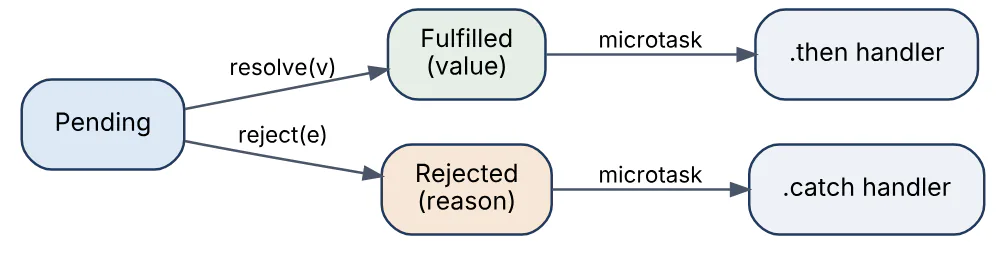
async / await (ES2017) is syntax over promises: an async function always returns a promise, await pauses the function until the awaited promise settles and resumes with its value or throws its rejection, which lets ordinary try / catch and loops handle asynchronous code.
async function loadOrder(id) {
  try {
    const res = await fetch(`/api/orders/${id}`);
    if (!res.ok) throw new Error(`HTTP ${res.status}`);
    return await res.json();
  } catch (err) {
    console.error("loadOrder failed:", err.message);
    throw err;                       // rethrow so callers see the rejection
  } finally {
    hideSpinner();
  }
}

// Independent work: run concurrently, not one after another
const [user, orders] = await Promise.all([getUser(id), getOrders(id)]);
The combinators matter in interviews: Promise.all fails fast on the first rejection, allSettled waits for every result, race settles with the first to settle, and any fulfils with the first fulfilment. fetch rejects only on network failure, not on HTTP 4xx/5xx, hence the res.ok check.
20In a real project using JavaScript, how would you apply, test, or troubleshoot promises and async await?
Apply. In a checkout service the request handler is async; independent lookups (customer, inventory, pricing) run through Promise.all, while steps with dependencies are awaited sequentially. Every external call is wrapped with a timeout via AbortSignal.timeout and a retry helper that itself returns a promise. I register process.on("unhandledRejection") to log and exit, because Node 15+ crashes on unhandled rejections by default, and I never leave a promise un-awaited unless it is explicitly fire-and-forget with its own .catch.
Test. Tests return or await the promise and use await expect(fn()).rejects.toThrow(/HTTP 503/) for the failure path. External calls are faked with msw or nock, including delayed and rejected responses, and fake timers verify the timeout triggers. A test with Promise.all and one failing dependency confirms the handler maps it to the right HTTP status. ESLint @typescript-eslint/no-floating-promises and require-await run in CI to catch forgotten awaits.
Troubleshoot. Classic symptoms: a value logged as Promise { <pending> } (missing await), a sequential waterfall visible in the network panel (awaiting in a for loop where Promise.all was intended), or an UnhandledPromiseRejection in logs with a useless stack. For the last, enabling --async-stack-traces (default in modern V8) and making sure errors are Error instances, not strings, restores the trace. Promise.all that aborts on one failure is swapped for allSettled when partial results are acceptable.
One consideration: forEach ignores returned promises, so arr.forEach(async ...) does not wait; use for...of or Promise.all(arr.map(...)).
21Explain callback hell and error handling in the context of JavaScript.
Callback hell is the deeply nested, rightward-drifting code that results from chaining asynchronous operations through nested callbacks. The nesting itself is a readability problem; the deeper issue is error handling: each callback must check its own err argument, try / catch around the outer call catches nothing because the callback runs later, and a forgotten check swallows failures silently.
// Node-style callbacks: every level repeats the error check
getUser(id, (err, user) => {
  if (err) return done(err);
  getOrders(user.id, (err, orders) => {
    if (err) return done(err);
    getInvoice(orders[0].id, (err, invoice) => {
      if (err) return done(err);
      done(null, invoice);
    });
  });
});

// Same flow with promises and async/await
async function loadInvoice(id) {
  const user = await getUser(id);
  const orders = await getOrders(user.id);
  return getInvoice(orders[0].id);     // any rejection propagates to the caller
}
Promises fix the structure and the error model together: a rejection anywhere in a chain skips to the nearest .catch, and with async / await ordinary try / catch / finally applies. Legacy callback APIs are converted with util.promisify in Node or a small wrapper that resolves or rejects from the callback. Remaining rules of good error handling: throw Error objects (not strings) so stacks survive, rethrow or wrap with cause (new Error("...", { cause: err }), ES2022) rather than swallowing, and handle errors at the level that can actually do something about them.
22In a real project using JavaScript, how would you apply, test, or troubleshoot callback hell and error handling?
Apply. In a Node file-processing worker that still talks to a callback-based SDK, I wrap each SDK call once with util.promisify (or a custom promisifier when the callback signature is non-standard) and expose only promise-returning functions to the rest of the code. The pipeline is then a flat async function with one try / catch per logical stage. Errors are normalised into a small hierarchy with code and cause, logged once at the boundary, and translated to a retry decision, a dead-letter message, or an HTTP status.
Test. For the promisified wrappers, tests stub the SDK to call back with (err) and with (null, result) and assert the wrapper rejects or resolves accordingly, including the case where the SDK calls the callback twice. Pipeline tests inject failures at each stage and verify that the error reaches the boundary with its cause chain intact and that finally cleanup (closing streams, releasing locks) still runs. A regression test confirms no stage swallows an error by returning undefined.
Troubleshoot. Symptoms include a job that “completes” with missing output (swallowed error), a process that hangs forever (callback never invoked, so the promise never settles), or a stack trace pointing only into the library. The hang is diagnosed by adding a timeout around the promisified call and by node --inspect to inspect pending handles; the lost context is restored by wrapping with cause. Logging the full cause chain with util.inspect(err, { depth: 5 }) shows the original failure.
The consideration is that promisifying an event emitter that emits multiple times does not fit the single-settle model; use async iterators or streams there.
23Explain spread rest destructuring in the context of JavaScript.
These three ES2015 features share the ... token and the pattern-matching style, but serve different purposes.
- Spread expands an iterable (arrays, strings, Sets) into individual elements in array literals and call arguments, and expands an object’s own enumerable properties into an object literal (ES2018). It creates shallow copies.
- Rest collects the remaining elements into a new array (function parameters, array destructuring) or the remaining properties into a new object (object destructuring). A rest element must be last.
- Destructuring unpacks values from arrays or properties from objects into variables, with defaults, renaming and nesting.
const defaults = { retries: 3, timeout: 1000 };
const opts = { ...defaults, timeout: 5000 };        // spread + override
const merged = [...[1, 2], ...new Set([2, 3])];     // [1, 2, 2, 3]

function log(level, ...parts) { return `${level}: ${parts.join(" ")}`; }

const { id, profile: { email }, role = "user", ...meta } = userRecord;
const [first, , third = "n/a"] = ["a", "b"];
console.log(third);                                 // "n/a"
Destructuring is common in function signatures to give named parameters: function connect({ host, port = 5432 } = {}). Spread replaces Function.prototype.apply for variadic calls (Math.max(...nums)) and Object.assign for copying. Because copies are shallow, nested objects in the result are still shared with the source.
24In a real project using JavaScript, how would you apply, test, or troubleshoot spread rest destructuring?
Apply. In a React application, spread drives immutable state updates in reducers ({ ...state, items: [...state.items, item] }) and prop forwarding (<Input {...field} />). In the Node API layer, object rest strips sensitive fields before responses (const { passwordHash, ...safeUser } = user), and destructured parameters with defaults replace long positional argument lists in service functions. Rest parameters implement variadic helpers such as a compose(...fns) utility.
Test. Reducer tests assert both value and identity: the new state toEquals the expected shape and not.toBe the previous state, while untouched branches keep the same reference (expect(next.user).toBe(prev.user)), which proves the spread was applied at the right depth. The response-sanitiser test asserts the forbidden keys are absent with expect(result).not.toHaveProperty("passwordHash"). Default-parameter behaviour is tested with undefined versus null, since only undefined triggers a default.
Troubleshoot. The most frequent bug is a shallow copy mistaken for a deep one: a nested object changes “on its own” because two states share it. I reproduce it with Object.isFrozen checks or by freezing state deeply in development and watching for the TypeError. Spread of a very large array in Math.max(...huge) throws RangeError: Maximum call stack size exceeded, fixed with reduce. Destructuring a null or undefined response (const { data } = await res.json() when the body is null) throws; a = {} default or optional chaining guards it.
The consideration to raise: object spread copies only own enumerable properties, so getters are evaluated and prototype methods are dropped.
25Explain map filter reduce in the context of JavaScript.
map, filter and reduce are higher-order array methods that express data transformations without manual loops or mutation. None of them changes the source array.
| Method | Callback receives | Returns | Use when |
|---|---|---|---|
map(fn) | (item, index, array) | New array, same length | Transforming each element |
filter(fn) | (item, index, array) | New array, subset | Selecting elements by predicate |
reduce(fn, init) | (acc, item, index, array) | Single accumulated value | Folding into a sum, object, or Map |
const orders = [
  { id: 1, total: 40, status: "paid" },
  { id: 2, total: 25, status: "pending" },
  { id: 3, total: 60, status: "paid" },
];
const paidTotal = orders
  .filter(o => o.status === "paid")
  .map(o => o.total)
  .reduce((sum, t) => sum + t, 0);               // 100

const byStatus = orders.reduce((acc, o) => {
  (acc[o.status] ??= []).push(o.id);
  return acc;
}, {});                                          // { paid: [1, 3], pending: [2] }
Two details interviewers probe: always pass an initial value to reduce, because without one an empty array throws and the first element becomes the accumulator; and chaining filter().map() walks the array twice, which is fine for typical sizes but a single reduce or a for...of loop avoids intermediate arrays when data is large. flatMap (ES2019) combines map and one-level flatten, and Object.groupBy (ES2024) replaces the grouping reduce idiom.
26In a real project using JavaScript, how would you apply, test, or troubleshoot map filter reduce?
Apply. In a reporting service that aggregates order events, the transformation pipeline is written as small named pure functions composed with map, filter and reduce: normalise records, drop cancelled ones, then fold into per-customer totals using a Map as the accumulator (safer than a plain object when keys might be "__proto__" or numeric). In the front end the same methods build view models from API responses, with flatMap for nested line items and Object.groupBy where the runtime supports it (Node 21+ and current browsers).
Test. Pure functions make the tests trivial: fixed input arrays, exact toEqual output, plus edge cases of an empty array, a single element, and duplicates. The reduce accumulator is tested with an empty input to confirm the initial value is returned instead of throwing. Property-based tests check invariants such as filter output length being at most the input length and map preserving length. Benchmarks with realistic volume (hundreds of thousands of records) guard against accidental quadratic patterns.
Troubleshoot. Common failures: reduce without an initial value crashing on empty input in production (TypeError: Reduce of empty array with no initial value); map used for side effects with the return value ignored, which lint rule array-callback-return flags; and memory spikes from long filter().map().filter() chains over large datasets, visible in a heap profile as many short-lived arrays. Replacing the chain with a single pass or a streaming approach (for await over a readable) fixes the latter.
The consideration is readability: when a reduce body grows beyond a few lines, a plain loop is usually clearer.
27Explain debouncing and throttling in the context of JavaScript.
Both are rate-limiting techniques for functions that fire too often, such as handlers for scroll, resize, input or mousemove. They differ in which calls survive.
- Debounce postpones execution until a quiet period of N milliseconds has passed with no new calls. Only the last call in a burst runs. Suited to “act when the user has finished”: search-as-you-type, autosave, window resize layout.
- Throttle guarantees at most one execution per N milliseconds, running at a steady rate while calls keep arriving. Suited to “keep up but not too often”: scroll position tracking, drag handlers, analytics pings.
function debounce(fn, wait) {
  let timer;
  return function (...args) {
    clearTimeout(timer);
    timer = setTimeout(() => fn.apply(this, args), wait);
  };
}

function throttle(fn, interval) {
  let last = 0;
  return function (...args) {
    const now = Date.now();
    if (now - last >= interval) { last = now; fn.apply(this, args); }
  };
}

input.addEventListener("input", debounce(e => search(e.target.value), 300));
window.addEventListener("scroll", throttle(updateProgressBar, 100));
Both rely on a closure to hold the timer or timestamp. Production implementations (Lodash’s debounce / throttle) add leading/trailing options, cancel() and flush(), and a maxWait so a debounced function cannot be starved by continuous input. For animation-driven work, requestAnimationFrame is a better throttle than a fixed interval because it aligns with the display refresh.
28In a real project using JavaScript, how would you apply, test, or troubleshoot debouncing and throttling?
Apply. In a product-search page, the input handler is debounced at roughly 250–300 ms and paired with an AbortController so a superseded request is cancelled rather than racing the newer one. Autosave of a document editor is debounced at a longer delay with maxWait so a user who types continuously still gets periodic saves. Scroll-linked header effects are throttled through requestAnimationFrame, and a telemetry client throttles “heartbeat” events to one per 10 seconds. In React, the debounced function lives in a useMemo or useRef so it is not recreated every render, which would reset its timer.
Test. Fake timers make these deterministic: call the debounced function five times, advance the clock by 299 ms and assert zero calls, advance 1 ms and assert exactly one call with the last arguments. For throttle, advance in steps and assert the call count equals floor(elapsed / interval) + 1. End-to-end Playwright tests type quickly into the search box and assert via network interception that only one request was issued after typing stops.
Troubleshoot. Symptoms: search results flickering between stale and current data (debounce present but no cancellation), the debounced callback never firing during continuous typing (missing maxWait), or a handler that fires on every keystroke in React because the wrapper is recreated per render. The last is confirmed by logging the function identity across renders. A this lost inside the wrapper shows up as undefined property errors when the wrapped function is a method; using fn.apply(this, args) fixes it.
The consideration: debounced work still runs on the main thread, so rate limiting reduces frequency but does not make the work itself cheaper.
29Explain event delegation and bubbling in the context of JavaScript.
When an event is dispatched on a DOM element it travels in three phases: capture from window down to the target, the target phase, and bubbling back up from the target to window. Listeners registered with addEventListener(type, fn) run in the bubbling phase by default; passing { capture: true } runs them on the way down. Most events bubble (click, input, keydown); a few such as focus, blur, load and scroll on elements do not, though focusin / focusout are bubbling equivalents.
The diagram shows a click on a list item propagating upward to a single listener on the list.
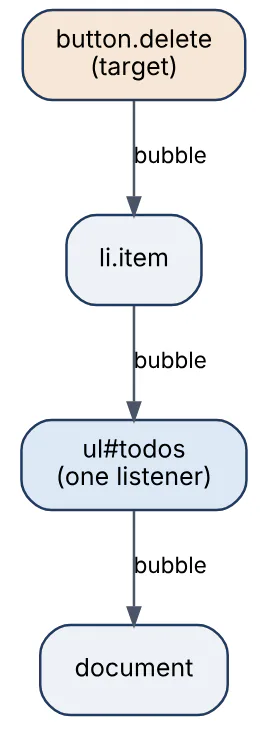
Event delegation exploits bubbling: instead of attaching a listener to every child, one listener on an ancestor inspects event.target (or event.target.closest(selector)) to decide what to do. It handles elements added later, uses far less memory for large lists, and simplifies cleanup.
document.querySelector("#todos").addEventListener("click", (e) => {
  const button = e.target.closest("button.delete");
  if (!button) return;                    // click was elsewhere
  const item = button.closest("li");
  removeTodo(item.dataset.id);
});
event.currentTarget is the element the listener is attached to; stopPropagation() halts further travel; preventDefault() cancels the browser’s default action without stopping propagation.
30In a real project using JavaScript, how would you apply, test, or troubleshoot event delegation and bubbling?
Apply. In a data-grid with thousands of rows rendered from a template, a single delegated click and keydown listener on the table body handles row selection, inline edit buttons and sort headers via data-action attributes, so re-rendering rows never requires re-attaching handlers. Global behaviours such as “close any open dropdown on outside click” are a delegated pointerdown listener on document. Custom components dispatch CustomEvent with bubbles: true, composed: true so parents can listen even across shadow DOM boundaries. React itself uses delegation internally at the root container, which is why stopPropagation interactions between React and native listeners need care.
Test. Testing Library tests render the grid and fire userEvent.click on a row button added after the listener was attached, asserting the handler ran, which proves delegation rather than per-element binding. Tests also click on padding between rows and assert nothing happened, covering the closest() null branch. A capture-phase listener in the test harness counts how many times the event reached document to detect double-handling.
Troubleshoot. Symptoms: a handler firing twice (listener attached on both child and delegated parent, or attached again on every render), a click on an icon inside a button not matching because e.target is the <svg> (fix with closest), or a modal that closes when clicking inside it because the inside click bubbles to the document listener (check modal.contains(e.target)). Chrome’s getEventListeners(el) in the console and the Event Listener Breakpoints panel show where handlers live and in which phase they fire.
The consideration: a delegated handler on document runs for every event of that type, so keep the early-exit check cheap.
31Explain DOM manipulation and rendering in the context of JavaScript.
The DOM is the browser’s in-memory object tree for the document; JavaScript manipulates it through APIs such as document.createElement, append, remove, textContent, classList and setAttribute. Rendering is the pipeline that turns the DOM plus CSS into pixels, and the cost of manipulation comes from what it triggers in that pipeline.
The main stages are shown here; a DOM or style change invalidates work from that stage onward.

Key points for writing efficient DOM code:
- Browsers batch mutations and render once per frame, after microtasks. Reading a layout property (
offsetHeight,getBoundingClientRect) between writes forces a synchronous layout, and alternating reads and writes in a loop causes layout thrashing. - Build subtrees off-document with a
DocumentFragmentor a detached element and insert once; change classes rather than many inline styles. - Prefer
textContentoverinnerHTMLfor text to avoid HTML parsing and injection. - Animate
transformandopacity, which can skip layout and paint and run on the compositor; schedule visual updates withrequestAnimationFrame.
const frag = document.createDocumentFragment();
for (const item of items) {
  const li = document.createElement("li");
  li.textContent = item.name;
  frag.append(li);
}
list.replaceChildren(frag);        // one insertion, one layout
Frameworks such as React, Vue and Svelte differ in strategy (virtual DOM diffing versus compiled fine-grained updates) but all exist to minimise exactly these invalidations.
32In a real project using JavaScript, how would you apply, test, or troubleshoot DOM manipulation and rendering?
Apply. For a live order-book widget that updates many times per second, I keep a map from order id to its row element, patch only the cells whose values changed with textContent, and coalesce all incoming updates into one requestAnimationFrame callback so the DOM is touched at most once per frame. Rows outside the viewport are virtualised: only the visible slice exists in the DOM. Any read of geometry happens before the batch of writes. User-supplied strings go through textContent or a sanitiser, never raw innerHTML.
Test. Unit tests in jsdom or happy-dom assert the resulting tree (toHaveTextContent, attribute checks) and, using a MutationObserver in the test, that an update of N orders produces at most N mutations rather than a full re-render. Performance is tested in a real browser with Playwright: a PerformanceObserver for longtask and layout-shift, and a Lighthouse CI budget for Interaction to Next Paint. Visual regression snapshots catch styling regressions from class-toggle refactors.
Troubleshoot. Symptoms: scroll jank, input lag, or a frame-time graph with purple (layout) spikes in Chrome’s Performance panel. The “Layout” events there show a warning for forced reflow with the responsible JavaScript stack, which identifies the read-after-write. A memory graph that climbs as rows are removed indicates detached DOM nodes still referenced from the id map or from listeners; the Memory panel’s “Detached” filter finds them. Flicker on update usually means two separate writes in different frames.
The consideration: innerHTML = "" style resets destroy and recreate nodes, losing focus, selection and scroll state; targeted updates preserve them.
33Explain modules CommonJS ESM in the context of JavaScript.
CommonJS (CJS) is the module system Node.js was built on: require() loads a module synchronously at call time and module.exports defines what it exposes. ECMAScript Modules (ESM, ES2015) are the language standard: import / export declarations are static, resolved before execution, and work natively in browsers and in Node (stable since Node 12/14).
| Aspect | CommonJS | ES Modules |
|---|---|---|
| Syntax | require / module.exports | import / export |
| Loading | Synchronous, at runtime | Static graph, async loading |
| Exports | Copy of the value at require time | Live read-only bindings |
| Tree shaking | Not possible (dynamic) | Possible by bundlers |
Top-level await | Not available | Available (ES2022) |
this / __dirname | Available | undefined; use import.meta.url |
// math.cjs (CommonJS)
exports.add = (a, b) => a + b;
// app.cjs
const { add } = require("./math.cjs");

// math.mjs (ESM)
export const add = (a, b) => a + b;
export default function multiply(a, b) { return a * b; }
// app.mjs
import multiply, { add } from "./math.mjs";
const { readFile } = await import("node:fs/promises");   // dynamic import
Node decides the format by file extension (.mjs, .cjs) or by the nearest package.json "type" field ("module" makes .js ESM). ESM can import CJS modules (default export is module.exports, named exports are detected heuristically); CJS can load ESM only with dynamic import(), except that Node 22.12+ supports synchronous require(esm) for modules without top-level await. Package authors use the "exports" field with import / require conditions to ship both.
34In a real project using JavaScript, how would you apply, test, or troubleshoot modules CommonJS ESM?
Apply. New services are written as ESM ("type": "module") with explicit .js extensions in relative imports, node: prefixes for built-ins, and import.meta.url with fileURLToPath where a file path is needed. Shared internal libraries are published with a dual build: "exports": { ".": { "import": "./dist/index.mjs", "require": "./dist/index.cjs", "types": "./dist/index.d.ts" } }, generated by a bundler such as tsup. In browsers, bundlers consume ESM so tree shaking removes unused exports; sideEffects: false in package.json lets them drop entire files.
Test. CI runs an “exports smoke test” that imports the package from a scratch directory in three ways — ESM import, CJS require, and TypeScript with moduleResolution: "NodeNext" — and asserts the main symbols are defined. publint and arethetypeswrong run on the built package to detect misconfigured exports. Test runners are configured for ESM (vitest natively; Jest with --experimental-vm-modules if still used) and mocking uses vi.mock because jest.mock hoisting assumes CJS.
Troubleshoot. The recurring errors: ERR_REQUIRE_ESM when CJS code requires an ESM-only dependency (upgrade Node to 22.12+ or switch the caller to import()); SyntaxError: Cannot use import statement outside a module (missing "type": "module" or wrong extension); __dirname is not defined in ESM; and circular-import TDZ errors that CJS had masked as undefined. node --trace-exit and --experimental-print-required-tla help on the Node side; for duplicated module instances in a bundle (two copies of React), npm ls react and the bundler’s analyser show the duplication.
The consideration: dual packages can load twice in one process (once per format), so singletons and instanceof checks need a single source of truth.
35Explain JSON serialization edge cases in the context of JavaScript.
JSON.stringify and JSON.parse are lossy for anything outside JSON’s six types (object, array, string, number, boolean, null), and the details catch people out.
undefined, functions and symbols are omitted from objects and becomenullinside arrays.NaNandInfinityserialise asnull.Datebecomes an ISO string via itstoJSONmethod and does not come back as aDateon parse.Map,Set,RegExpandErrorbecome{}; typed arrays become index-keyed objects.BigIntthrowsTypeError: Do not know how to serialize a BigInt.- Circular references throw
TypeError: Converting circular structure to JSON. - Only own enumerable string-keyed properties are included; prototype methods and symbol keys are dropped. Key order follows the object’s insertion order, so output is not canonical.
JSON.parseloses precision for integers beyond 2^53 and accepts__proto__as a plain key, which is harmless forJSON.parseitself but dangerous if the result is merged into another object naively.
const payload = {
  at: new Date(0), amount: 10n, ratio: NaN, tags: new Set(["a"]),
  skip: undefined, fn() {},
};
const safe = JSON.stringify(payload, (key, value) =>
  typeof value === "bigint" ? value.toString()
  : value instanceof Set ? [...value] : value);
console.log(safe);
// {"at":"1970-01-01T00:00:00.000Z","amount":"10","ratio":null,"tags":["a"]}
The replacer argument (function or allow-list array) and a reviver in JSON.parse are the standard hooks for handling these; the third space argument pretty-prints. structuredClone is the right tool when the goal is copying rather than serialising, since it preserves Date, Map, Set and cycles.
36In a real project using JavaScript, how would you apply, test, or troubleshoot JSON serialization edge cases?
Apply. In a financial API I never let money travel as JSON numbers: amounts are serialised as strings or integer minor units, and BigInt ids are stringified with a central replacer registered once in the HTTP layer. Dates are ISO strings on the wire and converted back with a schema library (zod ’s z.coerce.date()), so parsing is validation rather than guesswork. Error responses use a toJSON() method on the error class to expose code and message without leaking stack. Logging uses a safe stringifier that tolerates circular structures (util.inspect or safe-stable-stringify).
Test. Round-trip tests parse(stringify(x)) against fixture objects containing dates, nested maps, undefined and big integers, asserting the typed result equals the original after the reviver. Contract tests compare the serialised output of each response DTO against a stored JSON snapshot so an accidental new field or a leaked passwordHash fails the build. A test feeds {"__proto__": {"admin": true}} through the request parser and asserts the merged object has no admin property, guarding against prototype pollution.
Troubleshoot. Symptoms: a 500 with Converting circular structure to JSON after someone added a parent back-reference to a model (fix with a toJSON or a replacer that drops the field); ids that drift by one for values above 2^53 (switch to strings); dates arriving as strings and breaking getTime() calls; or [object Object] in logs from a Map. Inspecting the raw body with curl or the Network panel’s response tab, then bisecting the object in a REPL with JSON.stringify, localises the offending property quickly.
The important consideration: JSON is a data interchange format, not a general object serialiser, so decide the wire representation of each non-JSON type explicitly.
37Explain null undefined NaN in the context of JavaScript.
These are three distinct “no useful value” markers with different meanings and types.
undefinedmeans a value was never assigned: uninitialised variables, missing properties, missing function arguments, and functions with noreturn. Its type is"undefined".nullis an intentional, explicit “no value”, set by the programmer or returned by APIs such asdocument.querySelectorwhen nothing matches.typeof nullis"object", a long-standing quirk kept for compatibility.NaN(“Not-a-Number”) is anumberproduced by failed numeric operations:Number("abc"),0 / 0,Math.sqrt(-1),undefined + 1. It is the only value in the language not equal to itself.
let a;            console.log(a, typeof a);          // undefined "undefined"
const b = null;   console.log(b, typeof b);          // null "object"
const c = +"abc"; console.log(c, c === c);           // NaN false

console.log(Number.isNaN(c), isNaN("abc"));         // true true (global coerces)
console.log(null == undefined, null === undefined); // true false
console.log(null + 1, undefined + 1);               // 1 NaN
Practical rules: test for NaN with Number.isNaN or Object.is(x, NaN), never with ===; prefer the global-free Number.isNaN over isNaN, which coerces its argument first. The nullish operators (ES2020) treat null and undefined identically: a ?? fallback applies the fallback only for those two, unlike ||, and obj?.prop short-circuits to undefined. JSON.stringify drops undefined properties but keeps null, which is one reason APIs usually standardise on null for “absent”.
38In a real project using JavaScript, how would you apply, test, or troubleshoot null undefined NaN?
Apply. The team contract in a TypeScript-based Node API is: undefined means “field not provided” (so PATCH requests can omit fields), null means “explicitly cleared”, and the database layer maps null to SQL NULL. Numeric parsing happens once at the boundary with a validator that rejects NaN rather than letting it propagate into totals. Internally, ?? and ?. replace manual if (x !== null && x !== undefined) chains, and strictNullChecks is on so every nullable path is explicit in the types.
Test. Validation tests send {"price": "abc"}, {"price": null} and a request with price omitted, asserting a 400, a cleared value, and an unchanged value respectively. Aggregation functions are tested with inputs that include NaN to confirm they reject or skip it instead of returning NaN totals. A custom ESLint rule or no-restricted-globals bans the global isNaN.
Troubleshoot. The two production signatures are TypeError: Cannot read properties of undefined (reading 'x') and a NaN that appears in a report or a width: NaNpx style. For the first, the stack points to the access; the real question is why the data was missing, usually an API shape change or an async race where render ran before load, fixed with a loading state or ?. plus a default. For NaN, I trace backwards through arithmetic to the first non-numeric operand, typically a string from a form or a Date subtraction on an invalid date; Number.isFinite at the source stops it.
The consideration: ?? does not treat 0 or "" as missing, which is correct for numeric inputs and a frequent reason to prefer it over ||.
39Explain type coercion and truthiness in the context of JavaScript.
Type coercion is the automatic conversion of a value from one type to another when an operator or context requires it. Explicit conversion (Number(x), String(x), Boolean(x)) is predictable; implicit coercion follows the ToPrimitive, ToNumber, ToString and ToBoolean abstract operations and is where surprises come from.
+concatenates if either operand is a string (after ToPrimitive), otherwise adds. Every other arithmetic operator converts to numbers:"6" * "2"is12,"6" - 2is4, but"6" + 2is"62".- Comparison with
<,>converts to numbers unless both sides are strings, which are compared lexically:"10" < "9"istrue. - Objects convert via
Symbol.toPrimitive, thenvalueOf, thentoString; arrays stringify by joining, so[] + []is""and[1,2] + 1is"1,21". ==applies its own coercion rules;===applies none.
Truthiness is coercion to boolean. Exactly eight values are falsy: false, 0, -0, 0n, "", null, undefined and NaN. Everything else is truthy, including "0", "false", [], {} and any function.
console.log(1 + "2", 1 - "2", "3" * "4");       // "12" -1 12
console.log([] + {}, [] == false, [0] == false); // "[object Object]" true true
console.log(Boolean("0"), !!"", Boolean([]), !!NaN); // true false true false
console.log(0 || "default", 0 ?? "default");     // "default" 0
The || and && operators return one of their operands, not a boolean, which is why || is used for defaults and why ?? was added to default only on null / undefined. !!x and Boolean(x) are the explicit truthiness conversions.
40In a real project using JavaScript, how would you apply, test, or troubleshoot type coercion and truthiness?
Apply. In a Node service that reads configuration from process.env, every value is a string, so the config module converts explicitly (Number(process.env.PORT), process.env.FEATURE_X === "true") and validates with a schema before the app starts; nothing downstream ever sees a raw env string. For optional numeric fields ?? is used instead of || so a legitimate 0 survives. Truthiness checks are reserved for cases where all falsy values genuinely mean “absent” (an optional string), and explicit comparisons are used for numbers and booleans. Template literals replace + concatenation to avoid accidental arithmetic-versus-concatenation bugs.
Test. The config loader has table-driven tests: "0", "", "false", undefined and "abc" for each field, asserting either the typed value or a startup error. Business rules involving quantities are tested with 0 boundaries to catch if (qty) mistakes. ESLint rules eqeqeq, no-implicit-coercion and TypeScript’s strict mode make most implicit conversions compile-time or lint-time failures.
Troubleshoot. Classic production symptoms: a feature flag that is always on because "false" is truthy; a total shown as "1020" because a string from the request was concatenated instead of added; a port of NaN because PORT was undefined and multiplied; or an empty-string username rejected as “missing” because of if (!name). The diagnostic step is the same each time — log typeof alongside the value at the point of entry — and the fix is to convert once at the boundary.
The consideration: coercion is deterministic and fully specified, so the goal is not to avoid it but to make every conversion visible in the code.
41Explain memory leaks and garbage collection in the context of JavaScript.
JavaScript memory is managed automatically. The engine’s garbage collector (V8 uses a generational, mostly concurrent mark-and-sweep collector: a small “young” space collected frequently with a scavenger and an “old” space collected less often) frees any object that is no longer reachable from the roots: the global object, the current call stack, and active closures. Reference counting is not used, so cycles are collected fine.
A memory leak in JavaScript therefore means an object that is still reachable although the program no longer needs it. The usual culprits:
- Forgotten timers and event listeners that keep their callback, and everything it closes over, alive.
- Growing caches or maps keyed by objects that are never evicted.
- Detached DOM nodes still referenced from JavaScript variables or closures.
- Accidental globals (sloppy-mode assignment to an undeclared name).
- Long-lived closures that capture a large scope.
This diagram shows a typical retention chain: a global interval keeps a handler alive, which keeps a removed DOM subtree alive.
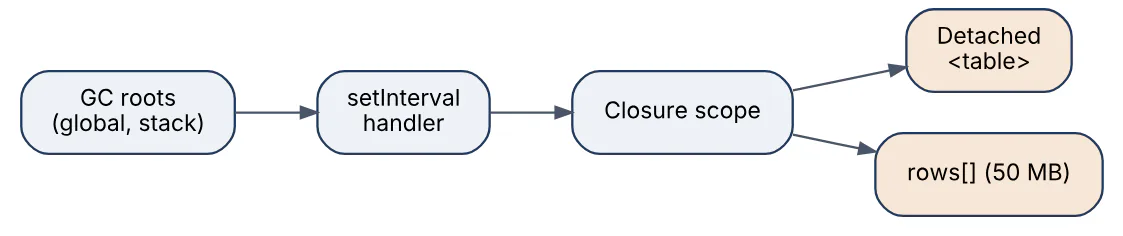
The language offers WeakMap and WeakSet (keys do not prevent collection), WeakRef and FinalizationRegistry (ES2021) for caches that should not pin their entries, and AbortController to detach many listeners at once. In Node, --max-old-space-size sets the heap limit, and exceeding it produces the JavaScript heap out of memory fatal error.
42In a real project using JavaScript, how would you apply, test, or troubleshoot memory leaks and garbage collection?
Apply. In a single-page application each component or route owns an AbortController; every addEventListener, fetch and subscription receives its signal, and teardown is a single controller.abort(). Per-element metadata lives in a WeakMap keyed by the element so it disappears with the node. In a long-running Node worker, in-process caches are bounded LRU structures (lru-cache) with TTLs rather than plain Maps, and the process exposes process.memoryUsage() as metrics so growth is visible on a dashboard.
Test. A Playwright test navigates between two routes 50 times, forces GC via the Chrome DevTools Protocol (HeapProfiler.collectGarbage), and asserts performance.memory.usedJSHeapSize (or a CDP heap-usage metric) returns within a tolerance of the baseline. For Node, a load test runs for 30 minutes while heapUsed is sampled; a monotonically rising trend fails the job. Unit tests for cleanup call the component’s unmount and then assert the listener count on the target is zero, using a spy on addEventListener / removeEventListener.
Troubleshoot. The symptom is RSS or heap climbing over hours, GC pauses lengthening, and finally an OOM crash or a tab that is killed. In Chrome I take three heap snapshots across the suspected action, use “Objects allocated between snapshots 1 and 2”, and follow the retainer tree of the biggest group; “Detached” in the class filter finds orphaned DOM. In Node, node --heapsnapshot-signal=SIGUSR2 or --inspect plus Chrome’s Memory panel does the same; --trace-gc shows collection frequency and pause times.
The main consideration is that a leak is defined by the program’s intent, not by the collector, so the tooling can show what is retained but only a human decides whether it should be.
43Explain fetch API and cancellation in the context of JavaScript.
fetch(url, options) is the standard promise-based HTTP client, available in browsers and in Node since version 18. It returns a promise for a Response whose headers arrive first; the body is read separately and asynchronously via response.json(), .text(), .blob(), .arrayBuffer() or the response.body ReadableStream. The promise rejects only on network-level failures (DNS, connection reset, CORS block, abort); an HTTP 404 or 500 fulfils normally, so response.ok or response.status must be checked.
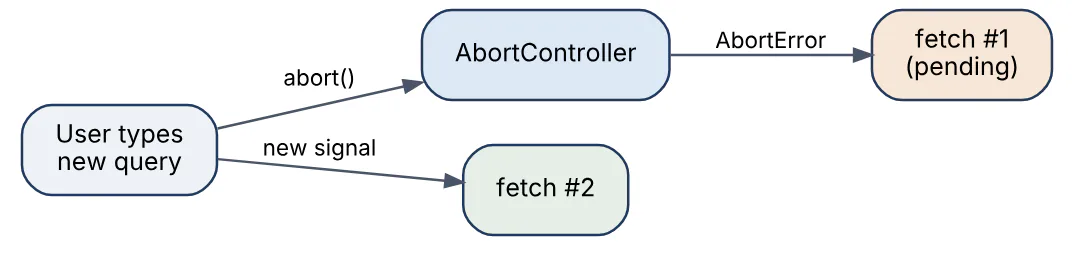
Cancellation uses AbortController: the controller’s signal is passed in the options, and calling controller.abort() rejects the pending fetch (and an in-progress body read) with a DOMException named AbortError. AbortSignal.timeout(ms) creates a signal that fires automatically, and AbortSignal.any([...]) combines signals (both widely available in current browsers and Node 20+).
The sequence for a user-triggered cancellation looks like this.
let controller;
async function search(term) {
  controller?.abort();                       // cancel the previous request
  controller = new AbortController();
  const signal = AbortSignal.any([controller.signal, AbortSignal.timeout(8000)]);
  try {
    const url = `/api/search?q=${encodeURIComponent(term)}`;
    const res = await fetch(url, { signal });
    if (!res.ok) throw new Error(`HTTP ${res.status}`);
    return await res.json();
  } catch (err) {
    if (err.name === "AbortError") return null;   // expected, not a failure
    throw err;
  }
}
Other details: fetch sends no cookies cross-origin unless credentials: "include"; request bodies must be strings, FormData, Blob or streams, so objects need JSON.stringify and a Content-Type header; and a Response body can be consumed only once unless clone() is called first.
44In a real project using JavaScript, how would you apply, test, or troubleshoot fetch API and cancellation?
Apply. The front end wraps fetch in a small apiClient that adds the base URL, auth header, JSON encoding, response.ok checking, a default timeout via AbortSignal.timeout, and an optional caller signal merged with AbortSignal.any. Data-fetching hooks create an AbortController per effect and abort it in the cleanup function, so navigating away cancels in-flight requests and avoids setting state on unmounted components. In Node, outbound calls to partner APIs use the same client with per-request timeouts and keepalive -style agents through undici.
Test. Unit tests use msw to intercept requests, including handlers that delay indefinitely so the timeout path can be asserted with fake timers (await expect(client.get("/slow")).rejects.toMatchObject({ name: "TimeoutError" })). A test aborts the controller mid-request and asserts the promise rejects with AbortError and that no state update followed. Contract tests check that non-2xx responses become typed HttpErrors with status and parsed body. Playwright’s page.route simulates offline and 500 responses end to end.
Troubleshoot. Symptoms: search results from an older query overwriting newer ones (no cancellation), “Failed to fetch” with no detail (a CORS failure or a network error; the Network panel shows the real reason), TypeError: body used already after logging res.json() twice, or an AbortError being reported as a crash because the catch did not special-case it. For hanging requests in Node, NODE_DEBUG=undici or an --inspect session shows pending sockets; usually a missing timeout or an exhausted connection pool.
The consideration: aborting the fetch stops the client from waiting, but the server may still complete the work, so idempotency and server-side timeouts remain necessary.
45Explain CORS and browser security in the context of JavaScript.
The browser’s same-origin policy prevents a script loaded from one origin (scheme + host + port) from reading responses from another origin. Cross-Origin Resource Sharing (CORS) is the HTTP header protocol a server uses to relax that rule selectively. The restriction is enforced by the browser, not the network: the request may still reach the server, but JavaScript cannot read the response unless the server opts in with Access-Control-Allow-Origin (a specific origin or *).
Requests are either simple (GET/HEAD/POST with safelisted headers and form-style content types) and sent directly, or preflighted: the browser first sends an OPTIONS request and only proceeds if the server’s Access-Control-Allow-Methods and Access-Control-Allow-Headers permit the real request. Cookies and Authorization headers are sent cross-origin only with credentials: "include", and then the server must echo the exact origin and send Access-Control-Allow-Credentials: true; * is not allowed.

CORS is one layer of the browser security model. Related mechanisms interviewers expect: Content Security Policy headers restrict which scripts and connections a page may make, the primary defence against XSS; HttpOnly, Secure and SameSite cookie attributes limit cookie theft and cross-site request forgery; Cross-Origin-Opener-Policy and Cross-Origin-Embedder-Policy isolate the page from cross-origin windows and are required for SharedArrayBuffer; and postMessage with an explicit targetOrigin is the sanctioned channel between frames of different origins.
46In a real project using JavaScript, how would you apply, test, or troubleshoot CORS and browser security?
Apply. For an API consumed by a known SPA, the Express or Fastify server uses the cors plugin with an explicit allow-list of origins read from configuration, credentials: true for the cookie-based session, maxAge on preflight responses to cut OPTIONS traffic, and only the methods and headers the client actually uses. The SPA is served with a strict CSP (default-src 'self'; connect-src 'self' https://api.example.com) with nonces for inline scripts, session cookies are HttpOnly; Secure; SameSite=Lax, and state-changing endpoints additionally require a CSRF token or a custom header that forces a preflight. Public widget endpoints that must be embedded anywhere use Access-Control-Allow-Origin: * and never rely on cookies.
Test. Supertest integration tests send requests with various Origin headers and assert the exact Access-Control-* headers, including the absence of them for an unlisted origin and the OPTIONS response for a preflighted PUT. Playwright runs the real SPA against the API and asserts no console CORS errors and that the CSP report endpoint receives no violations during a smoke flow. Security headers are checked in CI with a simple assertion script against the deployed preview URL.
Troubleshoot. blocked by CORS policy in the console is the symptom; the Network panel shows whether the preflight or the real request failed and which header is missing. Common causes: a proxy stripping headers, the server returning * with credentials, the allow-list missing the https:// scheme or the port, a 5xx on the OPTIONS route because auth middleware ran before CORS, or a missing Vary: Origin causing a CDN to cache one origin’s response for everyone.
The consideration: CORS protects users from malicious sites reading their data; it does not protect the API from non-browser clients, so authentication and authorisation are still mandatory.
47Explain web storage cookies in the context of JavaScript.
Browsers offer several client-side storage mechanisms; the right one depends on who needs to read the data and how long it should live.
| Mechanism | Capacity | Lifetime | Sent to server | Access |
|---|---|---|---|---|
| Cookie | ~4 KB each | Session or Expires / Max-Age | Yes, on every matching request | JS unless HttpOnly |
localStorage | ~5–10 MB per origin | Until cleared | No | Synchronous, same origin |
sessionStorage | ~5 MB | Tab lifetime | No | Synchronous, per tab |
| IndexedDB | Large (quota-based) | Until cleared | No | Async, structured data |
Cookies are the only mechanism the server sees automatically, which makes them the natural carrier for session identifiers. Their attributes control security: HttpOnly hides them from document.cookie, Secure restricts them to HTTPS, SameSite=Lax|Strict|None controls cross-site sending (None requires Secure), and Domain / Path scope them. The document.cookie API is a string you append to, one cookie at a time; the newer asynchronous CookieStore API exists in Chromium-based browsers but is not universal.
localStorage.setItem("theme", JSON.stringify({ mode: "dark" }));
const theme = JSON.parse(localStorage.getItem("theme") ?? "{}");

window.addEventListener("storage", (e) => {      // fires in *other* tabs
  if (e.key === "theme") applyTheme(JSON.parse(e.newValue));
});

document.cookie = "consent=1; Max-Age=31536000; Path=/; Secure; SameSite=Lax";
Web Storage stores strings only, is synchronous (so large reads block the main thread), is unavailable in workers, and is readable by any script on the origin, which is why tokens that must survive XSS belong in HttpOnly cookies rather than localStorage.
48In a real project using JavaScript, how would you apply, test, or troubleshoot web storage cookies?
Apply. The authentication design keeps the session or refresh token in an HttpOnly; Secure; SameSite=Lax cookie set by the server, with a short-lived access token held only in memory on the client. localStorage is reserved for non-sensitive preferences (theme, column layout, dismissed banners), wrapped in a small typed module that handles JSON.parse failures and quota errors and that namespaces keys with a version prefix (v2:prefs) so schema changes do not break old clients. Draft form data goes to sessionStorage so it survives a reload but not a new tab. Anything larger or structured, such as an offline cache of orders, goes to IndexedDB via a thin wrapper library.
Test. Unit tests run against jsdom’s storage with localStorage.clear() in beforeEach, and include a case where setItem throws QuotaExceededError (mocked) to confirm the app degrades gracefully. Playwright tests assert cookie attributes via context.cookies() after login, verify the token is not present in localStorage or in document.cookie, and open a second page to check the storage event synchronises preferences. A privacy test confirms no storage is written before consent.
Troubleshoot. Symptoms: users logged out at random (cookie too large or SameSite blocking it on a cross-site redirect from a payment provider), a SecurityError on localStorage access in Safari private mode or inside a third-party iframe with storage partitioning, or stale preferences after a deploy because the stored shape changed. The Application panel in DevTools shows every cookie with its attributes and every storage key; the Network panel’s cookie tab shows why a cookie was not sent.
The consideration: both cookies and Web Storage are origin-scoped, so subdomains and ports are different origins for storage even when a Domain cookie spans them.
49Explain functional programming and immutability in the context of JavaScript.
Functional programming in JavaScript means building programs from pure functions (same input, same output, no side effects), treating functions as values (passing, returning and composing them), and preferring immutable data: instead of changing an object, you produce a new one. The language supports this style natively through first-class functions, closures, array methods like map / filter / reduce, spread syntax and, since ES2023, non-mutating array methods such as toSorted, toReversed, toSpliced and with.
Immutability is a convention rather than a guarantee: const only freezes the binding, and Object.freeze is shallow. Deep immutability comes from discipline (never mutate, always copy), from libraries such as Immer (which lets you write mutating code against a draft and produces a new frozen object) or from readonly types in TypeScript.
const compose = (...fns) => x => fns.reduceRight((acc, f) => f(acc), x);

const applyDiscount = rate => order =>
  ({ ...order, total: Math.round(order.total * (1 - rate)) });
const addTax = rate => order =>
  ({ ...order, total: Math.round(order.total * (1 + rate)) });

const priceOrder = compose(addTax(0.2), applyDiscount(0.1));
const order = { id: 7, total: 100 };
console.log(priceOrder(order));   // { id: 7, total: 108 }
console.log(order.total);         // 100 — original untouched

const sorted = [3, 1, 2].toSorted();   // [1, 2, 3], source unchanged
The payoff is predictability: pure functions are trivially testable and cacheable, immutable data makes change detection a reference comparison (how React and Redux decide what to re-render) and removes a whole class of shared-state bugs in asynchronous code. The cost is extra allocation and, without structural sharing, more garbage for large structures.
50In a real project using JavaScript, how would you apply, test, or troubleshoot functional programming and immutability?
Apply. In a pricing engine the core is a set of pure functions (applyPromotions, computeTax, allocateShipping) composed into a pipeline; all I/O (fetching rates, writing to the database) sits at the edges in a thin imperative shell. State in the React client is updated through Immer-based reducers so nested updates stay readable while remaining immutable, and Object.freeze is applied to shared constants. Hot paths that process large arrays are allowed to mutate a local accumulator inside a function, as long as nothing escapes, because local mutation does not break purity at the function boundary.
Test. Pure functions get example-based tests and property-based tests (fast-check) for invariants: discounts never produce a negative total, composition order is respected, and the input object is deep-equal to a snapshot taken before the call, which proves no mutation. Reducer tests assert new references for changed branches and preserved references for unchanged ones. Running the test suite with deep-frozen fixtures turns any accidental mutation into an immediate TypeError in strict mode.
Troubleshoot. Typical symptoms: a component that does not re-render after a state change (an in-place mutation preserved the reference), a stale value in a memoised selector, or an “action at a distance” bug where one module’s change appears in another because they share a cached object. Freezing the suspect object in development surfaces the writer’s stack trace; the React DevTools profiler highlights props that changed identity without changing value, which is the opposite problem of over-copying. Excessive GC pressure from copying large arrays each tick shows in the Performance panel and is solved with structural sharing or by scoping mutation locally.
The consideration: immutability is a tool for correctness at module boundaries, not a rule to apply to every local variable; copying everywhere costs memory and readability.
Answers tailored to your resume and job description
Add your resume and the job description in CrackItX's Settings. When the interviewer asks a JavaScript question, Claude suggests an answer using your real projects and the role's requirements, in real time.
See pricing →