Top 80 React / Next.js
interview questions
Hooks, rendering, Server Components, routing and caching. Open a question to read the answer.
01Explain JSX and component rendering in the context of React.js / Next.js.
JSX is a syntax extension that lets you write element trees in a JavaScript file. It is not HTML: a compiler (Babel, SWC, or Turbopack in Next.js) turns <Button size="lg">Save</Button> into a call to the JSX runtime, which produces a plain object called a React element — { type: Button, props: { size: "lg", children: "Save" } }.
Rendering is the process of calling component functions to turn those element descriptions into a tree, diffing that tree against the previous one, and committing the minimal set of changes to the DOM. A component is a function that takes props and returns elements; React decides when to call it (initial mount, state change, parent re-render, context change).
function Price({ amount, currency = "EUR" }) {
  const formatted = new Intl.NumberFormat("de-DE", {
    style: "currency", currency
  }).format(amount);
  return <span className="price">{formatted}</span>;
}
// <Price amount={19.9} /> renders: <span class="price">19,90 €</span>
In Next.js the same JSX may be rendered on the server first (to HTML, or to the RSC payload for Server Components) and then hydrated or reconciled on the client. The three phases are shown below.

Key rules: a component must be pure during render, return a single root (or a fragment), and use className / htmlFor instead of the HTML attribute names.
02In a real project using React.js / Next.js, how would you apply, test, or troubleshoot JSX and component rendering?
Apply. In a product catalogue built with the Next.js App Router, I keep rendering logic declarative: ProductCard receives a product prop and returns JSX, with conditional UI expressed as {isOnSale && <Badge />} and lists as products.map(p => <ProductCard key={p.id} product={p} />). Anything that is not pure (fetching, timers, DOM access) stays out of the render body and goes into effects, event handlers, or a Server Component.
Test. With React Testing Library and Vitest or Jest, I render the component and assert on what a user sees: render(<ProductCard product={fixture} />); expect(screen.getByText("19,90 €")).toBeInTheDocument(). Snapshot tests are reserved for stable, presentational markup. For Server Components I test the async function directly or run a Playwright smoke test against next dev, since RSC rendering is not supported by jsdom-based renderers.
Troubleshoot. The commonest symptoms are “Objects are not valid as a React child” (rendering a Date or object directly), “Adjacent JSX elements must be wrapped” (missing fragment), and “Too many re-renders” (calling a setter during render). React DevTools shows which component re-rendered and why; console.log inside the body confirms whether a render is happening at all. In Next.js, a useState import in a file without "use client" fails at build time with a clear message pointing at the offending file.
A frequent mistake is defining a component inside another component’s body; it gets a new identity on every render, so React unmounts and remounts it, losing state and focus.
03Explain props versus state in the context of React.js / Next.js.
Props are inputs passed from a parent; state is data a component owns and changes over time. Both trigger a re-render when they change, but only the owner can change state, while props are read-only from the child’s perspective.
| Aspect | Props | State |
|---|---|---|
| Owner | Parent component | The component itself |
| Mutability | Immutable inside the child | Updated via a setter (useState, useReducer) |
| Flow | Downward, one direction | Local, can be lifted to a common ancestor |
| Typical content | Configuration, data, callbacks | Form values, open/closed flags, fetched results |
function Counter({ step }: { step: number }) {     // step is a prop
  const [count, setCount] = useState(0);            // count is state
  return <button onClick={() => setCount(c => c + step)}>{count}</button>;
}
In the Next.js App Router the distinction gains one more dimension: Server Components can receive props (including params and searchParams) but cannot hold state, because they never re-render on the client. Any interactive state must live in a Client Component marked with "use client", and props crossing that boundary must be serialisable (no functions, class instances, or Dates without conversion).
04In a real project using React.js / Next.js, how would you apply, test, or troubleshoot props versus state?
Apply. For a checkout flow I decide ownership deliberately: the Cart page holds line items as state because several children (totals, item list, promo box) read and modify them; each LineItem receives its item and an onQuantityChange callback as props and holds no state of its own. Derived values such as the total are computed from state during render rather than stored, which eliminates a whole class of “stale copy” bugs. In Next.js, server-fetched data arrives as props from a Server Component and becomes initialData for client state only when it genuinely must be edited locally.
Test. Unit tests render a component with controlled props and assert output; for stateful behaviour I fire events with userEvent.click and assert the new DOM, never reading internal state directly. A prop-contract test type-checks with TypeScript (tsc --noEmit in CI) so wrong or missing props fail the build.
Troubleshoot. Two classic symptoms: a child “ignores” a prop change because it copied the prop into state once (useState(props.value)), and a value “resets” because the component remounted (key change or conditional rendering) and state was lost. React DevTools lets me inspect props versus hooks state side by side to see which one is wrong. For the first bug the fix is to render from the prop directly or lift the state; for the second, stabilise the component position and key.
Copying props into state is almost always a sign the state belongs one level higher.
05Explain useState in the context of React.js / Next.js.
useState declares a piece of component-local state and returns the current value plus a setter. Calling the setter schedules a re-render; React batches multiple setter calls in the same event (and, since React 18, in promises and timeouts too) into one render.
Important behaviours:
- The argument is the initial value and is used only on the first render. Pass a function (
useState(() => expensiveInit())) to avoid recomputing it every render. - Setting state to the same value (by
Object.is) bails out without re-rendering. - Updates are queued, so reading the variable immediately after calling the setter still gives the old value. Use the functional form when the next value depends on the previous one.
const [items, setItems] = useState([]);

function addTwice(item) {
  setItems(prev => [...prev, item]);   // functional update: safe to chain
  setItems(prev => [...prev, item]);   // both apply; the array grows by two
}
State must be treated as immutable: create a new object or array rather than mutating, otherwise React may skip the update. In Next.js, useState is a client-only hook; a file that uses it needs the "use client" directive, and its initial value is also rendered on the server during SSR, so it should not depend on window.
06In a real project using React.js / Next.js, how would you apply, test, or troubleshoot useState?
Apply. In a filter sidebar for a listings page I keep related fields in one state object ({ category, priceMax, sort }) and update it with a spread, instead of three separate useState calls that have to be kept in sync. When the shape grows past a handful of fields or transitions have rules, I switch to useReducer. Values that are derivable (filtered count) are computed, not stored. For URL-driven filters in Next.js the state lives in searchParams and useState only holds uncommitted input.
Test. I test through behaviour: await user.type(input, "shoes"); expect(screen.getByRole("list").children).toHaveLength(3). For the lazy initialiser I assert that the expensive function is called once using vi.fn(). Testing a custom hook that wraps useState uses renderHook and act.
Troubleshoot. Typical issues: a counter that increments by one when two clicks were expected (closure over a stale value; fix with setCount(c => c + 1)), a list that does not update after items.push(x) (mutation; create a new array), and a “Cannot update a component while rendering a different component” warning (setter called in render; move it to an effect or handler). In Next.js, an SSR warning about window appears when the initialiser reads browser APIs; I defer that read to an effect or guard with typeof window.
Keep state minimal: every extra useState is another value that can drift out of sync.
07Explain useEffect dependencies in the context of React.js / Next.js.
The dependency array tells React when to re-run an effect: after any render in which one of the listed values changed (compared with Object.is). An empty array means run once after mount (twice in development with Strict Mode, to surface missing cleanup); no array means run after every render.
The rule enforced by eslint-plugin-react-hooks is simple: every reactive value read inside the effect — props, state, context, and anything derived from them in the component body — must be listed. Omitting one creates a stale closure that silently uses old data.
useEffect(() => {
  const controller = new AbortController();
  fetch(`/api/orders?status=${status}`, { signal: controller.signal })
    .then(r => r.json())
    .then(setOrders);
  return () => controller.abort();   // cancels the stale request
}, [status]);                        // re-runs only when status changes
Common pitfalls:
- Objects or arrays created during render (
{ id }or[a, b]) are new on every render and make the effect loop; depend on the primitive fields or memoise the object. - Functions defined in the component are also new each render; wrap them in
useCallbackor move them inside the effect. - React 19.2 adds
useEffectEventfor logic that should read the latest values without being a dependency.
In Next.js, effects run only on the client, after hydration, so they are the correct home for browser-only work, never for data a Server Component could fetch.
08In a real project using React.js / Next.js, how would you apply, test, or troubleshoot useEffect dependencies?
Apply. In a live dashboard I use effects for genuine synchronisation with external systems: subscribing to a WebSocket channel keyed by accountId, registering a resize listener, or integrating a non-React chart library. Each effect depends on exactly the values it reads and returns a cleanup that undoes the subscription. Data loading moves out of effects altogether — into Server Components or TanStack Query — so most pages end up with very few useEffect calls.
Test. With renderHook I change a dependency through rerender({ accountId: 2 }) and assert the mock socket was unsubscribed from channel 1 and subscribed to channel 2. The react-hooks/exhaustive-deps lint rule runs in CI as an error, not a warning, so a missing dependency fails the pipeline. Strict Mode in development doubles mount/unmount, which quickly exposes effects whose cleanup is incomplete.
Troubleshoot. An infinite request loop usually means an object or array dependency recreated each render; React DevTools’ “why did this render” plus a console.count in the effect confirms it, and the fix is to depend on primitives or memoise. A chart that keeps showing the first account’s data is a stale closure from an omitted dependency. Duplicate WebSocket messages in dev point to a missing cleanup. In Next.js, an effect reading searchParams without listing it is a frequent cause of “the page did not update after navigation”.
Never silence the lint rule with an eslint-disable comment; restructure the code so the dependencies are honest.
09Explain useMemo in the context of React.js / Next.js.
useMemo caches the result of a calculation between renders and recomputes it only when one of its dependencies changes. It is a performance hint, not a semantic guarantee: React may discard the cached value (for example in future offscreen features), so the code must still be correct if the function runs again.
Two legitimate uses:
- Skipping an expensive computation such as sorting or filtering thousands of rows on every keystroke.
- Keeping a stable object identity so that a memoised child (
React.memo) or an effect dependency does not fire needlessly.
const visibleRows = useMemo(
  () => rows.filter(r => r.region === region).sort(byDate),
  [rows, region]
);
It is not a general optimisation: the hook itself costs memory and a comparison, so wrapping cheap expressions makes things marginally slower and harder to read. Measure with the React Profiler first. The React Compiler (stable since its 1.0 release in October 2025, and enabled in Next.js 16 via reactCompiler: true) applies this kind of memoisation automatically, which makes hand-written useMemo largely unnecessary in compiled codebases. useMemo is a client hook; Server Components run once per request and have no re-render to optimise.
10In a real project using React.js / Next.js, how would you apply, test, or troubleshoot useMemo?
Apply. In an analytics grid rendering 20,000 transactions, I memoise the derived dataset (filter, group, aggregate) against [transactions, filters] so typing in an unrelated search box does not recompute it. I also memoise the columns configuration object passed to a virtualised table, because that library compares props by reference and would otherwise reset its internal layout on every parent render.
Test. Correctness tests do not change: assert the rendered output for given inputs. For the optimisation itself I add a targeted test using a spy inside the memoised function and assert it was called once across two renders with unchanged deps, and again after a dep change. Performance is verified with the React DevTools Profiler, comparing commit durations before and after, and recorded in the PR.
Troubleshoot. When memoisation “does not work”, the dependency is almost always a new reference each render — a filters object built inline by the parent, or a prop array from .map(). Logging Object.is(prev, next) for each dependency across two renders pinpoints the culprit. The opposite problem, stale output, is a missing dependency that the lint rule would have caught. If the memoised function has side effects, move them to an effect; useMemo must be pure.
The important consideration: premature useMemo everywhere hides real hot spots and clutters code. Profile, then memoise the two or three calculations that matter.
11Explain useCallback in the context of React.js / Next.js.
useCallback returns the same function instance across renders until one of its dependencies changes. It is useMemo specialised for functions: useCallback(fn, deps) is equivalent to useMemo(() => fn, deps).
Its purpose is referential stability, which matters in exactly two situations:
- The function is passed to a child wrapped in
React.memo; without a stable reference the memoisation is defeated because props compare unequal every render. - The function is a dependency of
useEffect,useMemo, or anotheruseCallback, and an unstable identity would re-trigger them.
const handleSelect = useCallback((id) => {
  onChange(selected.includes(id)
    ? selected.filter(s => s !== id)
    : [...selected, id]);
}, [selected, onChange]);
Wrapping every handler in useCallback is a common anti-pattern: the hook does not make the function cheaper to create, and if the child is not memoised there is no benefit. The dependency array must include everything the function reads, otherwise the callback closes over stale values. In codebases using the React Compiler the hook is rarely needed, since the compiler stabilises callbacks automatically. Like all hooks it is client-only in Next.js.
12In a real project using React.js / Next.js, how would you apply, test, or troubleshoot useCallback?
Apply. A typical case is a DataTable where each of 500 memoised Row components receives onToggle. Without useCallback in the parent, selecting one row re-renders all 500. I pair useCallback on the handler with React.memo on Row, and write the handler with a functional state update (setSelected(prev => ...)) so its dependency array can be empty and the identity never changes. The other place I reach for it is a debounced search handler whose identity must survive renders so the debounce timer is not reset.
Test. Behaviour tests cover the handler’s effect on the DOM. For stability, a test renders the parent twice (rerender) and asserts a vi.fn() passed as a child mock received the same function reference both times. A render-count assertion on the memoised child (incrementing a counter inside a test-only wrapper) proves the optimisation holds.
Troubleshoot. The React DevTools Profiler with “Record why each component rendered” shows “props changed: onToggle” when the callback is unstable, usually because a dependency such as an inline options object changes each render. Stale behaviour — the handler acting on an old selected array — means a dependency was left out; the lint rule flags it. In Next.js, passing a client-side callback as a prop from a Server Component fails to serialise, so the handler must be created inside the Client Component.
Stabilising a callback only pays off when something downstream compares it by reference.
13Explain useRef in the context of React.js / Next.js.
useRef returns a mutable object { current } whose identity persists for the component’s lifetime. Changing ref.current does not trigger a re-render, which distinguishes it from state and makes it the right tool for values React does not need to display.
Two main uses:
- DOM access. Pass the ref as the
refprop of a host element to focus an input, measure size, scroll into view, or hand the node to a third-party library. - Instance variables. Hold a timer id, the previous value of a prop, a WebSocket instance, or an “is mounted” flag without causing renders.
function SearchBox() {
  const inputRef = useRef(null);
  useEffect(() => { inputRef.current?.focus(); }, []);
  return <input ref={inputRef} placeholder="Search orders" />;
}
Rules: do not read or write ref.current during render (it is not reactive and breaks purity); access it in effects or handlers. In React 19 ref is an ordinary prop on function components, so forwardRef is no longer required to pass a ref to a custom component, and ref callbacks may return a cleanup function. In Next.js, a ref’s current is null during server rendering, so any DOM work must sit in an effect, which only runs on the client.
14In a real project using React.js / Next.js, how would you apply, test, or troubleshoot useRef?
Apply. In a support chat widget I use refs for three things: a ref on the message list to scroll to the bottom after each new message, a ref holding the setTimeout id for the typing indicator so it can be cleared on unmount, and a ref storing the latest onMessage callback so a long-lived WebSocket effect can call the newest version without re-subscribing. For an embedded map library I give it the container node via a ref in an effect and destroy the instance in cleanup.
Test. Testing Library covers DOM refs indirectly: after rendering, expect(screen.getByRole("textbox")).toHaveFocus(). For scroll behaviour I stub Element.prototype.scrollIntoView with vi.fn() in jsdom and assert it was called. Timer refs are tested with fake timers (vi.useFakeTimers()), unmounting the component and asserting the callback never fires.
Troubleshoot. “Cannot read properties of null” on ref.current means the element was not mounted yet or was conditionally rendered; moving the access into an effect or checking for null fixes it. A UI that does not update after changing ref.current is a misuse — that value should be state. In Next.js, the forwardRef warning on a component library migrated to React 19 is resolved by accepting ref as a normal prop. If a third-party library mutates the node React also controls, the symptom is flicker on re-render; the fix is to let one side own that subtree.
A ref is for values React should ignore; the moment the UI depends on it, convert it to state.
15Explain React Context in the context of React.js / Next.js.
Context lets a parent make a value available to every component beneath it without passing props through each level. A provider publishes the value; any descendant reads it with useContext (or simply use(MyContext) in React 19) and re-renders whenever the provided value changes identity.
const ThemeContext = createContext<"light" | "dark">("light");

function App() {
  const [theme, setTheme] = useState<"light" | "dark">("light");
  return (
    <ThemeContext value={theme}>   {/* React 19: provider is the context */}
      <Toolbar />
    </ThemeContext>
  );
}
function Toolbar() {
  const theme = useContext(ThemeContext);
  return <div className={`toolbar ${theme}`} />;
}
Context is a dependency-injection mechanism, not a state manager: it broadcasts a value but offers no selective subscription, so every consumer re-renders when any part of the value changes. For that reason it suits low-frequency, wide-reach data — theme, locale, authenticated user, feature flags, a router — and is a poor fit for rapidly changing or large state.
In the Next.js App Router, providers must be Client Components ("use client") because they use state. The pattern is a small Providers client wrapper rendered from the root layout.tsx; Server Components below it remain Server Components, since children passed through a Client Component are not converted. Server Components themselves cannot call useContext.
16In a real project using React.js / Next.js, how would you apply, test, or troubleshoot React Context?
Apply. In a multi-tenant SaaS app I expose the current tenant and the signed-in user through a SessionContext provided once in a Providers client component under the root layout, hydrated with data the Server Component layout fetched. To keep re-renders contained I split state and actions into two contexts (CartStateContext, CartActionsContext) so components that only dispatch do not re-render on every cart change, and I memoise the provided value with useMemo. Each context ships a custom hook (useSession()) that throws a clear error when used outside its provider.
Test. Components are tested with a renderWithProviders helper that wraps the tree in the real providers with test values, so I never mock useContext directly. One test per context verifies the “outside provider” error. For re-render behaviour I render a consumer with a render counter, update an unrelated field, and assert the count did not increase.
Troubleshoot. The standard performance complaint — the whole page repaints when one value changes — shows in the Profiler as every consumer rendering with reason “context changed”; the fix is splitting contexts or memoising the value object that was being recreated inline. In Next.js, “createContext is not a function” or “useContext only works in Client Components” means a provider file is missing "use client". A consumer that always sees the default value is rendered outside the provider, usually because the provider was placed in a nested layout while the consumer lives in a parallel route or the root not-found page.
Context solves prop drilling, not frequent updates; reach for a store with selectors when values change many times a second.
17Explain custom hooks in the context of React.js / Next.js.
A custom hook is a function whose name starts with use and that calls other hooks. It packages stateful logic — not UI — so the same behaviour can be reused across components without render props or higher-order components. Each component that calls the hook gets its own independent state; hooks share logic, never state.
function useDebouncedValue<T>(value: T, delayMs = 300): T {
  const [debounced, setDebounced] = useState(value);
  useEffect(() => {
    const id = setTimeout(() => setDebounced(value), delayMs);
    return () => clearTimeout(id);
  }, [value, delayMs]);
  return debounced;
}

// usage inside a search component
const query = useDebouncedValue(input, 400);
Because they are ordinary hooks, custom hooks obey the Rules of Hooks: call them at the top level of a component or another hook, unconditionally, in the same order on every render. They may return anything — a value, a tuple, an object with functions.
Good candidates for extraction are media queries, local storage synchronisation, form field handling, polling, and wrappers around a data library (useOrders(id) around TanStack Query). In Next.js, custom hooks are client-side code; a Server Component that needs reusable logic uses a plain async function instead, and a hook file imported by a Client Component needs no directive of its own but can only be used beneath one.
18In a real project using React.js / Next.js, how would you apply, test, or troubleshoot custom hooks?
Apply. In an internal admin tool I extracted usePagination(total, pageSize) (page state, bounds checks, next / prev), useMediaQuery("(max-width: 768px)") for responsive behaviour that CSS alone could not express, and useFeatureFlag(name) that wraps the flag context with a typed API. Each hook lives in hooks/ with a single responsibility; hooks that need Next.js APIs such as useSearchParams get a thin wrapper (useQueryParam("page")) so components do not depend on the router directly.
Test. Hooks are tested in isolation with renderHook from Testing Library: const { result } = renderHook(() => usePagination(95, 10)); act(() => result.current.next()); expect(result.current.page).toBe(2). Hooks depending on context are wrapped via the wrapper option. Fake timers cover debounce and polling hooks. Because hooks are plain functions, coverage is cheap and runs in milliseconds without a browser.
Troubleshoot. “Rendered more hooks than during the previous render” indicates a hook called conditionally or inside a loop; the fix is to call it unconditionally and branch on the returned value. A hook that mysteriously shares state between two components is usually module-level state leaking (a variable outside the hook body); state belongs inside. In Next.js, useSearchParams inside a hook used on a statically rendered page triggers a build error asking for a Suspense boundary; wrapping the consuming component resolves it.
Extract a hook only when logic repeats or a component is hard to read; a hook used once adds indirection without benefit.
19Explain controlled versus uncontrolled inputs in the context of React.js / Next.js.
A controlled input takes its displayed value from React state (value={name}) and reports changes through onChange; React is the single source of truth. An uncontrolled input keeps its value in the DOM, and React reads it when needed through a ref or from FormData on submit.
| Aspect | Controlled | Uncontrolled |
|---|---|---|
| Source of truth | React state | DOM element |
| Re-render per keystroke | Yes | No |
| Live validation / formatting | Natural | Requires manual DOM reads |
| Reset / programmatic set | Set state | Use key or ref.current.value |
| Typical use | Dynamic forms, dependent fields | Simple forms, file inputs, performance-critical pages |
// controlled
<input value={email} onChange={e => setEmail(e.target.value)} />

// uncontrolled, read on submit
<form onSubmit={e => {
  e.preventDefault();
  const data = new FormData(e.currentTarget);
  save(data.get("email"));
}}>
  <input name="email" defaultValue={user.email} />
</form>
File inputs are always uncontrolled. React 19 and the Next.js App Router push toward the uncontrolled style: a <form action={serverAction}> submits FormData directly to a server action, and useActionState returns validation errors without a controlled value per field. Form libraries such as React Hook Form use uncontrolled inputs by default for performance, while Formik is controlled.
20In a real project using React.js / Next.js, how would you apply, test, or troubleshoot controlled versus uncontrolled inputs?
Apply. In an onboarding wizard I use controlled inputs where the UI reacts as the user types — a password strength meter, a country field that changes the postcode mask, a character counter — and uncontrolled inputs everywhere else, submitting FormData to a Next.js server action. For a 60-field compliance form, React Hook Form (uncontrolled under the hood, with register) avoided a full re-render per keystroke. Dynamic default values are handled by passing defaultValue and remounting via key={user.id} when the record changes.
Test. With Testing Library, await user.type(screen.getByLabelText("Email"), "a@b.c") followed by an assertion on the displayed value works for both styles. For controlled fields I additionally assert that the live indicator updated. Submit tests check the payload the mocked action received, which verifies uncontrolled fields without touching refs.
Troubleshoot. The warning “A component is changing an uncontrolled input to be controlled” arises when value starts as undefined (data not loaded yet); I initialise state to "" or render the form only after data arrives. “You provided a value prop without an onChange handler” means the field is read-only by accident; add the handler or switch to defaultValue. A field that refuses to type is a controlled input whose setter is wired to the wrong state key. In Next.js, hydration warnings on inputs appear when defaultValue differs between server and client, usually from a Date.now() or locale-dependent default.
Mixing the two styles on the same element is the root of most form bugs; pick one per field and be consistent.
21Explain component lifecycle and cleanup in the context of React.js / Next.js.
A function component’s lifecycle has three observable moments: mount (first render committed to the DOM), update (re-render because props, state, or context changed), and unmount (removed from the tree). Hooks map onto these: useEffect and useLayoutEffect run after commit, and the function returned from an effect is its cleanup, executed before the effect runs again and on unmount.

Cleanup exists because effects usually create something external: a subscription, a timer, an event listener, an in-flight request. Without the matching cleanup these leak, fire after unmount, or double up. Strict Mode in development mounts, unmounts, and remounts each component once to verify that the effect-plus-cleanup pair is symmetric; React 19 also reuses state on that simulated remount.
Class components expressed the same ideas with componentDidMount, componentDidUpdate, and componentWillUnmount; they still work but are not idiomatic in new code. In Next.js, Server Components have no lifecycle at all — they run once per request and never mount on the client — so cleanup concerns apply only to Client Components. Fast Refresh in development re-runs effects on save, which is another reason cleanups must be reliable.
22In a real project using React.js / Next.js, how would you apply, test, or troubleshoot component lifecycle and cleanup?
Apply. In a trading dashboard built on the App Router, each price panel is a Client Component whose effect opens a subscription for its symbol and returns () => unsubscribe(). A polling hook uses setInterval and clears it in cleanup; the fetch inside uses an AbortController aborted on cleanup so a slow response cannot overwrite newer data. I use useLayoutEffect only for measurements that would otherwise cause visible flicker, such as positioning a tooltip, because it blocks paint.
Test. renderHook with a mocked subscription client: after unmount(), assert unsubscribe was called exactly once and that no state update happened afterwards. Running the test suite with Strict Mode on (reactStrictMode: true in next.config for the app, and <StrictMode> in test wrappers) catches asymmetric cleanup early. A Playwright test navigates between pages and reads performance.memory or inspects the WebSocket count via the CDP session to confirm connections close.
Troubleshoot. Duplicate messages or doubled API calls in development are nearly always Strict Mode exposing a missing cleanup, not a bug in React. A growing memory profile across navigations in Chrome DevTools (heap snapshots, “Detached” DOM nodes) points to listeners never removed. “Can’t perform a React state update on an unmounted component” (removed as a warning in React 18 but still a logic smell) indicates an async callback outliving the component; aborting or ignoring the result in cleanup fixes it.
Every effect that acquires a resource must release it in the same effect; splitting acquire and release across effects is where leaks begin.
23Explain React keys reconciliation in the context of React.js / Next.js.
Reconciliation is the diff React runs between the previous element tree and the new one to decide which DOM nodes to update, insert, or remove. For a list of siblings, React cannot know whether an item was moved, inserted, or edited just from its position, so the key prop gives each child a stable identity across renders.
With correct keys, React matches old and new children by key, moves existing DOM nodes and preserves their component state. With index keys, or no keys, it matches by position: inserting an item at the top shifts every item, so React re-renders all of them and attaches the wrong state (checked boxes, input text, animation) to the wrong row.
// correct: a stable id from the data
{orders.map(o => <OrderRow key={o.id} order={o} />)}

// wrong: index changes when the list is reordered or filtered
{orders.map((o, i) => <OrderRow key={i} order={o} />)}
Rules: keys must be unique among siblings (not globally), stable across renders (never Math.random()), and derived from the data, not generated during render. Changing a key deliberately is a legitimate technique to reset a component — key={userId} on a form remounts it with fresh state when the user changes.
Beyond lists, reconciliation compares element type: if a <div> becomes a <span> or a different component appears at the same position, React discards the subtree and mounts a new one, which is why components defined inside render functions lose state every render.
24In a real project using React.js / Next.js, how would you apply, test, or troubleshoot React keys reconciliation?
Apply. In a kanban board with drag-and-drop, cards are keyed by their database id so moving one between columns preserves its expanded state and avoids re-rendering its neighbours. Rows created client-side before the server assigns an id get a temporary crypto.randomUUID() stored on the object at creation time, never generated in the render path, and swapped for the real id only through a keyed update that intentionally remounts. The reset-by-key trick is used on the card editor: key={card.id} guarantees a clean form when the selection changes.
Test. A Testing Library test renders a list, types into the second row’s input, prepends a new item through a state update, and asserts the typed text is still attached to the same logical item — the test fails with index keys. ESLint’s react/jsx-key rule runs in CI. For large lists, a Profiler recording confirms that reordering commits only the moved rows.
Troubleshoot. Symptoms of broken keys are distinctive: checkbox state jumping to another row after deletion, focus lost on every keystroke, animations replaying, or the console warning “Each child in a list should have a unique key”. Duplicate keys appear when the backend returns duplicate ids after pagination; the fix is deduplication at the data layer, not a composite index key. In Next.js, a list rendered on the server and re-rendered on the client with different keys (for example keys based on Math.random()) also produces hydration mismatches.
Keys are about identity, not uniqueness alone; if the key would not survive a reorder, it is the wrong key.
25Explain React.memo in the context of React.js / Next.js.
React.memo wraps a component so that React skips re-rendering it when its props are shallowly equal to the previous render’s props. Normally a component re-renders whenever its parent does, regardless of whether its inputs changed; memo changes that default for one component.
const OrderRow = React.memo(function OrderRow({ order, onSelect }) {
  return <tr onClick={() => onSelect(order.id)}><td>{order.ref}</td></tr>;
});
Shallow comparison means each prop is compared with Object.is. Primitives compare by value; objects, arrays, and functions compare by reference, so a parent that passes { ...style } or an inline arrow function defeats the memoisation on every render. That is why memo is normally paired with useCallback and useMemo in the parent. A second argument lets you supply a custom comparison function for cases where deep equality on a small object is cheaper than re-rendering.
memo does not block re-renders caused by the component’s own state or by context it consumes; only parent-driven renders are skipped. Candidates are components that render often with the same props and are expensive to render — table rows, chart tiles, list items — not every leaf in the tree. With the React Compiler enabled (reactCompiler: true in Next.js 16), components are memoised automatically and manual memo becomes rare. It applies to Client Components only; Server Components never re-render on the client.
26In a real project using React.js / Next.js, how would you apply, test, or troubleshoot React.memo?
Apply. In a fleet-tracking map, 2,000 vehicle markers are rendered from a list that updates every second as new telemetry arrives. Wrapping VehicleMarker in React.memo means only the markers whose coordinates actually changed re-render; the others reuse their last output. For this to work I made the parent pass primitives (lat, lng, heading) rather than the whole vehicle object, and stabilised the onClick handler with useCallback. I did not memoise the small header or footer components, where the cost of comparison roughly equals the cost of rendering.
Test. A test renders the memoised component inside a parent with a render-count probe (a vi.fn() called in the child body), re-renders the parent with identical props, and asserts the count stayed at one; a second case changes one prop and asserts it became two. Visual behaviour tests remain unchanged.
Troubleshoot. When the Profiler shows a memoised child still rendering, its “why did this render” panel names the unstable prop — typically an inline object, an array from .filter(), or a non-memoised callback. Fixing the parent is the cure; adding a custom comparator that deep-compares everything is a trap that can cost more than rendering. A memoised component that fails to update when it should usually has a mutated prop (same reference, new contents), which violates immutability; the fix is to create new objects on change.
The important consideration: memo is a targeted tool applied after profiling, since widespread use adds comparison overhead and hides the real cause of unnecessary renders.
27Explain error boundaries in the context of React.js / Next.js.
An error boundary is a component that catches JavaScript errors thrown during rendering, in lifecycle methods, and in constructors of its descendant tree, then renders a fallback UI instead of unmounting the whole application. It does not catch errors in event handlers, asynchronous code, server-side rendering, or in itself; those need ordinary try/catch or promise handling.
Boundaries can only be written as class components with static getDerivedStateFromError (to switch to the fallback) and componentDidCatch (to log). Most teams use the react-error-boundary package, which wraps that class and exposes FallbackComponent, onError, and resetErrorBoundary.
<ErrorBoundary
  FallbackComponent={({ error, resetErrorBoundary }) => (
    <div role="alert">
      <p>Could not load recommendations.</p>
      <button onClick={resetErrorBoundary}>Retry</button>
    </div>
  )}
  onError={(err, info) => reportToSentry(err, info.componentStack)}
>
  <Recommendations />
</ErrorBoundary>
The Next.js App Router builds this in through file conventions: error.tsx in a route segment is automatically wrapped around that segment’s page as a Client Component boundary and receives error and reset props; global-error.tsx catches failures in the root layout. Errors thrown in Server Components during rendering also surface in the nearest error.tsx, with the message redacted in production. not-found.tsx handles the notFound() case separately. Placing boundaries around independent widgets, rather than one at the root, keeps a failure local.
28In a real project using React.js / Next.js, how would you apply, test, or troubleshoot error boundaries?
Apply. On an e-commerce product page I place boundaries at the granularity of independent features: the recommendations carousel, the reviews panel, and the live stock indicator each have their own, so a failure in a third-party recommendations API leaves the buy button working. In the App Router that means an error.tsx per route segment for whole-page failures, plus react-error-boundary around individual Client Components. Each onError forwards to Sentry with the component stack, and the fallback offers a retry button wired to reset or resetErrorBoundary, often combined with router.refresh() to re-fetch server data.
Test. A test renders a child that throws on demand (if (shouldThrow) throw new Error("boom")) inside the boundary and asserts the fallback appears and the onError spy received the error. React logs the error to the console in tests, so I silence console.error for that case. For error.tsx files I render them directly with a fake error and a reset spy, then click Retry. A Playwright test mocks the recommendations endpoint with a 500 and verifies the rest of the page remains interactive.
Troubleshoot. An error that bypasses the boundary and shows the Next.js overlay or a blank page usually originated in an event handler or a fetch().then callback; those must be handled with try/catch and surfaced through state. A boundary that is never triggered in production but fires in development is often an SSR-time error — error.tsx catches it but the production message is generic, so I correlate using the error.digest value in server logs.
Boundaries are a last line of defence; the important consideration is that they should recover user flow, not silently hide bugs from monitoring.
29Explain Suspense and lazy loading in the context of React.js / Next.js.
Suspense lets a component tree declare a fallback to show while something inside it is not ready. When a descendant “suspends” — by throwing a promise, which React.lazy, the use() hook, and Suspense-aware data libraries do — React shows the nearest Suspense fallback and swaps in the real content once the promise resolves.
Lazy loading is the most common trigger. React.lazy(() => import("./Chart")) splits Chart into its own JavaScript chunk that is downloaded only when first rendered, reducing the initial bundle.
const ReportChart = lazy(() => import("./ReportChart"));

function Report() {
  return (
    <Suspense fallback={<Skeleton height={320} />}>
      <ReportChart />
    </Suspense>
  );
}
The flow during a first render is shown below.

Boundaries define loading granularity: one near the root gives a single spinner; several nested ones let independent regions appear as they finish. In Next.js the App Router adds loading.tsx, which is sugar for a Suspense boundary around a route segment, and next/dynamic, which wraps lazy with options such as ssr: false for browser-only components. Combined with server streaming, each boundary’s HTML is sent as soon as it is ready. Suspense also covers startTransition: a transition that suspends keeps showing the old UI instead of a fallback.
30In a real project using React.js / Next.js, how would you apply, test, or troubleshoot Suspense and lazy loading?
Apply. In a reporting application the heavy pieces — a charting library, a PDF exporter, a rich-text editor — are each loaded with next/dynamic so the dashboard shell arrives quickly and the 400 KB chart bundle downloads only when a user opens a report. Route-level loading.tsx files provide skeletons per segment, and inside a page I wrap slow Server Components (an aggregation query) in their own Suspense so the header and filters stream first. Browser-only widgets use dynamic(() => import("./MapView"), { ssr: false }) to avoid window errors during SSR.
Test. Unit tests with Testing Library use await screen.findByText(...) so the lazy component’s promise resolves before asserting, and expect(screen.getByTestId("skeleton")) before that confirms the fallback. Bundle impact is checked with @next/bundle-analyzer in CI, failing the build when the first-load JS of a route exceeds a budget. Lighthouse in CI tracks Largest Contentful Paint for the dashboard route.
Troubleshoot. A fallback that flashes briefly on every interaction indicates a Suspense boundary placed too close to the updating state; moving the boundary or wrapping the update in startTransition keeps old content visible. “A component suspended while responding to synchronous input” means a lazy component rendered inside an event without a boundary. A chunk-load error after a deployment (users on an old HTML page requesting hashed chunks that no longer exist) is handled by catching the error in a boundary and prompting a reload. In Next.js, useSearchParams without a Suspense boundary breaks static rendering and fails next build.
Over-splitting is a real cost: dozens of tiny chunks create waterfalls; group by route or feature.
31Explain forms and validation in the context of React.js / Next.js.
Forms in React collect input, validate it, and submit it, and the approach has shifted from fully controlled components toward the platform’s own form model. Validation itself happens at three layers: HTML constraints (required, pattern, type="email") for immediate feedback, client-side schema validation for a good experience, and server-side validation as the authority, since client checks can be bypassed.
React 19 and the Next.js App Router add first-class primitives:
<form action={fn}>passesFormDatato a function — a server action in Next.js — without manualonSubmitplumbing.useActionState(action, initialState)returns the latest result (for example field errors) and a pending flag.useFormStatus()gives a submit button access topendingwithout prop drilling.
"use server";
import { z } from "zod";
const Schema = z.object({
  email: z.string().email(),
  age: z.coerce.number().min(18),
});

export async function signUp(prev: State, formData: FormData): Promise<State> {
  const parsed = Schema.safeParse(Object.fromEntries(formData));
  if (!parsed.success) return { errors: parsed.error.flatten().fieldErrors };
  await db.user.create({ data: parsed.data });
  redirect("/welcome");
}
Sharing a Zod or Valibot schema between client and server gives one source of truth. For complex client-heavy forms (dynamic arrays, cross-field rules, wizard steps), React Hook Form with a schema resolver remains standard; it is uncontrolled, re-renders minimally, and integrates with server actions by calling them from handleSubmit. Progressive enhancement is a bonus: a server-action form still submits before JavaScript loads.
32In a real project using React.js / Next.js, how would you apply, test, or troubleshoot forms and validation?
Apply. For a loan application form in a Next.js 15 app I define one Zod schema in a shared module. The client uses React Hook Form with zodResolver for inline errors as users move between fields, and handleSubmit calls a server action that re-validates with the same schema, writes to the database, and returns typed field errors for anything only the server can know (duplicate email, credit check). useActionState exposes those errors and a pending flag; useFormStatus disables the submit button. Simple forms such as newsletter sign-up skip the library and use <form action> directly.
Test. Schema tests run in plain Vitest — fast and exhaustive over edge cases. Component tests use userEvent to fill fields, submit, and assert error messages are associated with inputs via aria-describedby. The server action is tested as a function with a constructed FormData, mocking the database module. A Playwright test covers the real round trip, including the JavaScript-disabled case to confirm progressive enhancement.
Troubleshoot. Server-side errors that never appear on screen usually mean the action threw instead of returning state; returning structured errors fixes it. Field values that vanish after a failed submit on a server-action form come from the form resetting on action completion; React 19 keeps values when the action returns normally, so the culprit is typically a key change or a redirect. “Only plain objects can be passed to Server Actions” means a Date or class instance leaked into the payload. Mismatched client/server validation messages signal schema drift, which sharing the module eliminates.
Validate on the server always; client validation exists for user experience, not security.
33Explain React Router navigation in the context of React.js / Next.js.
React Router is the standard client-side router for plain React applications (Vite, CRA); Next.js replaces it with its own file-system router, so the two are alternatives, not a combination. In React Router v6/v7, routes are declared as a configuration or JSX tree, <Link> and <NavLink> render anchors that intercept clicks, useNavigate() navigates imperatively, and useParams() / useSearchParams() read URL state. Nested routes render through <Outlet>, and loaders/actions in the data APIs fetch before rendering.
const router = createBrowserRouter([
  { path: "/", element: <Layout />, children: [
    { index: true, element: <Home /> },
    { path: "orders/:id", element: <OrderPage />, loader: orderLoader },
  ]},
]);
// in a component
const navigate = useNavigate();
navigate(`/orders/${id}`, { replace: true });
The Next.js equivalents differ by router:
| Concern | React Router | Next.js App Router |
|---|---|---|
| Route definition | Code configuration | Folder structure under app/ |
| Link | <Link to> | next/link <Link href>, prefetches |
| Imperative navigation | useNavigate() | useRouter().push() from next/navigation |
| Params | useParams() | params prop (async in Next 15) or useParams() |
| Nested layouts | <Outlet> | layout.tsx with children |
The Pages Router uses next/router instead, with router.query for params. React Router v7 also ships a framework mode (formerly Remix) with SSR, which positions it as a direct alternative to Next.js rather than a library inside it.
34In a real project using React.js / Next.js, how would you apply, test, or troubleshoot React Router navigation?
Apply. In a Vite-based internal dashboard I use React Router’s data APIs: a loader per route fetches data in parallel with the component chunk, <NavLink> drives active styling in the sidebar, and protected routes are a layout route that checks the session and returns <Navigate to="/login" state={{ from: location }} />. The analogous Next.js project uses next/link with the default viewport prefetching, useRouter().push after a successful mutation, and redirect() inside a server action or middleware / proxy for authentication, keeping URL state in searchParams so filters are shareable.
Test. Route components are tested by rendering with createMemoryRouter at a given initial entry and asserting the page content; a click on a link followed by await screen.findByRole("heading", { name: "Order 42" }) proves navigation. In Next.js, useRouter from next/navigation is mocked (vi.mock("next/navigation")) in unit tests, while actual navigation is covered in Playwright, including back-button behaviour and scroll restoration.
Troubleshoot. A 404 on refresh of a deep link in a React Router SPA means the host is not rewriting all paths to index.html; fix the hosting config. Links that cause full page reloads are plain <a href> tags or a <Link> rendered outside the router provider. In Next.js, useRouter throwing “invariant expected app router to be mounted” is an import of next/router inside the App Router (or vice versa). Stale data after router.push to the same page is the client router cache; router.refresh() or revalidatePath in the action resolves it.
Mixing routers in one app is the main pitfall; Next.js owns routing end to end.
35Explain state management libraries in the context of React.js / Next.js.
A state management library holds application state outside the component tree and lets components subscribe to the slices they need, re-rendering only when that slice changes. It becomes worthwhile when many distant components share mutable state, when updates are frequent, or when Context re-render fan-out hurts.
| Library | Model | Strengths | Typical fit |
|---|---|---|---|
| Redux Toolkit | Single store, reducers, middleware | Devtools, predictable, mature | Large teams, complex workflows |
| Zustand | Small store, hooks with selectors | Minimal boilerplate, fast | Most new apps |
| Jotai / Recoil | Atoms, bottom-up | Fine-grained updates | Highly interactive UIs |
| MobX | Observables, mutation | Little ceremony | OOP-leaning domain models |
| XState | State machines | Explicit transitions | Multi-step flows |
import { create } from "zustand";
const useCart = create<CartState>((set) => ({
  items: [],
  add: (item) => set((s) => ({ items: [...s.items, item] })),
}));
// component re-renders only when the count changes
const count = useCart((s) => s.items.length);
A key distinction is client state versus server state. Most data in a typical app comes from an API and is better handled by a server-state cache (TanStack Query, SWR, or the Next.js data layer) than by a global store. What remains — UI preferences, multi-step form drafts, undo history, optimistic flags — is small. In the Next.js App Router, stores are client-only: create them per request inside a provider rather than as a module singleton, otherwise state leaks between users during SSR.
36In a real project using React.js / Next.js, how would you apply, test, or troubleshoot state management libraries?
Apply. In a Next.js 15 design-tool application I keep server data in TanStack Query and use Zustand for the editor’s canvas state: selection, zoom, undo stack, tool mode. The store is created inside a StoreProvider client component with useRef so each server render gets a fresh instance and the client hydrates it from props, following the pattern in the Zustand and Redux Toolkit Next.js guides. Components subscribe with selectors (useEditor(s => s.zoom)) so moving a shape does not re-render the toolbar. Redux Toolkit would be my pick if the team needed time-travel debugging or a standardised middleware pipeline.
Test. Store logic is tested without React: create a store, call actions, assert state, including undo/redo sequences. Component tests inject a store with a known initial state through the provider. For Redux, slices and thunks are tested as pure functions and the reducer composition once. An integration test confirms server-provided initial state matches what the client store exposes after hydration.
Troubleshoot. State bleeding between users on a server-rendered page is the module-singleton mistake; moving creation into the provider fixes it. Components re-rendering on unrelated updates are subscribing to the whole store (useStore() with no selector) or selecting a new object each time without a shallow comparator. A hydration mismatch after persisting state to localStorage is solved by loading persisted state in an effect, not in the initialiser. Redux DevTools or Zustand’s devtools middleware show the action timeline when a value “changes by itself”.
The common mistake is putting server data into the store; that duplicates a cache and invites staleness.
37Explain server state caching in the context of React.js / Next.js.
Server state is data owned by a backend that the UI merely displays — orders, profiles, prices. It differs from client state because it can change without the client knowing, is shared between users, and is read far more than written. Server-state caching libraries (TanStack Query, SWR, RTK Query, Apollo Client) treat fetched data as a cache with a lifecycle instead of as component state.
The core model is stale-while-revalidate: a query is identified by a key, its result is cached, consumers read it instantly, and the library refetches in the background when the data is older than staleTime, when the window regains focus, or when a mutation invalidates the key. Deduplication means ten components asking for the same key produce one request.
const { data, isPending } = useQuery({
  queryKey: ["order", orderId],
  queryFn: () => fetchOrder(orderId),
  staleTime: 30_000,
});

const mutation = useMutation({
  mutationFn: updateOrder,
  onSuccess: () => queryClient.invalidateQueries({ queryKey: ["order", orderId] }),
});
In the Next.js App Router, Server Components fetch directly and Next.js provides its own layers: request memoisation for duplicate fetch calls in one render, the Data Cache, and the Full Route Cache, with revalidatePath / revalidateTag for invalidation. Client libraries still earn their place for interactive views — pagination, infinite scroll, polling, optimistic updates — and a common pattern is to prefetch in a Server Component, then hydrate a QueryClient on the client with HydrationBoundary.
38In a real project using React.js / Next.js, how would you apply, test, or troubleshoot server state caching?
Apply. In a logistics dashboard built on Next.js 15, static reference data (depots, carriers) is fetched in Server Components with fetch(url, { next: { revalidate: 3600, tags: ["depots"] } }), while the live shipment table is a Client Component using TanStack Query with refetchInterval: 15_000 and keyed by filters. The initial page is prefetched on the server and handed over through HydrationBoundary, so the first paint has data and the client takes over polling. Status updates use useMutation with an optimistic update in onMutate and rollback in onError, then invalidate the list key.
Test. Hooks are tested with renderHook wrapped in a fresh QueryClient (retries disabled) and MSW intercepting network calls, asserting the loading-to-success sequence and that two consumers trigger one request. Invalidation is tested by firing a mutation and asserting a second fetch of the list. For the Next.js layer, an integration test calls the revalidation route handler and checks the next request returns new data.
Troubleshoot. Stale data after an edit means the mutation invalidates a different key than the query uses — printing queryClient.getQueryCache().getAll() keys clarifies it. Request storms come from unstable queryKey objects or staleTime: 0 combined with many mounts; the TanStack Query Devtools panel shows the fetch count per key. Server-side, a page that never updates in production is a cached fetch or a route unintentionally static; Next.js build output marks routes with ○ (static) or ƒ (dynamic), and the logged fetch cache HIT/MISS (enable logging.fetches in next.config) shows what was served from cache.
Pick one source of truth per piece of data; caching the same thing in both Next.js and a client library doubles the invalidation work.
39Explain render performance profiling in the context of React.js / Next.js.
Render performance profiling measures how long React spends rendering and committing, which components re-render, and why, so optimisation targets evidence rather than guesswork. The primary tool is the Profiler tab in React DevTools: it records a session, shows a flame graph per commit with the duration of every component, and — with “Record why each component rendered” enabled — attributes each render to changed props, state, hooks, or a parent render.
Supporting tools:
<Profiler id="Table" onRender={cb}>component for programmatic timings in code.- Chrome Performance panel with React’s
schedulermarks (React 19 adds Performance Tracks that show scheduler, component, and effect timings). - Lighthouse and Web Vitals (
web-vitalslibrary or Next.jsuseReportWebVitals) for user-centric metrics such as INP and LCP. @next/bundle-analyzerfor JavaScript size, which affects hydration time.
The typical findings are a handful of patterns: a parent re-rendering a large list because an inline object prop changed, a context value recreated every render, expensive computation in render without useMemo, and layout thrashing from reading DOM measurements in effects. Fixes follow directly — stabilise props, split context, memoise, virtualise long lists.
Profiling in development exaggerates costs because of Strict Mode double renders and unminified code; measure in a production build (next build && next start) with a profiling-enabled React bundle for realistic numbers. In Next.js, server render time appears in the server logs and in the response’s Server-Timing headers when added, separate from the client-side profile.
40In a real project using React.js / Next.js, how would you apply, test, or troubleshoot render performance profiling?
Apply. When a 300-row pricing matrix felt sluggish while typing in a filter, I recorded a Profiler session in a production build. The flame graph showed every row re-rendering on each keystroke with reason “parent rendered”, and the cells were computing currency formatting inline. The fixes were ordered by payoff: debounce the filter input, memoise rows with React.memo and stable callbacks, hoist Intl.NumberFormat instances out of render, and virtualise with @tanstack/react-virtual so only ~30 rows exist in the DOM. Interaction time dropped from around 180 ms to under 20 ms per keystroke.
Test. To keep the gain, a Playwright test measures INP for the typing interaction using the web-vitals library injected into the page and fails above a threshold. Lighthouse CI tracks LCP and total blocking time per route on every pull request. A unit test asserts render counts for the memoised row with a probe, which catches a future inline-object regression.
Troubleshoot. When production users report lag that I cannot reproduce, useReportWebVitals in the Next.js root layout sends INP and LCP with route attribution to the analytics backend, which narrows it to a route and device class. A long commit in the Profiler with little render time points to layout effects or heavy CSS rather than React; the Chrome Performance panel shows the paint and layout cost. Slow hydration appears as a long “Hydrate” entry, usually fixed by moving non-interactive components to Server Components to shrink the client bundle.
Measure first and after; optimisations applied blind often make the code slower and always make it harder to read.
41Explain accessibility in React in the context of React.js / Next.js.
Accessibility (a11y) in React is mostly standard web accessibility applied through JSX: semantic elements, keyboard operability, labels, and focus management. React changes only a few details — attributes are written in camelCase except aria-* and data-*, which keep their hyphenated names, and htmlFor replaces for.
Practical principles:
- Prefer native elements (
<button>,<nav>,<dialog>) over<div onClick>; they bring roles, focus, and keyboard behaviour for free. - Every input has a label, via
<label htmlFor>oraria-labelledby; error messages connect througharia-describedbyandaria-invalid. - Manage focus in single-page apps: on route change move focus to the new heading or main region, and return focus to the trigger when a modal closes.
- Announce dynamic updates with live regions (
role="status",aria-live="polite"). - Respect
prefers-reduced-motionand ensure colour contrast.
<label htmlFor="email">Email</label>
<input id="email" type="email" aria-invalid={!!error}
       aria-describedby={error ? "email-error" : undefined} />
{error && <p id="email-error" role="alert">{error}</p>}
Tooling: eslint-plugin-jsx-a11y for static checks, @axe-core/react or jest-axe for automated audits, Testing Library’s role-based queries (getByRole) that fail when semantics are missing, and headless component libraries (Radix, React Aria) that implement complex widgets correctly. In Next.js, next/link renders real anchors, the App Router announces route changes to screen readers, and server rendering means content is present without JavaScript, which helps assistive technology and progressive enhancement.
42In a real project using React.js / Next.js, how would you apply, test, or troubleshoot accessibility in React?
Apply. On a public-sector booking site with a WCAG 2.2 AA obligation, I built components on Radix primitives for dialogs, menus, and comboboxes so focus trapping, arrow-key navigation, and aria-* wiring are correct by construction. Forms use visible labels and server-action validation that returns errors rendered in an aria-live region. Skip links and landmark regions (<main>, <nav aria-label>)
sit in the root layout, and all iconography has text alternatives or aria-hidden. Data tables use <th scope> and captions.
Test. Three layers: eslint-plugin-jsx-a11y in CI; jest-axe in component tests (expect(await axe(container)).toHaveNoViolations()); and Playwright with @axe-core/playwright on every route plus scripted keyboard-only journeys (page.keyboard.press("Tab") sequences asserting document.activeElement). Manual testing with NVDA and VoiceOver happens before each release because automated tools catch only around a third of issues.
Troubleshoot. A common report is “the screen reader does not announce the new page” after client navigation; the fix is a focus move to the <h1> on route change or relying on the App Router’s built-in announcer and ensuring each page has a unique <h1> /title. A modal that lets focus escape indicates a hand-rolled dialog; replace with <dialog> or Radix. Testing Library queries that only work with getByTestId reveal missing roles or labels. Colour contrast failures from axe are fixed in the design tokens rather than per component.
Accessibility retrofitted late is expensive; the important consideration is making role-based queries and axe checks part of the definition of done from the first component.
43Explain SSR CSR SSG ISR in the context of React.js / Next.js.
These are four rendering strategies that differ in when and where HTML is produced.
| Strategy | HTML generated | Freshness | Typical use |
|---|---|---|---|
| CSR (client-side rendering) | In the browser after JS loads | Live, per user | Dashboards behind login |
| SSR (server-side rendering) | On the server per request | Always current | Personalised or rapidly changing pages |
| SSG (static site generation) | Once at build time | Fixed until next build | Docs, marketing, blogs |
| ISR (incremental static regeneration) | At build, regenerated in background after N seconds | Near-fresh, cached | Product pages, news listings |
The request paths are shown here; ISR serves the cached page and regenerates it when stale.
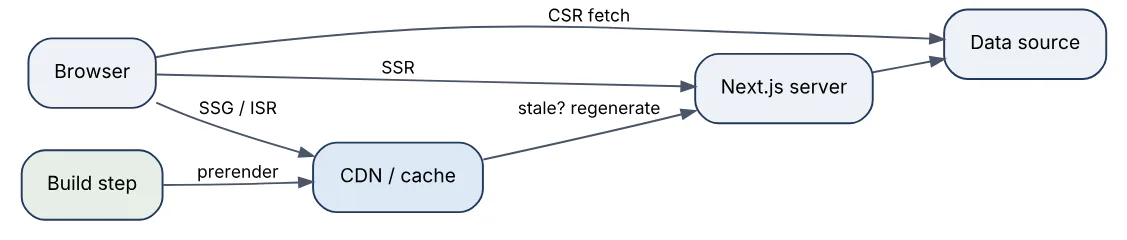
In the Pages Router these map to explicit functions: getServerSideProps (SSR), getStaticProps (SSG), getStaticProps with revalidate (ISR), and no data function plus client fetching (CSR). The App Router infers the mode: a route is static by default and becomes dynamic (SSR) when it uses request-time APIs such as cookies(), headers(), searchParams, or an uncached fetch; export const revalidate = 60 on a segment, or next: { revalidate } on a fetch, yields ISR behaviour. All server-rendered modes still hydrate on the client, so interactivity is identical; the difference is time-to-content, server cost, and freshness.
44In a real project using React.js / Next.js, how would you apply, test, or troubleshoot SSR CSR SSG ISR?
Apply. For a retail site on Next.js 15 I mix strategies per route. Category and product pages use ISR — export const revalidate = 300 plus on-demand revalidateTag("product-123") from a CMS webhook — because they are read-heavy and change rarely. The cart and account pages are dynamic (SSR) since they read the session cookie. The order history table inside the account page is CSR with TanStack Query because it paginates and polls. Marketing pages are pure SSG via generateStaticParams.
Test. After next build, the route table in the output confirms each route’s mode (○ static, ● SSG with params, ƒ dynamic); a CI script parses it and fails if a route that should be static has become dynamic. Playwright tests with JavaScript disabled verify SSR/SSG pages render full content. For ISR, an integration test publishes a product change, calls the webhook, and asserts the next response contains the new price while x-nextjs-cache or Cache-Control headers show the expected HIT / STALE states.
Troubleshoot. A page that unexpectedly became dynamic usually imported a utility that calls cookies() or headers() somewhere in the tree; the build log names the offending API and route. A page showing stale prices long after the webhook means the tag on the fetch does not match the one revalidated, or the hosting platform does not share the ISR cache between instances (self-hosted deployments need a custom cacheHandler). Hydration errors on SSR pages come from time or locale-dependent rendering.
The important trade-off: static modes are cheapest and fastest but every static assumption must be revisited when personalisation appears.
45Explain Next.js App Router in the context of React.js / Next.js.
The App Router, introduced in Next.js 13 and the default since 13.4, is the routing and rendering system built on React Server Components under the app/ directory. It replaces the Pages Router’s pages/ folder and data functions with file conventions and async components.
Core conventions in a route folder:
page.tsx— the UI for the route;layout.tsx— shared UI that wraps children and persists across navigations;loading.tsx,error.tsx,not-found.tsx— Suspense and error boundaries per segment.route.ts— an API endpoint (Route Handler) at that path.- Folder names give the URL;
[id]is dynamic,[...slug]catch-all,(group)organises without affecting the URL,@slotdefines parallel routes.
app/
  layout.tsx          -> root layout (html, body, providers)
  page.tsx            -> /
  dashboard/
    layout.tsx        -> sidebar for all dashboard routes
    page.tsx          -> /dashboard
    orders/[id]/
      page.tsx        -> /dashboard/orders/:id
      loading.tsx     -> skeleton while the page streams
Components are Server Components by default: they run only on the server, can be async and await data directly, and send no JavaScript to the browser. Interactive parts opt in with "use client". Navigation is handled by next/link and useRouter from next/navigation, with soft navigations that fetch only the changed segments as an RSC payload and preserve layout state. Mutations use Server Actions. Next.js 15 made params, searchParams, cookies(), and headers() asynchronous and stopped caching fetch and GET route handlers by default; Next.js 16 adds opt-in Cache Components with the "use cache" directive.
46In a real project using React.js / Next.js, how would you apply, test, or troubleshoot Next.js App Router?
Apply. Migrating a B2B portal from the Pages Router, I moved route by route, since both routers coexist in one project. Each page became a Server Component that fetches directly from the service layer, with the former getServerSideProps logic inlined; shared chrome moved into nested layout.tsx files; interactive widgets were isolated into small "use client" leaf components. Mutations that used API routes plus client fetches became server actions. Route groups separate the (marketing) and (portal) trees, each with its own root layout.
Test. Server Components are tested as functions where practical (await Page({ params: Promise.resolve({ id: "1" }) }) and inspecting the returned tree is brittle, so most coverage goes to Playwright end-to-end tests running against next start). Client Components use Testing Library with next/navigation mocked. A build-time check greps for next/router imports in app/ and fails. Lighthouse CI compares Pages versus App Router routes to confirm the client bundle shrank.
Troubleshoot. The most frequent errors: “You’re importing a component that needs useState… add the ‘use client’ directive” (an interactive component used from a server tree); “Functions cannot be passed directly to Client Components” (a callback crossing the boundary — pass a server action or move the handler); and params used synchronously in Next 15 (await params). Layout state unexpectedly resetting means a layout.tsx was replaced by template.tsx or the component sits under a changing dynamic segment. Slow navigation often traces to a layout awaiting data that should sit in the page behind Suspense.
Incremental migration is the important consideration: do not convert everything at once, and keep Client Components at the leaves.
47Explain Server Components versus Client Components in the context of React.js / Next.js.
Server Components render exclusively on the server and ship no JavaScript to the browser; Client Components are the traditional React components that render on the server for the initial HTML and then hydrate and run in the browser. In the App Router every component is a Server Component unless its module (or an importer up the chain) starts with "use client".
| Capability | Server Component | Client Component |
|---|---|---|
async / await data, direct DB or secrets | Yes | No |
Hooks (useState, useEffect), event handlers | No | Yes |
Browser APIs (window, localStorage) | No | Yes (after hydration) |
| Adds to client bundle | No | Yes |
| Can import the other kind | Can render Client Components | Cannot import Server Components; receives them as children |
The server renders Server Components to the RSC payload, a compact description of the UI plus references to client component chunks; the client reconciles it into the tree.

Props crossing from server to client must be serialisable: plain objects, arrays, primitives, Dates, Promises (consumable with use()), and server actions — not functions or class instances. The server-only package guards modules that must never reach the client. The mental model: Server Components for data and layout, Client Components for interaction, composed by passing server-rendered content as children into client wrappers.
48In a real project using React.js / Next.js, how would you apply, test, or troubleshoot Server Components versus Client Components?
Apply. In a news site rebuilt on the App Router, the article page is a Server Component tree: headline, body (rendered from CMS Markdown with a heavy library that now never ships to the browser), and related articles, all fetched in parallel with Promise.all. Only the comment form, share buttons, and a reading-progress bar are Client Components, each a small leaf. The paywall check reads the session via cookies() on the server and passes a boolean down. Context providers live in one Providers client component in the root layout, with Server Components passed through as children.
Test. Bundle composition is the measurable outcome: @next/bundle-analyzer in CI shows the Markdown library absent from client chunks, and a budget on first-load JS enforces it. Client leaves get Testing Library tests. Server Components are verified through Playwright against a real server and through type tests that the props crossing the boundary are serialisable (a lint rule flags functions in props of "use client" components). The server-only import in the data-access module turns a misplaced import into a build error, which is itself a test.
Troubleshoot. “Attempted to call X from the server but X is on the client” means a client module’s export was invoked in a server tree. A secret appearing in the client bundle traces to a shared utility imported by both sides; server-only prevents the regression. Bundle growth after a refactor is usually a "use client" placed too high, turning an entire subtree into client code; moving the directive down to the interactive leaf fixes it. Hydration mismatches between the server-rendered Client Component and the browser version follow the usual rules (time, random, browser-only APIs).
Keep the boundary as low in the tree as possible; every "use client" is a bundle-size decision.
49Explain Next.js routing layouts in the context of React.js / Next.js.
A layout in the App Router is a layout.tsx file that wraps every route beneath its folder, receives the matched child as children, and is not re-rendered or remounted when the user navigates between its children. Layouts nest: the root layout (required, must render <html> and <body>) wraps a section layout, which wraps the page. This nesting is illustrated below.
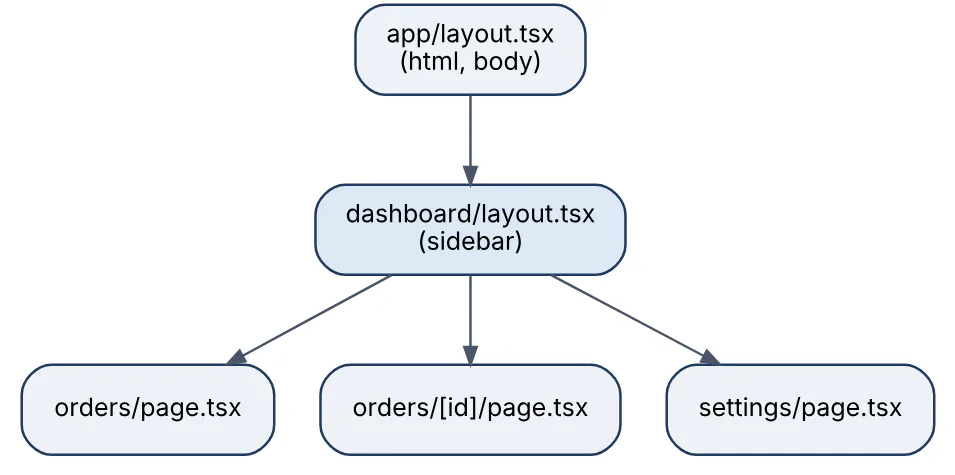
Related conventions:
template.tsxbehaves like a layout but remounts on each navigation — useful for enter animations or per-page effects.- Route groups
(name)let different sections have different layouts without affecting URLs, including multiple root layouts. - Parallel routes (
@analytics,@teamfolders) render several pages in one layout simultaneously, each with independent loading and error states; Next.js 16 requires adefault.tsxfor every slot. - Intercepting routes (
(.)photo) render another route inside the current layout — the modal-on-list pattern — while a hard refresh shows the full page.
Layouts are Server Components by default, can fetch data, and may declare metadata. They do not receive searchParams, and they cannot read the current pathname on the server; a Client Component with usePathname handles active-link styling. Because a layout persists, state in a client layout survives navigation between its pages, which is both a feature (sidebar scroll position) and a pitfall (stale state).
50In a real project using React.js / Next.js, how would you apply, test, or troubleshoot Next.js routing layouts?
Apply. For a SaaS admin console I use route groups to separate (auth) pages with a centred card layout from (app) pages with a sidebar layout, each group having its own root layout and metadata defaults. The (app)/layout.tsx fetches the organisation and user once and renders them in the header; pages beneath fetch only their own data. A @modal parallel slot in the projects layout plus an intercepting route shows project details in a dialog over the list while /projects/42 still works as a full page on refresh. A template.tsx wraps the onboarding wizard so each step’s analytics effect fires on entry.
Test. Playwright covers navigation behaviour that unit tests cannot: sidebar scroll position persists across sibling pages, the modal opens from the list and the same URL renders a full page on reload, and default.tsx renders when a slot has no match. Component tests cover the layout’s rendering given fixture props. A lint check ensures each parallel slot folder contains default.tsx, since Next.js 16 fails the build without it.
Troubleshoot. “Layout re-fetching on every navigation” is often a page fetch placed in the layout with dynamic APIs that force dynamic rendering; moving request-specific reads into the page keeps the layout cached. A missing <html> / <body> error means a group root layout was omitted. Stale user data in a persistent layout after a profile edit is fixed with revalidatePath or router.refresh() in the action. Active link styling that is wrong on the first render comes from computing it on the server; use usePathname in a client NavLink.
Layouts are for structure that truly spans pages; putting request-specific data in them removes the caching benefit for the whole subtree.
51Explain Next.js data fetching in the context of React.js / Next.js.
In the App Router, data is fetched in Server Components by awaiting it directly: call fetch, an ORM, or any async function inside the component body. There is no getServerSideProps; the component itself is the loader.
type Props = { params: Promise<{ id: string }> };

export default async function OrderPage({ params }: Props) {
  const { id } = await params;                        // async in Next.js 15+
  const [order, history] = await Promise.all([
    getOrder(id),                                     // direct DB access
    fetch(`${API}/orders/${id}/events`, {
      next: { revalidate: 60, tags: [`order-${id}`] }
    }).then(r => r.json()),
  ]);
  return <OrderView order={order} events={history} />;
}
Key behaviours:
- Parallel versus sequential. Independent requests should start together (
Promise.all); nested awaits create waterfalls. - Request memoisation. Identical
fetch(url, options)calls during one render are deduplicated automatically; for non-fetch calls use React’scache(). - Caching. Next.js 15 no longer caches
fetchby default (cache: 'no-store'semantics); opt in withcache: 'force-cache'ornext: { revalidate }. Next.js 14 cached by default. - Streaming. Wrap slow fetches in
Suspenseso the rest of the page is sent first. - Preloading. Start a request in a parent and
awaitit in a child, or pass the promise to a Client Component that reads it withuse().
Client Components fetch with TanStack Query or SWR in effects when data depends on interaction. Route Handlers (route.ts) serve external consumers, not the app’s own pages. In the Pages Router, getServerSideProps, getStaticProps, and getStaticPaths remain the model.
52In a real project using React.js / Next.js, how would you apply, test, or troubleshoot Next.js data fetching?
Apply. In a Next.js 15 customer portal I centralise data access in lib/data/*.ts functions marked server-only, wrapped in React’s cache() so a layout and a page calling getCurrentUser() in the same request hit the database once. Pages start independent requests in parallel and hand the slow ones to child components behind Suspense, so the invoice list streams in after the account summary. Fetches to the billing API carry next: { revalidate: 120, tags: ["invoices"] }; a webhook handler calls revalidateTag("invoices") when a payment posts. Data that depends on user interaction (search, pagination) uses searchParams so the URL remains the state.
Test. Data functions are unit-tested with the database mocked. Caching behaviour is verified in an integration environment with logging: { fetches: { fullUrl: true } } enabled, asserting HIT after the first request and MISS after revalidation. Playwright confirms streamed content appears without blocking the shell and that the page is fully rendered with JavaScript disabled.
Troubleshoot. Slow pages are usually waterfalls — a sequence of awaits; the Next.js dev overlay and server timing logs show request ordering, and Promise.all fixes it. Data that never updates after Next 14-to-15 migration is rare, but the reverse — database load spiking — is common because fetch stopped being cached; adding explicit revalidate restores it. “Dynamic server usage” errors during build mean a static route reads cookies(); either make it dynamic (export const dynamic = "force-dynamic") or move that read into a client-rendered part. Duplicate queries show up when the same function is called with different argument objects, defeating cache().
Fetch close to where data is used, and parallelise; the framework handles deduplication only when the calls are identical.
53Explain Next.js caching and revalidation in the context of React.js / Next.js.
Next.js App Router caching has four layers, each with its own scope and invalidation.
| Layer | Where | Scope | Invalidated by |
|---|---|---|---|
| Request memoisation | Server, per render | Identical fetch calls in one request | Automatically at request end |
| Data Cache | Server, persistent | Individual fetch results | revalidate time, revalidateTag, revalidatePath |
| Full Route Cache | Server, persistent | Rendered HTML + RSC payload of static routes | Rebuild or data revalidation |
| Router Cache | Browser memory | RSC payload of visited segments | router.refresh(), server action revalidation, staleTimes |
How they relate during a request is shown below.

Defaults changed between versions. Next.js 14 cached fetch and GET route handlers by default and kept pages in the Router Cache for 30 seconds. Next.js 15 flipped these: fetch is uncached unless you set cache: 'force-cache' or next: { revalidate }, GET handlers are dynamic unless export const dynamic = 'force-static', and the client staleTimes.dynamic default is 0. Revalidation is time-based (revalidate on a fetch or segment) or on-demand (revalidateTag / revalidatePath from a server action or route handler). Next.js 16 adds the opt-in Cache Components model: cacheComponents: true, the "use cache" directive with cacheLife / cacheTag, revalidateTag(tag, profile) for stale-while-revalidate, and updateTag for read-your-writes in actions.
54In a real project using React.js / Next.js, how would you apply, test, or troubleshoot Next.js caching and revalidation?
Apply. For a content-heavy marketplace on Next.js 15 I treat caching as explicit. Catalogue fetches use next: { revalidate: 600, tags: ["catalog", seller-${id} ] }; the CMS and seller dashboard trigger a route handler that validates a secret and calls revalidateTag for the affected tag, so edits appear within seconds while traffic is served from cache. Personalised data (cookies()) is isolated in small dynamic components so the surrounding route stays in the Full Route Cache. After a server action mutates data, the action calls revalidatePath("/cart"), which also purges the Router Cache for that path on the client. Self-hosted on Kubernetes, a Redis-backed cacheHandler shares the Data Cache across pods.
Test. An integration suite runs against next start with fetch logging on: it asserts a MISS then HIT, calls the revalidation endpoint, and asserts the next request is a MISS returning new data. Response headers (x-nextjs-cache, Cache-Control) are asserted per route class. A build check parses the route table to confirm catalogue routes remain static.
Troubleshoot. Stale content after a publish is almost always a tag mismatch or the webhook hitting one instance in a multi-instance deployment without a shared cache handler. Content that is never cached traces to a dynamic API read high in the tree or a missing revalidate on Next 15. Users seeing another user’s data is the most serious failure: personalised fetches were cached with force-cache; caches must key on the user or stay uncached. “Hard” navigations ignoring server changes are the Router Cache; router.refresh() or action-side revalidation fixes it.
Explicit is the rule since Next.js 15: write down the caching intent on every fetch.
55Explain Next.js server actions in the context of React.js / Next.js.
Server Actions (called Server Functions in React 19 terminology) are asynchronous functions marked with "use server" that run on the server but can be called from Client Components as if they were local functions. Next.js compiles each into a POST endpoint identified by an encrypted id; the client sends the arguments (serialised) and receives the return value plus any updated RSC payload in one round trip.
// app/orders/actions.ts
"use server";
import { revalidatePath } from "next/cache";

export async function cancelOrder(orderId: string) {
  const session = await getSession();                 // authorise every call
  if (!session) throw new Error("Unauthenticated");
  await db.order.update({ where: { id: orderId, userId: session.userId },
                          data: { status: "CANCELLED" } });
  revalidatePath("/orders");
  return { ok: true };
}
Actions can be passed to <form action={cancelOrder}> for progressive enhancement, invoked from event handlers, or bound with .bind(null, id). React 19 hooks round them out: useActionState for returned state and pending flag, useFormStatus in submit buttons, and useOptimistic for instant UI. The flow is below.
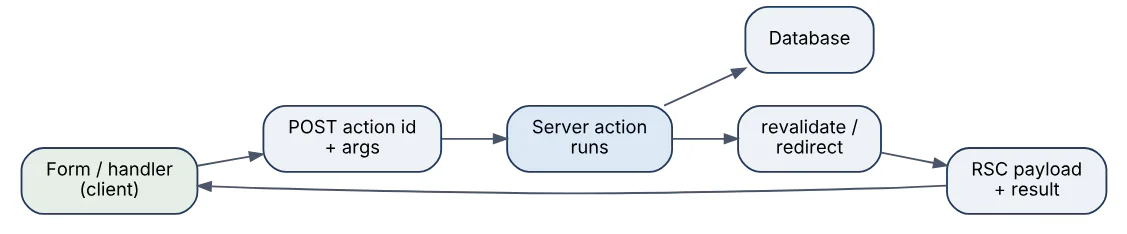
Security points: actions are public endpoints, so they must authenticate and authorise internally and validate inputs; Next.js adds CSRF protection by checking Origin against Host and dead-code-eliminates unused actions. In the Pages Router the equivalent is an API route plus a client fetch.
56In a real project using React.js / Next.js, how would you apply, test, or troubleshoot Next.js server actions?
Apply. In a project-management tool I use actions for every mutation: creating tasks, reordering, commenting. Each action lives in a actions.ts file, validates with a Zod schema, checks the session, performs the write through the service layer, and calls revalidateTag for the affected board. The task list uses useOptimistic so a drag reorder appears instantly and rolls back if the action throws. Forms use useActionState to show field errors returned as plain objects, and the submit button reads useFormStatus().pending. Large uploads bypass actions in favour of a pre-signed URL, since the default body limit is 1 MB (serverActions.bodySizeLimit can raise it).
Test. Actions are plain async functions, so Vitest tests call them with constructed FormData and mocked cookies() /database modules, asserting on the returned state and that revalidateTag was called with the right tag. Authorisation tests assert an unauthenticated call throws. Playwright covers the real round trip, including the JavaScript-disabled submit path and optimistic UI rollback when the API is forced to fail.
Troubleshoot. “An error occurred in the Server Components render” with a digest means the action threw an unhandled error; production hides the message, so I return structured errors for expected failures and look up the digest in server logs for the rest. An action receiving undefined arguments was bound incorrectly or the client passed a non-serialisable value. Actions firing twice come from a form with both action and an onSubmit that also calls it. Stale UI after a successful action is a missing revalidatePath / revalidateTag. An Invalid Server Actions request error on a deployment with a proxy usually indicates the Origin header is rewritten; serverActions.allowedOrigins fixes it.
Treat every action like an API endpoint: authenticate, validate, and never trust the id argument the client sends.
57Explain Next.js middleware in the context of React.js / Next.js.
Middleware is a single function, exported from middleware.ts at the project root, that runs before a request is matched to a route. It can rewrite, redirect, set headers or cookies, or let the request continue, and it applies to pages, Route Handlers, and static assets according to its matcher config.
import { NextResponse, type NextRequest } from "next/server";

export function middleware(request: NextRequest) {
  const session = request.cookies.get("session")?.value;
  if (!session && request.nextUrl.pathname.startsWith("/account")) {
    const login = new URL("/login", request.url);
    login.searchParams.set("next", request.nextUrl.pathname);
    return NextResponse.redirect(login);
  }
  return NextResponse.next();
}

export const config = { matcher: ["/account/:path*", "/api/private/:path*"] };
The position in the request path is shown here.
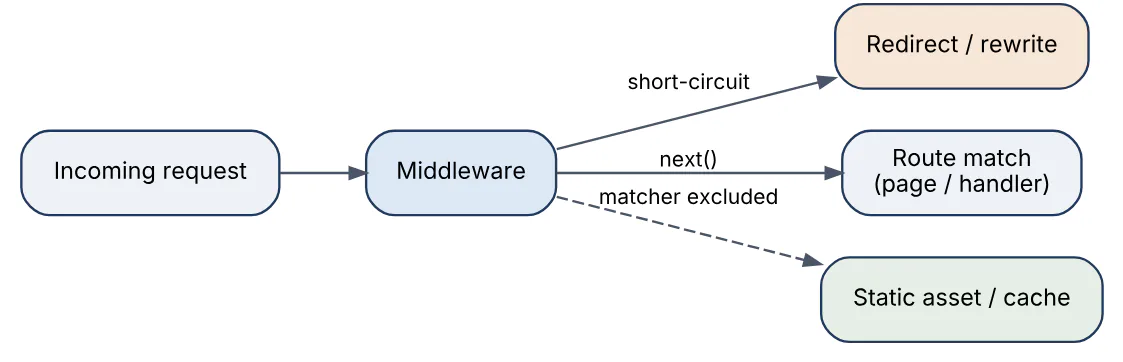
Typical uses are lightweight: authentication redirects based on a cookie, locale detection and rewriting, A/B bucketing, bot blocking, and adding security headers. It is not the place for database queries or full session validation — through Next.js 15 middleware ran on the Edge runtime by default (Node.js runtime for middleware became stable in 15.5), with limited APIs and a strict size limit, and it executes on every matched request. In Next.js 16 the file is renamed proxy.ts with an exported proxy function, runs on Node.js, and middleware.ts is deprecated. Middleware cannot render UI; real authorisation belongs in the data layer close to the data it protects.
58In a real project using React.js / Next.js, how would you apply, test, or troubleshoot Next.js middleware?
Apply. In a multi-region storefront on Next.js 15 the middleware does three cheap things: detects locale from the Accept-Language header and a cookie and rewrites /products to /de/products; redirects unauthenticated users away from /account/* by checking for the presence of the session cookie (not validating it — the Server Component layer does that against the database); and stamps a request id header for tracing. The matcher excludes _next/static, images, and favicon.ico so it does not run on asset requests. When we upgraded to Next.js 16 we renamed it to proxy.ts with the same logic.
Test. The function is pure enough to unit test: construct a NextRequest with new NextRequest(new URL(".../account"), { headers }), call middleware(req), and assert response.status and the location header. Locale rewriting is asserted via the x-middleware-rewrite header. Playwright covers end-to-end redirects and that static assets are untouched. A bundle-size check watches the middleware output because the Edge limit is easy to hit by importing a heavy library.
Troubleshoot. A redirect loop (/login redirecting to itself) means the matcher includes the login page or the cookie check is inverted. “The edge runtime does not support Node.js ‘crypto’ module” or similar errors come from importing database clients or Node-only libraries; move the logic to a Server Component or Route Handler, or on Next.js 15.5+ set runtime: 'nodejs'. Middleware apparently not running is usually a misplaced file (must be at the project root or in src/, next to app/). High latency per request indicates a network call inside middleware; cache the result in a cookie or drop it.
The important consideration: middleware should decide where a request goes, not what it is allowed to see.
59Explain Next.js authentication in the context of React.js / Next.js.
Authentication in Next.js is implemented with standard web primitives — a session established after login and carried in an HTTP-only cookie — plus framework-specific places to check it. Next.js itself ships no auth system; teams use Auth.js (NextAuth v5), Clerk, Lucia-style custom sessions, or an identity provider such as Auth0 or Cognito.
The pieces and where they live in the App Router:
- Login happens in a server action or Route Handler that verifies credentials or completes an OAuth callback, then sets a signed,
HttpOnly,Secure,SameSite=Laxcookie containing a session id or a JWT. - Optimistic checks in middleware (
proxy.tsin Next.js 16) redirect obviously unauthenticated users early by reading the cookie. - Authoritative checks happen in Server Components, server actions, and Route Handlers by reading
await cookies()and verifying the session (database lookup or JWT verification) through a cachedgetSession()helper — the Data Access Layer pattern recommended in the Next.js docs. - Authorisation (what the user may do) sits next to the data: queries filter by
userId, actions check roles.

Client Components receive only what they need (a user object without secrets) via props or a session provider. In the Pages Router the same checks happen in getServerSideProps and API routes. Rendering any route that reads cookies makes it dynamic, so authenticated pages are server-rendered per request.
60In a real project using React.js / Next.js, how would you apply, test, or troubleshoot Next.js authentication?
Apply. For a healthcare portal on Next.js 15 I used Auth.js v5 with an OIDC provider and database sessions. The auth() helper is wrapped in React cache() as getSession() so a layout and several components in one request verify the session once. Middleware redirects when the session cookie is absent; every Server Component, action, and Route Handler that touches patient data calls getSession() and then a DAL function that applies row-level authorisation. The client receives a SessionProvider with the display name and role only. Sign-out is a server action that deletes the session row and clears the cookie.
Test. Unit tests cover the DAL authorisation rules exhaustively (user A cannot read patient of user B). Server actions are tested with a mocked cookies() returning valid, expired, and absent sessions. Playwright logs in through the real provider’s test tenant, stores the browser state with storageState, and runs authenticated journeys; a separate test asserts direct navigation to a protected URL without cookies redirects to login and that the session cookie has HttpOnly, Secure, and SameSite flags.
Troubleshoot. A user seeing another user’s data is the critical bug: it is almost always a cached fetch or a "use cache" function keyed without the user; personalised data must not be in shared caches. Random logouts trace to cookie size limits (JWT with too many claims) or a secure cookie on an http:// preview domain. “Headers already sent” or cookies not being set in a Server Component is expected — cookies can only be set in actions, handlers, and middleware. Middleware allowing access with a forged cookie is by design; the authoritative check in the DAL is what must reject it.
Never rely on middleware alone for authorisation; it is an optimisation, and the data layer is the gate.
61Explain Next.js metadata and SEO in the context of React.js / Next.js.
Next.js generates <head> tags for search engines and social previews through the Metadata API in the App Router. A layout.tsx or page.tsx exports either a static metadata object or an async generateMetadata function; nested segments merge with and override their parents, so the root layout defines defaults and pages refine them.
import type { Metadata } from "next";

export async function generateMetadata(
  { params }: { params: Promise<{ slug: string }> }
): Promise<Metadata> {
  const { slug } = await params;
  const post = await getPost(slug);
  return {
    title: post.title,                 // uses root template "%s | Acme Blog"
    description: post.excerpt,
    alternates: { canonical: `https://acme.com/blog/${slug}` },
    openGraph: { title: post.title, images: [post.coverUrl] },
  };
}
Supporting conventions: title.template in the root layout; file-based metadata such as opengraph-image.tsx (generated with ImageResponse), icon.png, robots.ts, and sitemap.ts; and JSON-LD structured data rendered as a <script type="application/ld+json"> in the page. Because Server Components deliver complete HTML, crawlers see content without executing JavaScript, which is the main SEO advantage over a client-rendered SPA. Static and ISR routes also respond fast, which supports Core Web Vitals, now a ranking signal.
The Pages Router uses next/head with explicit tags instead, and next-seo is common there. generateMetadata runs in parallel with the page render and shares memoised fetches, so fetching the post twice costs one request. Metadata cannot be exported from Client Components.
62In a real project using React.js / Next.js, how would you apply, test, or troubleshoot Next.js metadata and SEO?
Apply. For a real-estate listings site I define title.template, default Open Graph settings, and metadataBase in the root layout, then generateMetadata per listing with canonical URLs, locale alternates (hreflang), and a dynamic opengraph-image.tsx that renders the property photo and price. sitemap.ts streams listing URLs from the database with lastModified, split into sitemap index files above 50,000 entries; robots.ts blocks the account area. JSON-LD RealEstateListing data is rendered in the page component. Listing pages use ISR so they are fast and indexable.
Test. Playwright fetches each page type and asserts the <title>, <meta name="description">, canonical, and og:* tags, and validates the JSON-LD against the schema with a small script. Lighthouse CI runs the SEO and performance categories on representative URLs with budgets. A test with JavaScript disabled confirms the body content is present in the raw HTML, which is what matters for crawlers that do not render.
Troubleshoot. Missing or default titles on a page usually mean generateMetadata threw or returned before the data resolved, or the page is a Client Component that cannot export metadata. Social previews showing the wrong image are typically a relative URL without metadataBase. Pages dropping out of the index after a migration are commonly caused by the canonical pointing to the old domain or by noindex left in a preview environment configuration. Google Search Console’s URL inspection shows the rendered HTML Google saw, which settles whether the issue is on our side.
Content and performance drive SEO; metadata only makes sure the right page is understood and shared correctly.
63Explain Next.js image optimization in the context of React.js / Next.js.
next/image is a component that replaces <img> with an optimised pipeline: it serves images resized to the device, converts to modern formats (WebP, AVIF when supported), lazy-loads offscreen images, and reserves layout space to prevent Cumulative Layout Shift.
import Image from "next/image";
import hero from "@/public/hero.jpg";       // static import: size known at build

<Image src={hero} alt="Warehouse at dawn" priority sizes="100vw" />

<Image
  src={product.imageUrl}                     // remote:  must be in remotePatterns
  alt={product.name}
  width={400} height={400}
  sizes="(max-width: 768px) 100vw, 400px"
/>
How it works: the component renders an <img> with srcset pointing at /_next/image? url=...&w=...&q=...; the built-in Image Optimization API resizes on demand with Sharp and caches the result (default minimumCacheTTL 60 s in Next.js 15, 4 hours in 16). Static imports provide intrinsic dimensions and a blur placeholder automatically. Remote sources must be allow-listed in images.remotePatterns to prevent the optimiser being abused as an open proxy (images.domains is deprecated).
Important props: priority disables lazy loading and adds a preload for the LCP image; fill makes the image fill a positioned parent when dimensions are unknown; sizes tells the browser which srcset candidate to pick and must match the CSS layout; quality defaults to 75. For platforms without an optimiser (static export) unoptimized or a custom loader pointing at a CDN such as Cloudinary or Imgix is used. The component works identically in both routers.
64In a real project using React.js / Next.js, how would you apply, test, or troubleshoot Next.js image optimization?
Apply. On a travel marketplace with thousands of user-uploaded photos, I serve images from S3 through next/image with remotePatterns restricted to our bucket hostname and path prefix. Hero images receive priority and an accurate sizes attribute; gallery thumbnails use fill inside fixed aspect-ratio containers with sizes="(max-width: 640px) 50vw, 25vw". On the self-hosted deployment I set images.loader to our CDN’s URL scheme so resizing happens at the edge rather than on the Next.js pods, and minimumCacheTTL to a day because uploads are immutable.
Test. Lighthouse CI asserts LCP and zero CLS on listing pages. A Playwright test inspects the rendered <img> to confirm srcset contains multiple widths, that loading="lazy" is absent on the hero and present on gallery items, and that the response Content-Type is image/avif or image/webp in Chromium. A unit test renders the component and asserts alt text is never empty for content images.
Troubleshoot. “Invalid src prop … hostname is not configured” means a new image host was not added to remotePatterns. A blurry image is usually a sizes value smaller than the rendered size, so the browser picked a small candidate; matching sizes to the CSS fixes it. High CPU on the server comes from on-demand optimisation of many unique images; a CDN loader or longer minimumCacheTTL resolves it. Layout shift despite next/image points to a fill image whose parent lacks position: relative and explicit dimensions. The ‘image with src … has either width or height modified’ warning means CSS changed one dimension without height: auto.
Without a correct sizes attribute the component downloads oversized images; it is the most commonly neglected prop.
65Explain Next.js edge versus node runtime in the context of React.js / Next.js.
Next.js can execute server code in two runtimes. The Node.js runtime is the default for pages, layouts, Route Handlers, and server actions: full Node APIs, any npm package, native modules, long-running work. The Edge runtime is a lightweight environment built on Web APIs (fetch, Request, Response, Web Crypto, TextEncoder) that can be deployed to CDN edge locations, starts in milliseconds, and has strict limits on bundle size, CPU time, and available APIs.
| Aspect | Node.js runtime | Edge runtime |
|---|---|---|
| APIs | Full Node.js (fs, net, native addons) | Web standard subset only |
| Cold start | Tens to hundreds of ms | Near-instant |
| Deployment location | Regional server/serverless | Globally distributed |
| Typical use | Database access, heavy rendering, ORMs | Redirects, headers, personalisation at the edge |
| Limits | Function timeout, memory | Small bundle, no file system, limited CPU |
A route opts in with export const runtime = "edge". The usual trade-off is latency to the user versus latency to the database: an edge function in Frankfurt querying a database in Virginia is slower than a Node function next to the database, so edge suits code that needs no origin round trip or talks to an edge-friendly store (KV, Durable Objects, globally replicated databases). ORMs such as Prisma need a driver adapter or Accelerate to run on edge. Middleware historically ran on edge only; Next.js 15.5 stabilised the Node.js runtime option for it, and Next.js 16’s proxy.ts runs on Node.js. Self-hosted deployments run both runtimes in the same Node process, so the “edge” benefits only materialise on platforms like Vercel or Cloudflare.
66In a real project using React.js / Next.js, how would you apply, test, or troubleshoot Next.js edge versus node runtime?
Apply. For a global news site on Vercel I keep rendering and data on the Node runtime in the region closest to the Postgres primary. Three things run at the edge: middleware for geo-based locale rewrites, a Route Handler that serves personalised recommendation ids from Vercel KV, and the opengraph-image generator, which is pure computation. Both runtimes read the same environment variables, but the edge code imports only web-standard libraries, enforced by keeping it in a separate lib/edge/ folder with its own ESLint restricted-imports rule.
Test. CI builds and checks the route table, which labels runtime per route, failing if a route unexpectedly becomes edge or node. Edge handlers are unit-tested in Vitest with the edge-runtime environment (@edge-runtime/vm) so Node-only globals are absent during tests. Synthetic monitoring measures p95 latency from several regions for both an edge and a Node route to confirm the placement decision pays off.
Troubleshoot. Build errors such as “Module not found: Can’t resolve ‘fs’” or “The edge runtime does not support Node.js ‘crypto’” mean a Node dependency leaked into an edge route; replace it with a Web Crypto equivalent or move the route. A size-limit error (middleware over 1 MB on Vercel) is fixed by trimming imports — commonly a whole date or validation library. Edge routes querying a regional database that show higher latency than before are the classic misplacement; move them back to Node or pin the function region. Behaviour that differs between next dev and production often involves APIs that the dev simulation permits but the real edge does not.
Choose the runtime per route by data locality, not by default; edge is a tool for latency, not a free upgrade.
67Explain Next.js streaming and suspense in the context of React.js / Next.js.
Streaming sends a server-rendered page to the browser in chunks as parts of it become ready, instead of waiting for the slowest data fetch before sending any HTML. In the App Router, Suspense boundaries define the chunks: everything outside a boundary is rendered and flushed immediately with the boundary’s fallback in place; when the data inside resolves, the server streams the real HTML plus a small inline script that swaps it in. React Server Components make this natural because each async component suspends independently.
export default function OrderPage({ params }) {
  return (
    <>
      <OrderHeader params={params} />               {/* fast, sent first */}
      <Suspense fallback={<TimelineSkeleton />}>
        <OrderTimeline params={params} />            {/* slow query, streams */}
      </Suspense>
      <Suspense fallback={<RecsSkeleton />}>
        <Recommendations />                          {/* independent */}
      </Suspense>
    </>
  );
}
The sequence over one HTTP response is shown here.

loading.tsx is a route-level Suspense boundary that streams the layout immediately while the page loads. Selective hydration means React hydrates streamed islands as they arrive and prioritises the one the user interacts with. Streaming improves Time to First Byte and perceived speed, but it has consequences: HTTP status and most headers are fixed once the shell is sent, so redirect() or notFound() inside a streamed boundary is handled with client-side scripts rather than a 3xx status; and metadata must resolve before the shell for SEO, which Next.js guarantees for generateMetadata. Next.js 16 Cache Components extend the idea with Partial Prerendering: a static shell served from cache with dynamic holes streamed per request.
68In a real project using React.js / Next.js, how would you apply, test, or troubleshoot Next.js streaming and suspense?
Apply. On a flight-search results page the shell — header, search form, filters — renders instantly from the layout and loading.tsx shows result skeletons. The results list is an async Server Component inside Suspense that awaits the aggregator API (two to four seconds); price-alert and nearby-airports widgets have their own boundaries so they never block each other. Data needed for SEO (route title, canonical) is resolved in generateMetadata, which completes before the shell is flushed. Client-side, the results list hydrates first because it is the element users interact with.
Test. A Playwright test uses page.goto(url, { waitUntil: "commit" }) and asserts the header is visible well before the results, then waits for the results and asserts the skeleton disappeared. A Node script with fetch reads the response body as a stream and records the timestamps of each chunk to assert the shell arrives within 200 ms. Web Vitals monitoring tracks TTFB and LCP per route before and after enabling streaming.
Troubleshoot. A page that does not stream — the whole response arrives at once — usually has a dynamic API call or slow await in the layout or above the first boundary, or a reverse proxy (nginx with proxy_buffering on, some CDNs) buffering the response; X-Accel-Buffering: no or disabling buffering fixes the proxy case. Fallbacks that never resolve indicate an awaited promise that rejected without an error.tsx catching it. redirect() inside a streamed component producing a 200 with a client-side redirect is expected; move the check above the boundary when a real 3xx is required. Flashing skeletons on navigation are boundaries placed too granularly for small fetches.
Streaming is only as good as the slowest thing outside the boundaries; keep layouts free of slow awaits.
69Explain hydration mismatch troubleshooting in the context of React.js / Next.js.
A hydration mismatch occurs when the HTML React rendered on the server differs from what the client renders on its first pass. React expects them to be identical so it can attach event handlers to the existing DOM; when they differ it logs “Hydration failed because the server rendered HTML didn’t match the client” (React 18 shows a diff in development, React 19 improves it) and, for severe mismatches, discards the server HTML and re-renders the subtree on the client, costing performance and sometimes flashing content.
Typical causes and their fixes:
- Time or randomness in render —
new Date().toLocaleString(),Math.random(),crypto.randomUUID()for keys. Compute on the server and pass down, or useuseIdfor ids and render time-dependent values in an effect. - Browser-only state during render — reading
window.innerWidthorlocalStorageto decide what to render. Render the server-safe default first and update inuseEffect, or mark the componentssr: falsevianext/dynamic. - Invalid HTML nesting —
<div>inside<p>,<tr>directly in<table>; the browser repairs the DOM and it no longer matches. - Browser extensions injecting attributes;
suppressHydrationWarningon<html>/<body>is the accepted workaround for theme-switcher attributes. - Locale or timezone differences between server and client, common with number and date formatting.
The diagnostic sequence is below.

The error applies only to Client Components (and the HTML they render); Server Components are never hydrated, so moving non-interactive content into them removes the opportunity for mismatch altogether.
70In a real project using React.js / Next.js, how would you apply, test, or troubleshoot hydration mismatch troubleshooting?
Apply. In a Next.js 15 fintech app I apply three rules that prevent most mismatches: date and currency formatting happens in Server Components with an explicit locale and timezone from the user’s profile, never from the browser; any component that depends on window or stored preferences renders a neutral state first and switches in an effect via a small useIsClient() hook; and the theme attribute on <html> is set by an inline script with suppressHydrationWarning on that element only. Markup validity is enforced by rendering tables and lists through typed components that forbid invalid children.
Test. The Playwright suite listens to page.on("console") and fails any test where a message contains “Hydration” or “did not match”; this runs against a production build, because React 19 also surfaces recoverable errors there through onRecoverableError. In production, reportWebVitals and Sentry capture onRecoverableError events with the component stack so mismatches reaching users are visible. A test runs with the browser timezone set to a non-UTC zone (timezoneId in the Playwright context) to catch timezone-dependent rendering.
Troubleshoot. With a report in hand I reproduce in development, where React prints the exact text or attribute diff and the component path. If the difference is textual (a time, a number), the fix is to compute it on the server or defer it. If an element is missing or extra, I check for conditionals on typeof window or on data that only exists client-side. If the diff is in attributes like class on <body>, an extension or theme script is responsible. Nesting errors are confirmed by validating the server HTML with an HTML validator.
Reaching for suppressHydrationWarning everywhere is the common mistake; it hides the symptom on one element and leaves the real cause active.
71Explain Next.js API routes handlers in the context of React.js / Next.js.
Next.js has two ways to expose HTTP endpoints, one per router. In the Pages Router, a file under pages/api/ exports a default handler (req, res) in the Node style. In the App Router, a route.ts file exports functions named after HTTP methods (GET, POST, PUT, DELETE, …) that receive a Web Request and return a Web Response; these are called Route Handlers.
// app/api/orders/[id]/route.ts
import { NextResponse } from "next/server";

export async function GET(
  req: Request,
  { params }: { params: Promise<{ id: string }> }
) {
  const { id } = await params;
  const order = await getOrder(id);
  if (!order) return NextResponse.json({ error: "Not found" }, { status: 404 });
  return NextResponse.json(order);
}
Behaviour worth knowing:
- A
route.tscannot live beside apage.tsxfor the same path. - Since Next.js 15,
GEThandlers are not cached by default; opt in withexport const dynamic = "force-static". In Next.js 14 they were cached. - Handlers can run on the Node or Edge runtime and can stream responses.
- They suit webhooks, third-party callbacks, file downloads, and APIs consumed by mobile apps or other services.
For the app’s own UI, Server Components fetching data directly and server actions for mutations are usually simpler than an internal API route, since they avoid an extra HTTP hop and a duplicated contract. Route Handlers do not share middleware-style wrappers automatically, so authentication and validation must be applied in each handler or through a shared helper.
72In a real project using React.js / Next.js, how would you apply, test, or troubleshoot Next.js API routes handlers?
Apply. In a payments integration I use Route Handlers for exactly what Server Components cannot do: a Stripe webhook at app/api/webhooks/stripe/route.ts that reads the raw body with await req.text(), verifies the signature, and updates the order idempotently using the event id; a signed-URL endpoint for uploads; and a public, versioned /api/v1/orders consumed by the mobile app. Each handler uses a shared withAuth wrapper and Zod validation, and returns consistent JSON error shapes with correct status codes.
Test. Handlers are plain functions, so Vitest tests call POST(new Request("http://x/api", { method: "POST", body })) and assert on the Response status and JSON. The webhook test uses fixture payloads with a real computed signature and asserts that replaying the same event does not duplicate side effects. A contract test validates responses against the OpenAPI schema used by the mobile team.
Troubleshoot. A 404 on an endpoint is usually a path clash with page.tsx or a file named wrongly (routes.ts). Webhook signature failures come from parsing the body as JSON before verification; the raw text must be used. A GET endpoint returning stale data after upgrading versions points to caching: Next.js 14 cached it, while 15 does not unless force-static is set. CORS errors from a browser client need explicit OPTIONS handling and Access-Control-* headers. Timeouts on serverless hosts indicate long work that belongs in a queue.
Do not call your own Route Handlers from Server Components; call the underlying function instead.
73Explain Next.js deployments in the context of React.js / Next.js.
A Next.js app can be deployed in several modes, chosen by how much server capability it needs.
| Mode | How | Supports | Typical target |
|---|---|---|---|
| Managed platform | Git push, automatic build | Everything, including ISR and edge | Vercel, Netlify, Amplify |
| Node server | next build then next start | Everything, single or multiple instances | VM, ECS, Kubernetes |
| Docker standalone | output: "standalone" image | Everything, small image | Containers, Cloud Run |
| Static export | output: "export" | No server features | S3 + CDN, GitHub Pages |
Static export produces plain HTML, CSS, and JavaScript, so server actions, middleware, dynamic rendering, ISR, and the default image optimiser are unavailable.
FROM node:20-alpine AS build
WORKDIR /app
COPY . .
RUN npm ci && npm run build            # next.config: output "standalone"

FROM node:20-alpine
WORKDIR /app
ENV NODE_ENV=production
COPY --from=build /app/.next/standalone ./
COPY --from=build /app/.next/static ./.next/static
COPY --from=build /app/public ./public
CMD ["node", "server.js"]
Production concerns beyond the build: environment variables (NEXT_PUBLIC_* values are inlined at build time, others are read at runtime), a shared cache for ISR and the Data Cache across instances (a custom cacheHandler, typically Redis), a CDN in front for /_next/static with immutable caching, consistent build ids and deploymentId for rolling releases, and health checks. Next.js 16 requires Node.js 20.9 or later and uses Turbopack as the default bundler.
74In a real project using React.js / Next.js, how would you apply, test, or troubleshoot Next.js deployments?
Apply. For an internal platform on Kubernetes I build the standalone Docker image in CI, tag it with the git SHA, and deploy with a rolling update behind an ingress. Static assets are uploaded to a CDN origin with assetPrefix, giving long-lived caching. ISR and data caches use a Redis cacheHandler so all pods share them, and a revalidation webhook reaches any pod. Secrets come from the cluster secret store; the same image is promoted across staging and production, with only runtime environment variables changing.
Test. Each pull request gets a preview deployment, and Playwright smoke tests run against it. A pipeline step runs the container locally, hits /api/health, and checks the route table from next build for unexpected dynamic routes. A post-deploy canary verifies that a revalidation request propagates, and a load test (k6) checks that p95 latency and memory stay stable under realistic traffic.
Troubleshoot. A “Failed to find Server Action” error or missing chunk during a rollout comes from clients on an old build talking to new pods; a stable deploymentId (version skew protection) and keeping old static assets available for a while resolve it. Differing content between pods means the ISR cache is local to each instance. A NEXT_PUBLIC_API_URL that stays wrong after changing the runtime variable shows the value was inlined at build time; it requires a rebuild or runtime configuration through a server-side endpoint. Out-of-memory kills point to image optimisation with many large sources, so lower concurrency or offload to a CDN loader. Images on Alpine may need sharp installed correctly.
Build once and promote the same artifact; building per environment makes environments drift.
75Explain Next.js security and environment variables in the context of React.js / Next.js.
Security in Next.js starts with a clear server/client boundary. Code in Server Components, server actions, and Route Handlers runs on the server and may use secrets; anything imported by a Client Component ships to the browser and must be treated as public.
Environment variables follow one rule: only names prefixed NEXT_PUBLIC_ are exposed to the browser, and their values are inlined into the JavaScript bundle at build time. Every other variable is available only on the server, read at runtime on Node. .env.local holds local secrets and is never committed; .env.production, .env.development, and .env.test provide per-mode defaults.
// lib/db.ts
import "server-only";                       // build error if a client imports this
export const db = connect(process.env.DATABASE_URL!);   // server-only secret

// client-safe configuration
const analyticsId = process.env.NEXT_PUBLIC_ANALYTICS_ID;
Other protections to know:
- Server actions check
OriginagainstHostfor CSRF protection and are public endpoints, so each one must authenticate, authorise, and validate input. - React escapes JSX output, so XSS arises mainly through
dangerouslySetInnerHTML, unsafe URLs inhref, or untrusted Markdown; sanitise with DOMPurify or a server-side sanitiser. - Security headers (
Content-Security-Policy,Strict-Transport-Security,X-Content-Type-Options,Referrer-Policy) are set innext.config headers()or middleware; a nonce-based CSP is set per request in middleware. taintObjectReferenceandtaintUniqueValue(experimental) can prevent sensitive objects from being passed to Client Components.- Keep dependencies patched; Next.js security advisories are published regularly.
76In a real project using React.js / Next.js, how would you apply, test, or troubleshoot Next.js security and environment variables?
Apply. In a banking dashboard I put all secrets behind server-only modules and validate environment variables at startup with a Zod schema in env.ts, so a missing DATABASE_URL fails the build rather than a request. Only two values carry the NEXT_PUBLIC_ prefix, and a code-review rule bans the prefix for anything that sounds like a key. Middleware sets a per-request CSP nonce; next.config adds HSTS and frame-ancestors 'none'. Every server action starts with getSession() plus a Zod parse, and rich-text content is sanitised on the server before storage.
Test. CI runs a secret scanner (gitleaks) on the repository and greps the .next/static output for known secret prefixes. Unit tests verify actions reject unauthenticated calls and malformed inputs. A Playwright test asserts the expected security headers on key routes, and an OWASP ZAP baseline scan runs against the staging deployment. npm audit and Dependabot gate dependency risk.
Troubleshoot. A variable that is undefined in the browser lacks the NEXT_PUBLIC_ prefix; the opposite problem, a secret visible in DevTools, means it was prefixed or imported into client code, and the key must be rotated immediately. A changed NEXT_PUBLIC_* value having no effect indicates the build was not rerun, because values are inlined at build time. A CSP that blocks inline scripts after hardening shows violations in the console and report endpoint; Next.js needs the nonce applied to its own scripts, which requires dynamic rendering for those pages. Cross-origin action failures behind a proxy are an allowedOrigins configuration issue.
Anything shipped to the browser is public; rotate on exposure rather than trying to hide it.
77Explain internationalization and localization in the context of React.js / Next.js.
Internationalization (i18n) is building the app so it can support multiple languages and regions; localization (l10n) is supplying the actual translations and regional formats for a given locale. In practice this covers translated strings with plural and gender rules, date, number, and currency formatting, text direction (RTL), and locale-aware routing.
The App Router has no built-in i18n routing (the Pages Router had i18n config in next.config, removed for the App Router), so applications use a library and a [locale] route segment. Common choices are next-intl and react-i18next / next-i18next, with FormatJS (react-intl) as another option.
// app/[locale]/page.tsx  (next-intl)
import { getTranslations } from "next-intl/server";

type Props = { params: Promise<{ locale: string }> };

export default async function Home({ params }: Props) {
  const { locale } = await params;
  const t = await getTranslations({ locale, namespace: "Home" });
  return <h1>{t("title", { count: 3 })}</h1>;
}
// messages/de.json:
// { "Home": { "title": "{count, plural, one {# Artikel} other {# Artikel}}" } }
Key pieces:
- Middleware detects the preferred language (cookie,
Accept-Language) and redirects or rewrites to/de/.... - Translations load on the server, so Server Components ship no translation library to the browser; Client Components receive only the messages they need through a provider.
Intl.DateTimeFormat,Intl.NumberFormat, and ICU message syntax handle formatting and plurals correctly.- SEO needs
hreflangalternates in metadata and localised sitemaps. - Set
<html lang dir>per locale for accessibility and RTL layout, preferring CSS logical properties.
78In a real project using React.js / Next.js, how would you apply, test, or troubleshoot internationalization and localization?
Apply. For a travel site in five languages I use next-intl with a [locale] segment, middleware for locale negotiation, and namespaced JSON message files, one per feature, loaded per route to keep payloads small. Prices and dates use Intl formatters with the user’s locale and the market currency (not locale-derived). Translators work in a platform (Crowdin) synced by CI, and ICU plurals handle languages with several plural forms. Arabic gets dir="rtl", and styles use logical properties (margin-inline-start). Metadata includes alternates.languages for hreflang.
Test. A script compares message files and fails the build when a key is missing in any locale or when ICU placeholders differ from the source language. Component tests render with a locale-specific provider and assert key strings. Playwright runs the primary journey in each locale, with pseudo-localisation (long, accented strings) to expose truncation, and a visual check of the RTL layout. Unit tests cover formatting with fixed timezone and locale.
Troubleshoot. Raw keys like Home.title on screen mean a missing message or a namespace not loaded for that route. A hydration mismatch on dates comes from formatting with the server’s default locale or timezone versus the browser’s; pass an explicit locale and timeZone. Redirect loops from the middleware occur when the locale detection and the matcher disagree about prefixed paths. Wrong language after sharing a link indicates the cookie overriding the URL; the URL should win. Missing translations in production but not locally often means message files were not included in the standalone output.
Treat the URL as the source of truth for locale, with cookies and headers only used to choose the initial redirect.
79Explain Next.js performance and monitoring in the context of React.js / Next.js.
Performance work in Next.js targets the Core Web Vitals: Largest Contentful Paint (LCP), Interaction to Next Paint (INP), and Cumulative Layout Shift (CLS), plus server metrics such as TTFB. The framework provides several levers, and monitoring closes the loop with real-user data.
Main levers:
- Rendering choice. Static or ISR pages from a CDN, streaming with
Suspensefor slow data, and Partial Prerendering through Cache Components in Next.js 16. - Less JavaScript. Server Components by default,
next/dynamicfor heavy client widgets,next/fontfor self-hosted fonts without layout shift,next/scriptwithstrategy="lazyOnload"for third-party tags, andoptimizePackageImportsfor large icon libraries. - Media.
next/imagewithpriorityon the LCP image and correctsizes. - Caching. Data Cache and tag revalidation, plus CDN cache headers.
- Navigation.
next/linkprefetching; Next.js 16 adds layout deduplication and incremental prefetching.
// app/web-vitals.tsx
"use client";
import { useReportWebVitals } from "next/web-vitals";

export function WebVitals() {
  useReportWebVitals((metric) => {
    navigator.sendBeacon("/api/vitals", JSON.stringify(metric));
  });
  return null;
}
Monitoring combines layers: useReportWebVitals or the web-vitals library for field data, an APM or tracing setup via instrumentation.ts and OpenTelemetry (supported by @vercel/otel), error tracking such as Sentry, and synthetic checks with Lighthouse CI. Development numbers are unreliable, so measurements come from production builds and real users.
80In a real project using React.js / Next.js, how would you apply, test, or troubleshoot Next.js performance and monitoring?
Apply. For a retail site whose mobile LCP was 4.1 seconds, I ran Lighthouse and the field data in Search Console to find the cause: an unoptimised hero image and a 600 KB client bundle from a carousel and a tag manager. Fixes were priority plus accurate sizes on the hero, next/dynamic for the carousel, moving non-interactive sections to Server Components, loading the tag manager with lazyOnload, and turning category pages into ISR. An instrumentation.ts registers OpenTelemetry so each request produces a trace covering data fetches, and web vitals flow to the analytics backend tagged by route.
Test. Lighthouse CI runs on every pull request against a preview build with budgets for LCP, CLS, total blocking time, and JavaScript size; @next/bundle-analyzer output is attached to the PR. Load tests with k6 check TTFB and error rate for dynamic routes. A synthetic monitor runs the checkout journey every few minutes from several regions and alerts on regression.
Troubleshoot. A slow TTFB is investigated from traces: usually a sequential await waterfall, an uncached upstream call, or a cold serverless start; parallelising and caching fix most cases. A poor INP in field data but not in the lab is found with the Chrome performance panel and React Profiler on a throttled CPU, commonly a heavy synchronous state update; startTransition or list virtualisation resolves it. Layout shift from late fonts or ads is addressed with next/font and reserved space. Rising memory on self-hosted pods suggests a leak or large image optimisation load, visible in heap snapshots and container metrics.
Optimise against field data for the routes that carry traffic; lab scores alone can mislead.
Answers tailored to your resume and job description
Add your resume and the job description in CrackItX's Settings. When the interviewer asks a React / Next.js question, Claude suggests an answer using your real projects and the role's requirements, in real time.
See pricing →