Top 50 Microsoft Azure
interview questions
Entra ID, App Service, Functions, AKS, networking and storage. Open a question to read the answer.
01What is Azure Resource Manager?
Azure Resource Manager (ARM) is the deployment and management layer for Azure. Every request to create, update, or delete a resource, whether it comes from the portal, the Azure CLI, PowerShell, an SDK, Bicep, or Terraform, goes through the ARM REST API, which authenticates the caller with Microsoft Entra ID, checks Azure RBAC and Azure Policy, and then forwards the request to the owning resource provider (for example Microsoft.Compute or Microsoft.Storage).
ARM also provides the organising model: management groups contain subscriptions, subscriptions contain resource groups, and resource groups contain resources. Declarative ARM templates (JSON) and Bicep files describe a desired state that ARM deploys idempotently, so the same template can be applied repeatedly without side effects.
02What is NSG?
A network security group (NSG) is a stateful layer-4 packet filter that controls inbound and outbound traffic for Azure virtual network resources. It holds prioritised allow and deny rules keyed on source, destination, port, and protocol, and can be associated with a subnet, a network interface, or both.
Rules are evaluated from the lowest priority number upwards; the first match wins and processing stops. Each NSG ships with default rules that allow traffic inside the virtual network and from Azure Load Balancer while denying all other inbound traffic. Service tags such as Internet or Storage and application security groups let rules reference groups of addresses or workloads instead of hard-coded IP ranges.
03What is Azure Blob Storage?
Azure Blob Storage is the object storage service inside an Azure Storage account, designed for unstructured data such as images, backups, logs, and data-lake files. Objects (blobs) live in containers and are addressed over HTTPS by URL, for example https://account.blob.core.windows.net/container/file.csv.
Three blob types exist: block blobs for ordinary files and streaming uploads, append blobs for logging, and page blobs for random-access workloads such as virtual machine disks. Access tiers (Hot, Cool, Cold, Archive) trade storage price against retrieval cost and latency, and lifecycle management policies move or delete blobs automatically by age. Hierarchical namespace turns the account into Azure Data Lake Storage Gen2, adding true directories and POSIX-style ACLs for analytics engines.
04In a real project using Microsoft Azure, how would you apply, test, or troubleshoot resource groups and ARM?
Apply. For an order-management platform I create one resource group per workload and environment (rg-orders-prod-weu, rg-orders-dev-weu) so that lifecycle, RBAC, and cost views align. Everything inside is deployed by Bicep through ARM in a pipeline; nobody creates resources by hand in production. Resource locks (CanNotDelete) protect the production group, tags (owner, costCenter, env) are enforced by Azure Policy, and deployment stacks or what-if runs keep the group matching the template.
Test. Before merging I run az deployment group what-if to see the exact create/modify/delete set, deploy to an ephemeral resource group in a sandbox subscription, run smoke tests, and delete the group in one call. Policy compliance is checked in the pipeline with az policy state list.
Troubleshoot. When a deployment fails I open the deployment operations in the resource group (az deployment operation group list) to find the failing resource and provider error code, such as QuotaExceeded, RoleAssignmentExists, or a name collision for a globally unique storage account. A common silent problem is a resource group in a different region from its resources after a template change; ARM allows it but it confuses DR planning, so I pin the group location in the template.
The important consideration is that deleting a resource group deletes everything in it, so locks and a review step on any complete -mode deployment are mandatory.
05Explain Azure RBAC and managed identities in the context of Microsoft Azure.
Azure role-based access control (RBAC) decides who can do what on which scope. A role assignment binds a security principal (user, group, service principal, or managed identity) to a role definition (a list of allowed Actions, DataActions, and NotActions) at a scope: management group, subscription, resource group, or single resource. Assignments inherit downwards, and the effective permission is the union of all assignments; Azure RBAC has no explicit deny except through deny assignments created by Blueprints or deployment stacks.
Managed identities answer the question of how code running in Azure proves who it is without storing a secret. Entra ID issues the identity, and the Azure platform exposes a local token endpoint (IMDS) that the application calls to obtain an access token for Key Vault, Storage, SQL, or any Entra-protected API.
| Aspect | System-assigned | User-assigned |
|---|---|---|
| Lifecycle | Created and deleted with the resource | Standalone resource, outlives the host |
| Sharing | One resource only | Attach to many VMs, apps, functions |
| Typical use | Single app needing Key Vault access | Fleet of workers sharing the same permissions |
The two features meet when a managed identity receives a role such as Storage Blob Data Reader, which is a data-plane role; a control-plane role like Contributor does not grant blob reads.
06In a real project using Microsoft Azure, how would you apply, test, or troubleshoot Azure RBAC and managed identities?
Apply. In a payments API hosted on App Service, I enable a user-assigned managed identity shared by the API and its background worker, then grant it Key Vault Secrets User on the vault and Storage Blob Data Contributor on the receipts container, scoped to those exact resources rather than the subscription. Human access is granted to Entra groups, never to individuals, and privileged roles (Owner, User Access Administrator) are made eligible rather than permanent through Privileged Identity Management. Application code uses DefaultAzureCredential, which picks up the managed identity in Azure and a developer login locally.
var credential = new DefaultAzureCredential(new DefaultAzureCredentialOptions {
    ManagedIdentityClientId = Environment.GetEnvironmentVariable("AZURE_CLIENT_ID")
});
var vaultUri = new Uri("https://kv-pay-prod.vault.azure.net");
var client = new SecretClient(vaultUri, credential);
KeyVaultSecret secret = await client.GetSecretAsync("StripeApiKey");
Test. An integration test deploys a throwaway slot, calls the health endpoint that performs a real Key Vault read, and asserts success. I also run az role assignment list --assignee <id> --all in the pipeline and fail the build if an unexpected broad role appears.
Troubleshoot. The classic symptom is HTTP 403 Forbidden with AuthorizationFailed even though a role was assigned seconds ago: role assignments can take several minutes to propagate, and tokens are cached for up to 24 hours, so I restart the app or wait rather than piling on more roles. Decoding the token at jwt.ms confirms the identity and audience, and Activity Log shows which principal actually made the failing call.
A frequent mistake is granting Contributor and expecting data access; data-plane operations need the specific data roles.
07Explain Entra ID authentication in the context of Microsoft Azure.
Microsoft Entra ID (formerly Azure Active Directory) is the identity provider for Azure, Microsoft 365, and any application registered in a tenant. Authentication follows OpenID Connect and OAuth 2.0: a client redirects the user to login.microsoftonline.com/{tenant}, Entra ID verifies credentials and Conditional Access policies (MFA, device compliance, location), and returns an ID token for sign-in plus an access token scoped to an API. Tokens are JWTs signed by Entra ID and validated by the resource using the published signing keys.
Key building blocks:
- App registration defines the application, its redirect URIs, exposed scopes, and app roles; the service principal is its instance in a tenant.
- Flows: authorization code with PKCE for web and SPA clients, client credentials for daemon-to-API calls, device code for CLIs, and on-behalf-of for middle-tier APIs.
- Workload identities: managed identities and federated credentials let Azure resources or GitHub Actions obtain tokens without client secrets.
- Entra External ID handles customer (B2C) sign-in with social and local accounts.
The request flow below shows a web app signing a user in and calling a protected API.

Azure control-plane access (portal, CLI, ARM) uses the same tokens, with Azure RBAC deciding authorisation after Entra ID has authenticated the caller.
08In a real project using Microsoft Azure, how would you apply, test, or troubleshoot Entra ID authentication?
Apply. For an internal HR portal with a React front end and an ASP.NET Core API, I register two applications: the SPA uses authorization code with PKCE through MSAL.js, and the API exposes a scope api://hr-api/Employee.Read plus app roles such as Payroll.Admin. The API validates tokens with Microsoft.Identity.Web, checking audience, issuer, and roles claims. Conditional Access requires MFA for everyone and a compliant device for payroll admins. Secrets are avoided entirely: the API calls Microsoft Graph with a managed identity, and the CI pipeline authenticates with workload identity federation instead of a client secret.
Test. Automated tests use a test tenant with seeded users; Playwright logs in through the real Entra flow for a smoke suite, while unit tests inject locally signed JWTs to exercise authorisation branches. I also test token expiry by shortening the token lifetime policy in the test tenant and confirming the SPA silently renews.
Troubleshoot. AADSTS error codes are the first clue: AADSTS50011 is a redirect URI mismatch, AADSTS65001 means admin consent was not granted, AADSTS700016 means the app ID is wrong for the tenant. Entra sign-in logs show the Conditional Access result and which policy blocked a user. For 401s at the API, I paste the token into jwt.ms to compare aud and scp with what the API expects; the usual culprit is a token requested for Graph rather than the custom API.
Expiring client secrets remain the most common production outage, so I use certificates or federated credentials and alert on expiry.
09Explain Azure Virtual Networks subnet NSG in the context of Microsoft Azure.
An Azure Virtual Network (VNet) is an isolated private address space (for example 10.20.0.0/16) in one region. Subnets partition it (10.20.1.0/24 for web, 10.20.2.0/24 for data), and Azure reserves five addresses in every subnet. Resources such as VM NICs, private endpoints, App Service VNet integration, and AKS nodes attach to subnets; some services require a dedicated, delegated subnet.
An NSG, described in Q2, applies at two levels: a subnet NSG filters all traffic entering or leaving that subnet, and a NIC NSG filters traffic for one interface. For inbound traffic the subnet NSG is evaluated first and then the NIC NSG; for outbound the order reverses. Both must allow the packet. The practical pattern is one NSG per subnet expressing tier rules (web accepts 443 from the Internet, data accepts 1433 only from the web subnet’s application security group), with NIC-level NSGs reserved for exceptions.
| Element | Role |
|---|---|
| VNet | Private IP space, DNS settings, peering boundary |
| Subnet | Placement unit, delegation, route table, NSG attachment |
| NSG | Stateful allow/deny rules by priority |
| Azure Firewall / NVA | Layer-7 and FQDN filtering beyond NSG scope |
The topology below shows a spoke VNet with one NSG per subnet.

NSGs cannot inspect payloads or filter by domain name; when that is required, user-defined routes send traffic through Azure Firewall.
10In a real project using Microsoft Azure, how would you apply, test, or troubleshoot Azure Virtual Networks subnet NSG?
Apply. For a three-tier e-commerce system I build a hub-and-spoke topology: the hub holds Azure Firewall and the VPN gateway, and each spoke VNet has snet-web, snet-app, and snet-data. Each subnet gets its own NSG in Bicep, with rules written against application security groups and service tags rather than IPs: AllowAppToSql permits TCP 1433 from asg-app to asg-sql, and a final DenyAllInbound at priority 4000 makes intent explicit. NSG flow logs (VNet flow logs) go to a Log Analytics workspace with Traffic Analytics enabled.
Test. Network Watcher’s IP flow verify checks a specific 5-tuple against the effective rules before I open a ticket; az network nic list-effective-nsg shows the merged subnet plus NIC result. In the pipeline, a policy denies any NSG rule that allows * from Internet on management ports.
Troubleshoot. A typical symptom is the app tier timing out to SQL after a redeploy. I check effective security rules for the app NIC, then query flow logs for denied flows (FlowStatus_s == "D") to find the blocking rule name. The usual causes are a NIC-level NSG someone added manually, a rule priority collision where a deny landed below an allow, or a route table forcing traffic through the firewall where a different rule set applies. Connection troubleshoot in Network Watcher gives a hop-by-hop verdict.
Remember that NSGs are stateful, so return traffic never needs a rule; adding “allow outbound 1433 replies” rules is a sign of misunderstanding and clutters the policy.
11Explain private endpoints versus service endpoints in the context of Microsoft Azure.
Both features restrict access to a PaaS service such as Storage, SQL Database, or Key Vault to a virtual network, but they work at different layers.
A service endpoint is a subnet-level switch that routes traffic to the service over the Azure backbone and stamps it with the subnet identity, so the service firewall can allow “only subnet X”. The service keeps its public IP; the client still resolves the public DNS name.
A private endpoint (Azure Private Link) injects a NIC with a private IP from your subnet that maps to one specific resource instance. DNS is overridden through a privatelink.* private DNS zone so clients resolve to the private IP, and the public endpoint can be disabled entirely. Traffic never leaves your address space and can traverse VPN or ExpressRoute from on-premises.
| Aspect | Service endpoint | Private endpoint |
|---|---|---|
| Address used | Service’s public IP | Private IP in your subnet |
| Scope | Whole service in region, filtered by firewall | One resource instance |
| On-premises reach | No | Yes, via VPN or ExpressRoute |
| Cost | Free | Per-hour plus data processed |
| DNS change needed | No | Yes, private DNS zone |
The diagram contrasts the two paths to the same storage account.
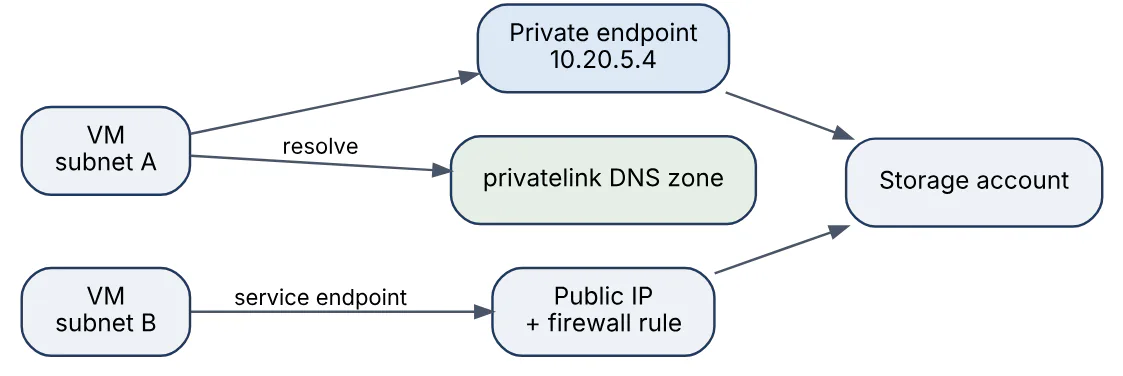
Private endpoints are the recommended default for new designs because they remove public exposure and prevent data exfiltration to other tenants’ accounts; service endpoints remain useful when cost or DNS constraints make Private Link impractical.
12In a real project using Microsoft Azure, how would you apply, test, or troubleshoot private endpoints versus service endpoints?
Apply. In a regulated reporting warehouse, the Azure SQL server, the data-lake storage account, and Key Vault all receive private endpoints in snet-pe of the data spoke, with publicNetworkAccess set to Disabled. Private DNS zones (privatelink.database.windows.net, privatelink.blob.core.windows.net, privatelink.vaultcore.azure.net) are linked to the hub VNet, and on-premises DNS servers forward those zones to the Azure DNS Private Resolver so analysts on the corporate network reach the same private IPs. Where a legacy batch job runs in a VNet without Private Link budget, a service endpoint plus storage firewall rule covers it as a documented exception.
Test. From a jump host I run nslookup sqlsrv-rpt.database.windows.net and expect a 10.x answer; Test-NetConnection -Port 1433 confirms reachability. A negative test from a developer laptop on public Wi-Fi must fail with a firewall error, proving the public path is closed. Terraform plan output is reviewed to ensure every new PaaS resource includes the private endpoint module.
Troubleshoot. Almost every incident is DNS: the client resolves the public IP and is rejected because public access is disabled. I check the private DNS zone has the A record, that the zone is linked to the right VNet, and that custom DNS servers forward correctly. A second cause is Storage sub-resources: the blob endpoint works but dfs or file fails because each sub-resource needs its own private endpoint and zone.
Service endpoints silently stop working when a subnet is recreated without the endpoint flag, so I codify them alongside the subnet definition.
13Explain Azure Load Balancer versus Application Gateway in the context of Microsoft Azure.
Azure Load Balancer is a layer-4 (TCP/UDP) distributor; Application Gateway is a layer-7 (HTTP/HTTPS) reverse proxy. The Load Balancer uses a five-tuple hash to spread flows across a backend pool, performs TCP or HTTP health probes, and is transparent to the payload, which gives it very low latency and millions of flows per second in the Standard SKU. It comes in public and internal variants and is also the mechanism behind outbound SNAT rules.
Application Gateway terminates TLS, inspects the request, and routes by host name or URL path, so /api/* can go to one pool and /images/* to another. It adds cookie-based session affinity, HTTP-to-HTTPS redirection, header rewrite rules, WebSocket support, and, in the WAF_v2 SKU, a Web Application Firewall with OWASP rule sets. Autoscaling and zone redundancy are properties of the v2 SKU.
| Aspect | Load Balancer (Standard) | Application Gateway (v2) |
|---|---|---|
| OSI layer | 4, any TCP/UDP | 7, HTTP/HTTPS/WebSocket |
| Routing | Hash of flow tuple | Host, path, headers |
| TLS | Pass-through | Termination and re-encryption |
| Security | NSG only | WAF, mTLS |
| Typical use | SQL AlwaysOn listener, AKS internal services, game servers | Public web apps, API front ends |
Many designs chain them: Application Gateway in front for web traffic and an internal Load Balancer behind for non-HTTP services such as database listeners.
14In a real project using Microsoft Azure, how would you apply, test, or troubleshoot Azure Load Balancer versus Application Gateway?
Apply. For a retail platform I place an Application Gateway WAF_v2 in its own /24 subnet as the single public entry point. Listeners for shop.example.com and api.example.com route by path to App Service backends and an AKS ingress, with end-to-end TLS and the OWASP 3.2 rule set in Prevention mode after a bake period in Detection. Behind the scenes, an internal Standard Load Balancer fronts the SQL Server Always On availability group listener on port 1433 and the Redis sentinel ports, where HTTP routing adds nothing.
Test. Health probes are tested deliberately: I stop one backend and watch Backend Health in the gateway move to Unhealthy within the probe interval, and confirm no 502s reach clients. Load tests with Azure Load Testing verify the gateway autoscales from 2 to 10 instances under 5,000 RPS. For the Load Balancer, I verify flow distribution by reading per-backend connection metrics and test failover of the SQL listener by failing over the availability group.
Troubleshoot. A 502 from Application Gateway nearly always means the probe fails: wrong probe path, backend expecting a host header the probe does not send, or an NSG on the backend subnet blocking the gateway subnet. The access log (ApplicationGatewayAccessLog) shows serverStatus and timeTaken; the WAF log reveals false-positive rule IDs that I exclude narrowly rather than disabling the rule group. For the Load Balancer, a backend receiving no traffic usually has a probe failing on a port the service is not listening on, visible in the Health Probe Status metric.
Application Gateway needs a dedicated subnet and takes minutes to update configuration, so changes belong in the pipeline, not in incident response.
15Explain Azure Front Door and CDN in the context of Microsoft Azure.
Azure Front Door is a global, anycast-based layer-7 entry point that combines a content delivery network, global load balancing, TLS termination, a Web Application Firewall, and Private Link connectivity to origins. Users connect to the nearest Microsoft edge point of presence; Front Door then routes over the Microsoft backbone to the healthiest or lowest-latency origin group, which can mix App Service, AKS, Storage static websites, or on-premises endpoints across regions.
The Standard tier covers CDN caching, compression, rules engine, custom domains with managed certificates, and basic routing; Premium adds managed WAF rule sets, bot protection, and Private Link to origins. Azure CDN Standard from Microsoft (classic) is being retired on 30 September 2027, and Azure CDN from Edgio was already retired, so Front Door Standard/Premium is now the content delivery service for new workloads.
The diagram shows a multi-region deployment behind Front Door.
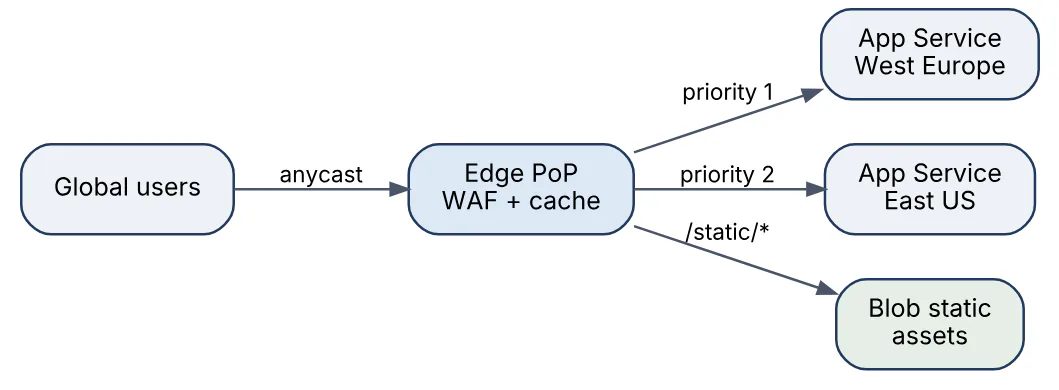
Caching is controlled by origin Cache-Control headers and rules-engine overrides, with query-string and compression behaviour set per route. Front Door operates only on HTTP(S); TCP or UDP workloads needing global anycast use Azure Traffic Manager (DNS-based) or cross-region Load Balancer instead.
16In a real project using Microsoft Azure, how would you apply, test, or troubleshoot Azure Front Door and CDN?
Apply. For a media site serving customers in Europe and North America, I deploy Front Door Premium with one endpoint, two origin groups (dynamic API and static assets), and health probes to /healthz every 30 seconds. The static route caches /assets/* for seven days with query-string caching ignored and Brotli compression on; the API route bypasses cache. Origins are App Service instances reachable only through Private Link, and the WAF runs the Microsoft Default Rule Set plus a rate-limit rule of 300 requests per minute per client IP on /login. Custom domains use managed certificates with automatic renewal.
Test. Cache behaviour is verified with curl -I and the X-Cache: TCP_HIT or TCP_MISS header from different regions using Azure Load Testing agents. Failover is tested by stopping the primary App Service and confirming traffic moves to the secondary within the probe threshold. WAF rules sit in Detection mode for two weeks while I review FrontDoorWebApplicationFirewallLog for false positives before switching to Prevention.
Troubleshoot. Stale content after a release is the top complaint; the fix is a purge by path in the pipeline (az afd endpoint purge) and versioned asset filenames so purges become rare. A 503 at the edge with healthy origins typically means the origin host header is wrong or Private Link approval is pending on the origin side. FrontDoorAccessLog gives routingRuleName, cacheStatus, and originUrl per request for tracing.
Because Front Door is global, configuration propagation takes minutes, and rules-engine changes should be tested on a secondary endpoint before touching production routes.
17Explain Azure App Service deployment slots in the context of Microsoft Azure.
Deployment slots are separate live instances of an App Service app, each with its own host name (myapp-staging.azurewebsites.net), configuration, and content, running on the same App Service plan. The production slot serves customers; additional slots such as staging host the next release. A swap exchanges the two slots’ routing: the staging code is warmed up (Application Initialization requests are sent), then virtual IP mappings flip so the new version serves production with no cold start and no DNS change. Rolling back is another swap.
Settings behave in two ways. Most app settings and connection strings travel with the code during a swap, but settings marked slot setting (deployment slot setting) stay attached to the slot, which is how staging keeps pointing at the staging database while the code moves. Swap with preview applies production settings to the staging slot first so you can validate before completing the swap. Traffic routing lets a slot receive a percentage of production requests for canary testing.
The swap sequence is shown below.

Slots are available on Standard and higher plans (Standard allows 5, Premium 20). Because slots share the plan’s compute, a heavy load test on staging affects production performance on the same plan.
18In a real project using Microsoft Azure, how would you apply, test, or troubleshoot Azure App Service deployment slots?
Apply. For a customer-portal API on a Premium v3 plan I keep production and staging slots. The release pipeline deploys the build artifact to staging, runs integration tests against the staging host name, then performs a swap with preview, and finally completes the swap. Database connection strings and APPINSIGHTS_CONNECTION_STRING are marked as slot settings so staging telemetry stays separate. For risky releases I route 10 percent of production traffic to the slot for 30 minutes and compare error rates before swapping fully.
- task: AzureAppServiceManage@0
  inputs:
    azureSubscription: 'sc-portal-prod'
    Action: 'Swap Slots'
    WebAppName: 'app-portal-prod'
    ResourceGroupName: 'rg-portal-prod'
    SourceSlot: 'staging'
    SwapWithPreview: true
Test. The warm-up is validated by an applicationInitialization entry in web.config (or a /warmup endpoint for Linux) that touches caches and database connections; I check the slot’s HTTP Server Errors metric stays at zero during swap. Rollback is rehearsed: swap back and confirm the previous build number from the /version endpoint.
Troubleshoot. A swap that “hangs” is almost always the warm-up failing because the slot setting for authentication or a WEBSITE_SWAP_WARMUP_PING_PATH returns non-200; the swap operation log in Activity Log shows the status code. Another symptom is production suddenly talking to the staging database, which means a connection string was not marked as a slot setting.
Slots share the plan, so a load test on staging degrades production; use a separate plan for performance testing.
19Explain Azure Functions hosting plans in the context of Microsoft Azure.
Azure Functions executes event-driven code, and the hosting plan determines how instances are provisioned, billed, and scaled. Five plans exist today:
| Plan | Scaling and billing | Typical use |
|---|---|---|
| Flex Consumption | Per-execution billing, scales to zero, optional always-ready instances, VNet integration; recommended for new serverless apps | Bursty APIs, event processing |
| Consumption (legacy) | Per-execution, scales to zero, 5-minute default and 10-minute maximum timeout, no VNet; Linux variant retiring | Existing low-volume apps |
| Premium (Elastic Premium) | Pre-warmed instances, no cold start, unbounded timeout, VNet, larger SKUs | Latency-sensitive or long-running work |
| Dedicated (App Service plan) | Runs on an existing App Service plan, needs Always On | Predictable load, reuse of plan |
| Container Apps | Functions image hosted on Azure Container Apps, KEDA scaling | Mixed microservices in one environment |
Flex Consumption scales by concurrency per instance rather than one request per instance, supports up to 1,000 instances, and reached general availability in late 2024. Regardless of plan, an HTTP-triggered function must respond within 230 seconds because of the platform load balancer idle timeout; longer work uses Durable Functions or a queue hand-off.
Plan choice is mostly about cold start versus cost and about whether private networking is required; Premium or Flex Consumption are needed when functions must reach resources behind private endpoints.
20In a real project using Microsoft Azure, how would you apply, test, or troubleshoot Azure Functions hosting plans?
Apply. For an invoice-processing pipeline, a Flex Consumption app handles blob-triggered PDF parsing because volume is spiky and the function must reach Storage through a private endpoint, which the legacy Consumption plan cannot do. The customer-facing quote API runs on Elastic Premium EP1 with one pre-warmed instance so it has no cold start and can hold an outbound static IP for a partner’s allow list. Both apps share a user-assigned managed identity and separate storage accounts, and a nightly reconciliation job that runs for 40 minutes lives on Premium where the timeout is unbounded.
Test. Cold-start latency is measured with Azure Load Testing after a 20-minute idle period and compared against the SLA; if P95 exceeds 500 ms on Flex Consumption, I add an always-ready instance. Scale-out is tested by dropping 5,000 blobs and watching the Instance Count metric and the queue depth drain. Cost is checked with the Cost Management export filtered by the function app tag.
Troubleshoot. A function that mysteriously stops at 10 minutes is on Consumption hitting its hard timeout; moving to Premium or Flex Consumption, or using Durable Functions fan-out, solves it. FunctionExecutionUnits and Memory Working Set show whether instances are memory-bound; Application Insights requests with success == false and the host logs reveal Host thresholds exceeded restarts. For VNet problems I confirm the plan actually supports integration and that the integration subnet is delegated.
The Linux Consumption plan is retiring, so new apps should start on Flex Consumption even when Consumption looks cheaper on paper.
21Explain Functions triggers and bindings in the context of Microsoft Azure.
A trigger is the event that starts a function execution, and there is exactly one per function: an HTTP request, a timer, a new blob, a Service Bus message, an Event Hubs batch, a Cosmos DB change-feed entry, and so on. Bindings are declarative connections to other services for input or output; a function can have any number, and they remove boilerplate SDK code because the runtime handles connection management, serialisation, and retries according to the binding’s extension.
Bindings are declared in attributes (C#, Java), decorators (Python v2, JavaScript v4), or function.json for older models. The example receives a Service Bus message, reads a matching Cosmos DB document as input, and writes a result blob as output.
[Function("EnrichOrder")]
[BlobOutput("enriched/{id}.json", Connection = "StorageConn")]
public async Task<string> Run(
    [ServiceBusTrigger("orders", Connection = "SbConn")] OrderMessage msg,
    [CosmosDBInput("shop", "customers", Connection = "CosmosConn",
        Id = "{customerId}", PartitionKey = "{customerId}")] Customer cust,
    FunctionContext ctx)
{
    var enriched = new { msg.Id, msg.Total, cust.Tier };
    return JsonSerializer.Serialize(enriched);
}
Binding expressions such as {customerId} pull values from the trigger payload. Trigger behaviour differs materially: Service Bus and Storage queue triggers use peek-lock with automatic completion, Event Hubs triggers checkpoint per partition, and blob triggers can use Event Grid for low latency instead of polling. Not every service has an output binding, in which case the SDK with a managed identity is used directly.
22In a real project using Microsoft Azure, how would you apply, test, or troubleshoot Functions triggers and bindings?
Apply. In an order-fulfilment system, a Service Bus-triggered function in the warehouse app consumes order-created messages, uses a Cosmos DB input binding to fetch the customer profile, and an output binding to a second Service Bus queue for the shipping label service. A timer trigger (0 */15 * * * *) reconciles stuck orders, and the blob trigger for supplier CSV files uses the Event Grid source so files are processed within seconds rather than on the ten-minute polling scan. All connections use identity-based connection settings (SbConn__fullyQualifiedNamespace) rather than connection strings.
Test. Unit tests call the function method directly with a fake OrderMessage and a stubbed Customer, since bindings are just parameters. Locally, Azurite and the Service Bus emulator feed real triggers through Core Tools (func start). Integration tests in the pipeline post a message to a test queue and assert the label message appears within a timeout.
Troubleshoot. Duplicate processing usually means the function exceeds the queue lock duration (default 60 seconds) and the message is redelivered; I either raise maxAutoLockRenewalDuration in host.json or make the handler idempotent by order ID. A trigger that never fires is typically a missing role (Azure Service Bus Data Receiver) on the identity or a scale controller that cannot read the queue; the Host.Triggers.ServiceBus log category and the ScaleControllerLogs setting show why. Blob triggers silently skipping files point to a stale receipt in the azure-webjobs-hosts container.
Bindings hide retries, so set maxDeliveryCount and dead-lettering deliberately rather than assuming the default behaviour fits.
23Explain Azure Service Bus queues and topics in the context of Microsoft Azure.
Azure Service Bus is a fully managed enterprise message broker that supports AMQP 1.0 and offers two messaging entities. A queue gives point-to-point delivery: producers send, one competing consumer receives each message, and the broker stores messages durably until they are completed, abandoned, dead-lettered, or expire. A topic gives publish/subscribe: a message sent to a topic is copied to every subscription whose SQL-style or correlation filter matches, and each subscription behaves like its own queue with independent consumers.
Both entities share the same reliability features:
- Peek-lock receive mode locks a message for a configurable duration; the consumer completes it after processing, which gives at-least-once delivery.
ReceiveAndDeleteis faster but can lose messages. - Sessions guarantee FIFO ordering and exclusive handling for all messages sharing a
SessionId, such as all events for one order. - Duplicate detection drops messages with a repeated
MessageIdinside a time window. - Scheduled messages, deferral, transactions across entities, and auto-forwarding between entities support complex workflows.
- Dead-letter sub-queue on every queue and subscription holds messages that cannot be delivered.
The diagram shows one topic fanning out to filtered subscriptions.
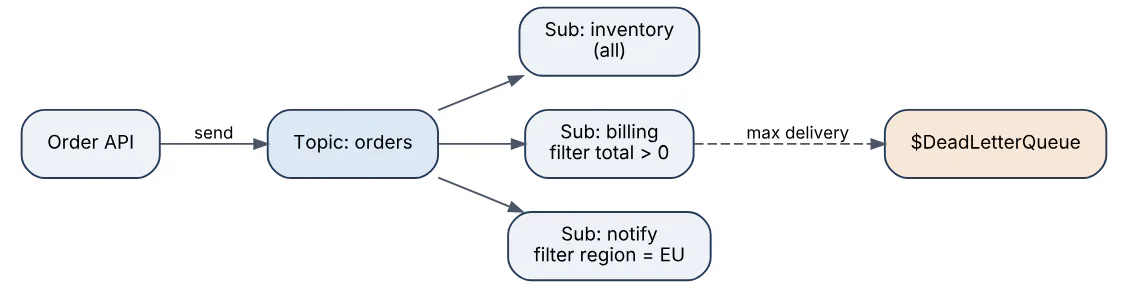
Tiers matter: Standard is shared, Premium gives dedicated messaging units, predictable latency, 100 MB messages, geo-disaster recovery, and private endpoints. Service Bus is the right choice when ordering, transactions, and per-message state matter; Event Hubs (Q27) is for high-throughput streaming where consumers manage their own offsets.
24In a real project using Microsoft Azure, how would you apply, test, or troubleshoot Azure Service Bus queues and topics?
Apply. For an e-commerce order flow I publish OrderPlaced events to a topic orders on a Premium namespace. Subscriptions inventory, billing, and notifications each carry a filter; billing uses a SQL filter total > 0 AND region = 'EU' to route only relevant events. Sessions keyed by orderId guarantee that OrderPlaced, OrderPaid, and OrderShipped are handled in sequence by one consumer. Senders set MessageId to the business event ID and duplicate detection is enabled with a 10-minute window so retried API calls do not create double charges. Consumers are Functions with the Service Bus trigger and maxConcurrentSessions tuned to the downstream database capacity.
Test. Consumer logic is tested with the Service Bus emulator in Docker during CI; a contract test publishes each event type and asserts every subscription receives exactly the expected subset. A load test with 20,000 messages verifies the Active Messages metric drains inside the five-minute SLO and that no message reaches the dead-letter queue.
Troubleshoot. Rising Active Messages with idle consumers usually means the consumer is session-enabled but the queue is not (or vice versa), which produces no error, only silence. Server Errors and Throttled Requests metrics indicate a Standard-tier namespace hitting credit limits, fixed by moving to Premium. Lock-lost exceptions (MessageLockLost) mean processing exceeds the lock duration; renew the lock or shorten the work.
Service Bus delivers at least once, so every consumer must be idempotent; relying on duplicate detection alone is insufficient after a consumer crash mid-processing.
25Explain dead-letter queues retry policies in the context of Microsoft Azure.
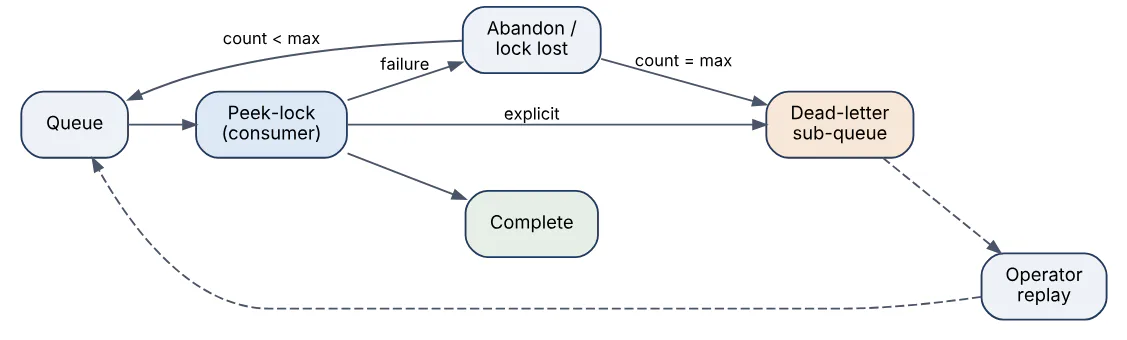
A dead-letter queue (DLQ) is a holding area for messages that a broker could not deliver or that a consumer explicitly rejected. In Azure Service Bus every queue and subscription has a built-in $DeadLetterQueue sub-entity; Azure Storage queues do not, so applications implement a poison queue themselves, and Azure Functions does this automatically after five failed dequeues. Event Grid also dead-letters undeliverable events to a storage container when configured.
Messages land in the DLQ for three reasons: the MaxDeliveryCount (default 10) is exceeded after repeated abandons or lock expirations, the message time-to-live elapses with dead-lettering on expiry enabled, or the consumer calls DeadLetterMessage with a reason and description, for example a schema validation failure. Subscription filter evaluation errors can also dead-letter.
Retry policy is layered. Client SDKs retry transient transport errors with exponential back-off (configurable maxRetries, delay, maxDelay). Service Bus itself redelivers a message each time a lock is abandoned or lost, which is the application-level retry up to MaxDeliveryCount. Azure Functions adds a host-level retry policy (fixed or exponential delay) for certain triggers. Delayed retries are implemented by scheduling a copy of the message for the future and completing the original.
The message lifecycle below shows how a message reaches the DLQ.
| Mechanism | Scope | Controls |
|---|---|---|
| SDK retry | Transport errors | Attempts, back-off |
| Redelivery | Processing failure | MaxDeliveryCount, lock duration |
| Scheduled resend | Business back-off | ScheduledEnqueueTime |
| DLQ | Final failure | Reason, operator replay |
Messages in a DLQ never expire and are billed as stored messages, so they must be monitored and drained.
26In a real project using Microsoft Azure, how would you apply, test, or troubleshoot dead-letter queues retry policies?
Apply. In a payments settlement service, the settlements queue has MaxDeliveryCount set to 5, a lock duration of 2 minutes, and TTL of 24 hours with dead-lettering on expiry. The consumer distinguishes transient failures (bank API 503) from permanent ones (invalid IBAN): transient errors are abandoned so Service Bus redelivers, with a scheduled resend applying 1, 5, and 30-minute delays stored in a retryCount application property; permanent failures are dead-lettered immediately with a machine-readable DeadLetterReason. A separate Function reads the DLQ, writes each message to a Cosmos DB failed-settlements container, and raises an alert. A replay tool lets operators resubmit fixed messages to the main queue.
async def handle(receiver, msg):
    try:
        await settle(json.loads(str(msg)))
        await receiver.complete_message(msg)
    except ValidationError as e:
        await receiver.dead_letter_message(
            msg, reason="InvalidPayload", error_description=str(e))
    except BankUnavailable:
        await receiver.abandon_message(msg)   # redelivered, counts toward max
Test. Fault-injection tests stub the bank client to fail N times and assert the message is completed on retry N+1 and dead-lettered on exhaustion with the expected reason. An alert on DeadLetteredMessages > 0 is fired in staging on purpose to verify routing to the on-call channel.
Troubleshoot. A DLQ filling with MaxDeliveryCountExceeded and no exception logs usually means lock expiry, not errors; comparing processing duration in Application Insights against the lock duration confirms it. Messages that vanish without reaching the DLQ typically expired with dead-lettering on expiry disabled.
Retrying immediately against a failing dependency amplifies the outage, so back-off and a circuit breaker belong alongside the DLQ design.
27Explain Azure Event Grid versus Event Hubs in the context of Microsoft Azure.
Event Grid is a reactive event router for discrete notifications; Event Hubs is a partitioned streaming log for high-volume telemetry. They solve different problems even though both carry “events”.
Event Grid receives individual events (CloudEvents 1.0 or its own schema) from Azure services, custom topics, or partner sources, applies subscription filters on subject and data fields, and pushes each event to handlers such as Functions, Logic Apps, webhooks, Service Bus, or Event Hubs with retries over 24 hours and optional dead-lettering. The newer namespace topics add MQTT and pull delivery. It is billed per million operations and expects each event to be meaningful on its own: “blob created”, “VM resized”.
Event Hubs ingests millions of events per second into partitions, retains them for one to ninety days, and lets consumer groups read independently by offset, like Apache Kafka (it even exposes a Kafka-compatible endpoint). Consumers checkpoint their position, so replay is possible and ordering is preserved within a partition. Capture can archive raw streams to Blob Storage or Data Lake.
| Aspect | Event Grid | Event Hubs |
|---|---|---|
| Model | Push (or pull) of discrete events | Pull from partitioned stream |
| Scale unit | Operations per second | Throughput units or processing units |
| Retention | Until delivered or 24 h retry | 1–90 days, replayable |
| Ordering | Not guaranteed | Per partition |
| Typical use | Trigger workflows on state change | Telemetry, clickstreams, log pipelines |
A typical architecture uses both: Event Hubs collects IoT telemetry, Stream Analytics detects a threshold breach, and Event Grid fans out the resulting alert to several handlers.
28In a real project using Microsoft Azure, how would you apply, test, or troubleshoot Azure Event Grid versus Event Hubs?
Apply. For a fleet-tracking product, vehicles stream GPS and engine telemetry into an Event Hubs namespace with 32 partitions keyed by vehicleId, retained for seven days and captured to Data Lake in Avro for batch analytics. A Stream Analytics job and a Functions consumer group read the stream independently. Event Grid handles the discrete side: when a daily report blob lands in Storage, a system topic subscription with a subject filter /blobServices/default/containers/reports/ triggers a Function that emails the fleet manager, and a custom topic carries GeofenceBreached events to a Logic App and a webhook for the customer’s own system.
Test. For Event Hubs I generate 50,000 events per second with a load generator and watch Incoming Messages, Throttled Requests, and consumer lag computed from checkpoint offsets; the auto-inflate ceiling is verified to kick in. For Event Grid I use the local Event Grid Viewer sample as a webhook endpoint to inspect delivered payloads, and a test confirms filters reject events outside the reports container.
Troubleshoot. Event Hubs consumers falling behind show as growing lag with Outgoing Messages flat; the usual fix is more partitions matched by more processor instances or a faster checkpoint store. ReceiverDisconnectedException means two consumers share a partition in the same consumer group. On Event Grid, Dead Lettered Events rising with delivery failures normally means the webhook did not complete the validation handshake or returns non-2xx slowly; the Delivery Failed metric filtered by error code explains which.
Event Grid does not guarantee ordering or exactly-once delivery, so handlers must be idempotent on the event id.
29Explain Logic Apps workflows in the context of Microsoft Azure.
Azure Logic Apps is a low-code integration service for building workflows as a sequence of a trigger followed by actions, defined in a JSON Workflow Definition Language document and edited visually in a designer. Over 1,000 managed connectors wrap SaaS and Azure services (Office 365, Salesforce, SAP, SQL, Service Bus, Storage), handling authentication, paging, and retries. Control-flow actions provide conditions, switches, For each loops with configurable parallelism, Until loops, scopes with run after error handling, and inline expressions in the Workflow Definition Language (@concat(...), @body('Get_order')?['total']).
Two hosting models exist. Consumption logic apps are multitenant and billed per action execution; each resource holds one workflow. Standard logic apps run on the single-tenant Azure Functions runtime (Workflow Service Plan or App Service Environment), hold many stateful or stateless workflows per app, support VNet integration and private endpoints, run locally in VS Code, and deploy through normal CI/CD because the workflow JSON lives in source control. Stateless workflows skip run-history persistence for low-latency, high-volume request-response scenarios.
Logic Apps shine when the job is orchestrating systems rather than computing: approvals, file transfers, B2B EDI through the Integration Account, or stitching an incoming email to a ticketing system. Heavy transformation or custom algorithms belong in Azure Functions, which Logic Apps can call as an action.
30In a real project using Microsoft Azure, how would you apply, test, or troubleshoot Logic Apps workflows?
Apply. For a supplier onboarding process I build a Standard logic app with three workflows. supplier-intake is triggered when a form submission lands in a SharePoint list, validates mandatory fields, writes a record to Azure SQL through a managed-identity connection, and starts an approval email to procurement; the run waits up to seven days for a response. supplier-sync listens on a Service Bus topic subscription and pushes approved suppliers to SAP through the on-premises data gateway. Every workflow wraps its actions in a scope with a run after: Failed, TimedOut branch that posts to Teams and dead-letters the payload to a blob. Parameters and connection references are environment-specific and injected by Bicep.
Test. Locally in VS Code I run the workflow with mock trigger payloads and the built-in run history. In the pipeline, a test stage posts a sample request to the HTTP trigger of a test slot, then polls the Logic Apps REST API for run status and asserts the SQL row exists. Connector actions are isolated with static results in the designer to test branches without hitting SAP.
Troubleshoot. The run history shows every action’s inputs and outputs, so most failures are diagnosed by opening the failed action; 429 responses point at connector throttling, solved by lowering For each concurrency or adding a retry policy with exponential back-off. Expression errors (InvalidTemplate) often come from null navigation, fixed with the ? operator or coalesce(). Stuck runs waiting on approvals show as Running and need a timeout on the action.
Consumption pricing is per action, so a loop over 10,000 items costs 10,000 executions; batching or a Function is cheaper at scale.
31Explain Azure Storage blobs files queues tables in the context of Microsoft Azure.
An Azure Storage account is a single namespace that exposes four data services over HTTPS, each with its own endpoint (blob, file, queue, table) but shared redundancy, encryption, firewall, and access settings.
| Service | Model | Protocol | Typical use |
|---|---|---|---|
| Blobs | Object store: containers of block, append, page blobs | REST, SDKs, NFS 3.0 | Media, backups, data lake, static sites |
| Files | Managed file shares with directories | SMB 3.x, NFS 4.1, REST | Lift-and-shift apps, shared config, Azure File Sync |
| Queues | Simple FIFO-ish message queue, 64 KB messages, 7-day TTL | REST | Decoupling web and worker roles |
| Tables | Schemaless key-value with PartitionKey + RowKey | REST, OData | Logs, device metadata, cheap lookups |
Redundancy applies account-wide: LRS keeps three copies in one datacenter, ZRS spreads across zones, GRS and GZRS replicate asynchronously to a paired region, and the RA- variants add read access to the secondary. Authorisation is by Entra ID with RBAC data roles (preferred), shared access signatures scoped by time and permission, or account keys that should be disabled where possible.
Storage queues differ from Service Bus (Q23) by lacking ordering guarantees, sessions, topics, and transactions, but they hold effectively unlimited messages at very low cost. Table storage is the same API offered by Azure Cosmos DB for Table, which adds global distribution and guaranteed latency for a higher price. Blob Storage with hierarchical namespace becomes Data Lake Storage Gen2, the foundation for Synapse, Databricks, and Fabric workloads.
32In a real project using Microsoft Azure, how would you apply, test, or troubleshoot Azure Storage blobs files queues tables?
Apply. For a document-management system I create a ZRS StorageV2 account with public network access disabled and private endpoints for blob, file, and queue. Uploaded contracts go to a contracts container via user-delegation SAS tokens minted by the API with 10-minute lifetimes; a lifecycle policy moves blobs to Cool after 30 days and Archive after one year, with soft delete and versioning turned on for 30 days. A legacy Windows service that needs a drive letter mounts an Azure Files SMB share with Entra Kerberos authentication. Thumbnail generation uses a Storage queue consumed by a Function with a poison-queue handler, and a Table holds per-document audit entries partitioned by customerId.
Test. Integration tests run against Azurite in CI for blobs, queues, and tables. In staging I verify the lifecycle policy by setting daysAfterModificationGreaterThan to 0 on a test container and confirming tier changes the next day, and I test recovery by deleting a blob and restoring it from soft delete. Throughput tests with AzCopy benchmark (azcopy bench) establish baseline MB/s for bulk ingest.
Troubleshoot. 403 AuthorizationPermissionMismatch after moving to identity-based access means the identity lacks a data-plane role such as Storage Blob Data Contributor. Server Busy (503) or IngressLimitExceeded indicate an account hitting its scalability targets; sharding across accounts or using premium block blobs fixes it. Slow SMB access from Azure Files normally traces to Standard tier IOPS limits or port 445 blocked by an ISP. Storage Analytics logs and the Transactions metric split by ResponseType pinpoint the failing operation.
Account keys in connection strings remain the most common leak; disabling shared key access (allowSharedKeyAccess: false) forces identity-based auth.
33Explain Azure SQL versus Cosmos DB in the context of Microsoft Azure.
Azure SQL Database is a managed relational engine (the SQL Server engine) with ACID transactions, T-SQL, joins, foreign keys, and a strongly typed schema. Azure Cosmos DB is a globally distributed, multi-model NoSQL service exposing several APIs (NoSQL/document, MongoDB, Cassandra, Gremlin, Table, and PostgreSQL via Citus) with horizontal partitioning, single-digit-millisecond reads, and tunable consistency.
| Aspect | Azure SQL Database | Cosmos DB (NoSQL API) |
|---|---|---|
| Data model | Relational tables, fixed schema | JSON documents, schema-free |
| Scaling | Vertical (vCores, DTUs), Hyperscale to 128 TB, read replicas | Horizontal by partition key, unlimited storage |
| Consistency | Strong, single primary region (geo-replicas read-only) | Five levels from strong to eventual, multi-region writes |
| Billing | Compute tier plus storage; serverless auto-pause | Request Units provisioned, autoscale, or serverless |
| Query | T-SQL joins, stored procedures, full reporting | SQL-like per container, no cross-container joins |
| Fit | Transactions, complex queries, existing SQL skills | Global low-latency apps, IoT, catalogs, session state |
Choose Azure SQL when the domain has rich relationships, needs multi-row transactions across entities, or feeds reporting tools with ad-hoc joins. Choose Cosmos DB when access patterns are known in advance and keyed by a partition, write volume or geography exceeds what a single primary can serve, or the schema evolves per document. Many systems use both: Cosmos DB for the high-volume product catalogue and shopping cart, Azure SQL for orders and finance, connected through the Cosmos DB change feed.
Cosmos DB’s cost model punishes unplanned queries: a cross-partition scan consumes RUs proportional to data touched, which is the opposite of how a relational optimiser with indexes behaves.
34In a real project using Microsoft Azure, how would you apply, test, or troubleshoot Azure SQL versus Cosmos DB?
Apply. For a global ticketing platform, the seat inventory and checkout use Azure SQL Database Business Critical with zone redundancy, because reserving seats is a multi-row transaction with strict consistency. The event catalogue and user session state live in Cosmos DB with multi-region writes in West Europe, East US, and Southeast Asia, partitioned by eventId and userId respectively, using session consistency. An active geo-replica of SQL in a second region and auto-failover groups provide DR; the Cosmos DB change feed streams catalogue updates into an Azure AI Search index. Connection strings are replaced by managed identity for both services.
Test. For SQL I run load tests against a copy restored from a point-in-time backup, examine Query Store for regressed plans, and test failover-group switching to prove the listener endpoint reconnects. For Cosmos DB I capture the x-ms-request-charge header in integration tests and fail the build if a key query exceeds a budget of 20 RU; a chaos test disables the primary write region and confirms the SDK fails over using the preferred-regions list.
Troubleshoot. SQL symptoms are blocking and high DTU/vCore: sys.dm_exec_requests and Query Performance Insight identify the heavy statement, and Intelligent Insights often suggests the missing index. On Cosmos DB, HTTP 429 (TooManyRequests) means RU exhaustion on a hot partition; the Normalized RU Consumption metric split by partition key range shows the skew, fixed by a better key or autoscale.
The decision is rarely either/or; the real mistake is modelling relational data with joins in Cosmos DB, or forcing a relational engine to serve a write-heavy global workload.
35Explain Cosmos DB partition keys and RU in the context of Microsoft Azure.
Every Cosmos DB container is horizontally partitioned by a partition key path chosen at creation, such as /customerId. Items sharing a value form a logical partition (up to 20 GB), and the service groups logical partitions into physical partitions, each capable of up to 10,000 RU/s and 50 GB. Throughput is divided evenly across physical partitions, so a container provisioned at 40,000 RU/s with four physical partitions gives each only 10,000. The key is immutable for a container, though hierarchical partition keys (up to three levels, for example /tenantId/userId) relieve the 20 GB limit for large tenants.
A request unit (RU) is the normalised cost of one operation: a 1 KB point read by ID and partition key costs 1 RU, while writes cost roughly 5 to 7 RU per KB due to indexing, and queries cost according to data scanned, index use, and result size. Throughput is provisioned manually, with autoscale between 10 percent and a maximum, or billed per request in serverless mode. Exceeding the budget in a one-second window produces HTTP 429 with a x-ms-retry-after-ms hint.
A good partition key therefore satisfies three tests:
- High cardinality, so data and requests spread across many logical partitions.
- Appears in the most frequent queries, so they are single-partition reads rather than fan-out scans.
- Avoids hot spots over time; a date-based key sends all of today’s writes to one partition.
The diagram shows how requests map to partitions.
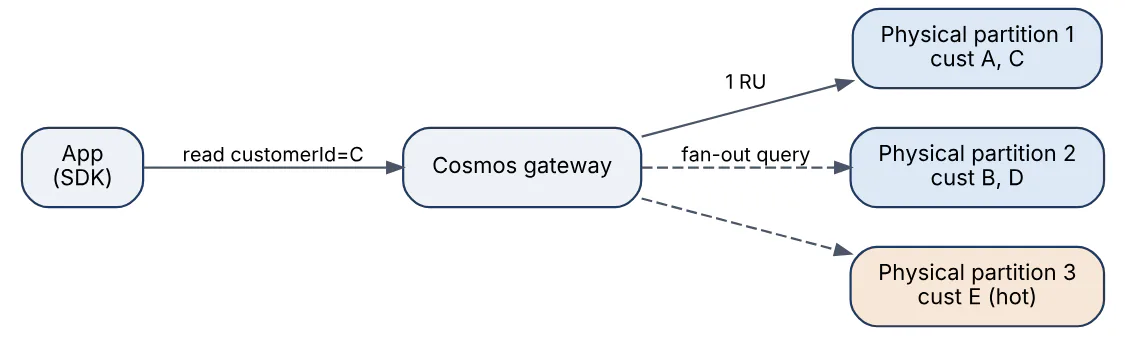
RU charges are returned on every response, which makes cost measurable per query during development.
36In a real project using Microsoft Azure, how would you apply, test, or troubleshoot Cosmos DB partition keys and RU?
Apply. For a multi-tenant SaaS audit log, I partition the events container with a hierarchical key /tenantId/deviceId, because tenants vary from a few devices to tens of thousands and a flat /tenantId would exceed 20 GB for large customers. The dominant query, “events for this device in the last hour”, is a single-partition query. I exclude large payload paths from the indexing policy to cut write RU by about 40 percent, set a TTL of 90 days, and use autoscale with a 4,000 to 40,000 RU/s range. Point reads use ReadItemAsync(id, partitionKey) rather than a query, since the former costs 1 RU and the latter at least 2.3.
Test. Every repository method has an integration test against the Cosmos DB emulator that records RequestCharge and asserts it stays under a threshold, so a developer who introduces a cross-partition query breaks the build. Before go-live I load a representative data set and inspect the Normalized RU Consumption metric by PartitionKeyRangeId to confirm no partition exceeds 70 percent while others idle.
var resp = await container.ReadItemAsync<AuditEvent>(
    id, new PartitionKeyBuilder().Add(tenantId).Add(deviceId).Build());
logger.LogInformation("RU {ru}", resp.RequestCharge);   // expect ~1.0
Troubleshoot. A burst of 429s with low average RU usage is a hot partition; Diagnostics PartitionKeyRUConsumption logs name the offending key value, and the fix is a finer key or a synthetic key with a suffix. Queries unexpectedly expensive often use ORDER BY on an unindexed path or CONTAINS on large strings; the query metrics (IndexHitRatio, RetrievedDocumentCount) show scans. Storage growth with flat RU usage points at missing TTL.
Changing a partition key means a new container and a migration through the change feed, so the decision deserves modelling before the first write.
37Explain Key Vault and secret rotation in the context of Microsoft Azure.
Azure Key Vault is a managed service for storing and controlling access to secrets (connection strings, API keys), cryptographic keys (RSA, EC, with HSM-backed options in the Premium tier and Managed HSM), and certificates. Data is encrypted at rest with hardware-backed keys, every operation is logged, and access is controlled by Azure RBAC data roles such as Key Vault Secrets User (the legacy vault access policy model is still supported but RBAC is recommended). Soft delete and purge protection prevent accidental or malicious permanent deletion. Each secret, key, and certificate is versioned, and references can point to the latest version or pin a specific one.
Secret rotation means replacing a credential on a schedule or after an incident so that a leaked value has a short useful life. Key Vault supports it at three levels:
- Certificates rotate automatically when issued through an integrated CA (DigiCert, GlobalSign) or self-signed, using a lifetime action such as “renew at 80 percent of lifetime”.
- Keys have a rotation policy that creates a new version on a cadence, with an Event Grid
KeyNearExpiryevent for notification. - Secrets have no built-in rotation because Key Vault does not know how to change the password on the target system. The pattern is an Event Grid
SecretNearExpiryevent (or a timer) triggering an Azure Function that generates a new credential, updates the target (SQL login, storage key), and writes a new secret version.
Applications should read the latest version at startup and refresh periodically, or use App Service and Functions Key Vault references (@Microsoft.KeyVault(SecretUri=...)), which re-resolve the secret roughly daily. The best rotation is no secret at all: managed identities remove the credential entirely wherever the target supports Entra authentication.
38In a real project using Microsoft Azure, how would you apply, test, or troubleshoot Key Vault and secret rotation?
Apply. For a logistics API that must call a partner’s REST service with an API key and a legacy SQL Server using a SQL login, I create a vault per environment with RBAC authorisation, purge protection, and a private endpoint. The partner key is stored with an expiry attribute of 90 days; an Event Grid subscription on Microsoft.KeyVault.SecretNearExpiry triggers a rotation Function 30 days before expiry that requests a new key from the partner’s portal API, stores it as a new version, and only then disables the old key at the partner. The SQL login uses the dual-credential pattern: two logins alternate, so the app always has one valid password while the other is being changed. Application code caches secrets for 15 minutes using SecretClient with a managed identity.
Test. In staging I set a secret’s expiry to tomorrow and confirm the Event Grid event, Function run, new version, and continued API success all appear in Application Insights in sequence. A negative test revokes the identity’s Key Vault Secrets User role and verifies the app fails fast with a clear log instead of using a stale value silently. Diagnostic logs are checked for any SecretGet by unexpected principals.
Troubleshoot. 403 Forbidden with ForbiddenByRbac means the data role is missing or was assigned minutes ago; ForbiddenByFirewall means the caller is not on the vault’s network path. App Service Key Vault references showing the literal @Microsoft.KeyVault(...) string indicate the identity cannot read the secret. Rotation that updates the vault but breaks the app means the app pinned a specific version URI instead of the versionless one.
Key Vault throttles at roughly 2,000 secret operations per 10 seconds per vault, so reading a secret on every request will fail under load; cache it.
39Explain API Management policies in the context of Microsoft Azure.
Azure API Management (APIM) is a gateway that sits in front of backend APIs and applies policies, which are XML statements executed in a pipeline around each request. Policies live at four scopes (global, product, API, operation) and in four sections: inbound runs before the backend call, backend controls the call itself, outbound shapes the response, and on-error handles failures. The <base /> element controls where parent-scope policies run relative to the current scope.
Commonly used policies include:
- Security:
validate-jwt(orvalidate-azure-ad-token) to check Entra ID tokens and claims;ip-filter;check-header; client certificate validation. - Traffic control:
rate-limit-by-key(per subscription, IP, or claim within a sliding window) andquota-by-keyfor longer-term allowances. - Transformation:
set-header,rewrite-uri,set-bodywith Liquid templates,xml-to-json, andset-backend-servicefor routing or versioning. - Performance:
cache-lookupandcache-storewith the built-in or external Redis cache. - Extensibility:
send-requestto call another service,return-responsefor mocking, andauthentication-managed-identityto acquire a token for the backend.
<inbound>
  <base />
  <validate-azure-ad-token tenant-id="{{tenant-id}}">
    <audiences><audience>api://orders</audience></audiences>
    <required-claims>
      <claim name="roles" match="any"><value>Orders.Read</value></claim>
    </required-claims>
  </validate-azure-ad-token>
  <rate-limit-by-key calls="100" renewal-period="60"
    counter-key="@(context.Request.IpAddress)" />
  <set-header name="X-Correlation-Id" exists-action="skip">
    <value>@(Guid.NewGuid().ToString())</value>
  </set-header>
</inbound>
Policy expressions in @(...) are C# snippets with access to the context object. Named values (optionally backed by Key Vault) keep secrets and environment-specific settings out of the policy document.
40In a real project using Microsoft Azure, how would you apply, test, or troubleshoot API Management policies?
Apply. For a partner-facing orders API, APIM Standard v2 fronts an App Service backend reachable only through VNet integration. At the product scope, validate-azure-ad-token enforces Entra ID tokens and quota-by-key grants each partner subscription 1 million calls per month; at the operation scope, rate-limit-by-key on the sub claim protects the backend from bursts, cache-lookup serves GET /products for 60 seconds, and set-backend-service routes v2 requests to the new backend during a migration. Backend calls use authentication-managed-identity so the App Service accepts only tokens from the gateway. Policies, named values, and API definitions are stored in Git using the APIM DevOps resource kit and deployed by Bicep per environment.
Test. The APIM policy test console in the portal, with trace enabled through the Ocp-Apim-Trace header, shows each policy’s evaluation and timing. In CI, a Postman/Newman collection asserts 401 without a token, 403 with the wrong role, 429 after the 101st call in a minute, and a cache hit header on the second GET. Policy fragments are unit-tested by deploying them to a dev instance against a mock backend defined with return-response.
Troubleshoot. 401 Unauthorized with the message Invalid JWT usually means the audience claim does not match or the token was issued for Microsoft Graph; the trace shows which check failed. Unexpected 429s across all partners point to a rate limit placed at product scope with a shared counter key rather than per subscription. Latency spikes are inspected through Application Insights integration, where the gateway records backend duration separately from policy overhead; a slow send-request to an external service is the usual culprit.
Policy XML with heavy C# expressions is hard to review, so complex logic belongs in a backend service or a policy fragment with tests, not inline.
41Explain Azure Monitor and Application Insights in the context of Microsoft Azure.
Azure Monitor is the platform-wide observability service that collects metrics, logs, traces, and changes from every Azure resource, guest operating systems, and applications, stores them, and offers analysis, alerting, and visualisation. Application Insights is the application performance management (APM) feature of Azure Monitor, implemented as a workspace-based resource that writes application telemetry into a Log Analytics workspace.
The data model has several stores:
- Metrics are numeric time series kept 93 days, queried in near real time, suitable for autoscale and fast alerts.
- Logs are structured tables in a Log Analytics workspace, queried with Kusto Query Language (KQL), with retention from 30 days to 12 years.
- Traces and distributed transactions come from Application Insights SDKs or OpenTelemetry, which record
requests,dependencies,exceptions,traces, andcustomEventslinked by an operation ID.
Application Insights adds application map, live metrics, failure and performance blades, availability tests, usage analytics, and smart detection of anomalies. Alert rules in Azure Monitor evaluate metrics, log queries, or activity-log events and fire action groups (email, SMS, webhook, Logic App, ITSM). Diagnostic settings route resource logs to a workspace, a storage account, or Event Hubs; data collection rules define what agents collect from virtual machines. Workbooks and Grafana provide dashboards.
requests
| where timestamp > ago(1h) and success == false
| summarize failures = count(), p95 = percentile(duration, 95)
    by name, resultCode
| order by failures desc
The KQL above lists the failing operations of the last hour with their 95th percentile duration, the typical first query during an incident. Cost is driven by ingested log volume, so sampling, table-level retention, and the Basic Logs tier are the main levers.
42In a real project using Microsoft Azure, how would you apply, test, or troubleshoot Azure Monitor and Application Insights?
Apply. For a microservice-based order platform on AKS and Functions, every service exports telemetry through the OpenTelemetry distro to one Application Insights resource per environment so the application map and end-to-end transaction view cover the whole request path. I enable adaptive sampling at 5 traces per second per node, add custom dimensions (tenantId, orderType) to every request, and define four SLO alerts: availability below 99.9 percent over 5 minutes, P95 latency above 800 ms, dependencies failure rate to Cosmos DB above 2 percent, and a log alert on exceptions containing PaymentDeclined surges. Diagnostic settings on AKS, APIM, and Service Bus send resource logs to the same workspace; action groups page the on-call engineer and open an incident through a webhook.
Test. Alert rules are tested by deploying a build that throws on a feature flag and confirming the alert fires and resolves within the expected evaluation window. Standard availability tests from five regions run every five minutes against /healthz. I verify sampling does not hide low-volume failures by checking itemCount sums match the backend request counter.
Troubleshoot. During an incident I open Failures, pick the top resultCode, and drill into a sample operation to see the dependency that failed; the end-to-end transaction view shows whether the latency lives in the service, the database, or the network. Missing telemetry from one pod typically means the connection string environment variable is absent or egress to the ingestion endpoint is blocked by an NSG or firewall rule. Cost spikes are traced with Usage | summarize sum(Quantity) by DataType and fixed by dropping noisy traces at Verbose level.
Correlating across services requires consistent operation_Id propagation through W3C traceparent headers; a single service that strips the header breaks the whole map.
43Explain Azure DevOps pipelines in the context of Microsoft Azure.
Azure Pipelines is the CI/CD service in Azure DevOps. A pipeline is defined as YAML in the repository (azure-pipelines.yml), versioned alongside the code, and structured as stages containing jobs containing steps (tasks or scripts). Triggers include pushes to branches, pull requests, schedules, and completion of another pipeline. Jobs run on Microsoft-hosted agents (Ubuntu, Windows, macOS images) or self-hosted agents and scale sets inside your own network; deployment jobs target environments, which carry approvals, checks, and deployment history.
Reusable building blocks are templates (steps, jobs, stages, or variables) referenced from a central repository, and extends templates that enforce a required skeleton for security. Variable groups link to Key Vault so secrets are never stored in YAML. Access to Azure uses a service connection, preferably with workload identity federation so no client secret exists.
The minimal pipeline below builds a .NET API and deploys it to a staging slot after tests pass.
trigger: [main]
pool: { vmImage: ubuntu-latest }
stages:
- stage: Build
  jobs:
  - job: build
    steps:
    - script: dotnet test --configuration Release
    - script: dotnet publish -c Release -o $(Build.ArtifactStagingDirectory)
    - publish: $(Build.ArtifactStagingDirectory)
      artifact: drop
- stage: DeployStaging
  dependsOn: Build
  jobs:
  - deployment: deploy
    environment: orders-staging
    strategy:
      runOnce:
        deploy:
          steps:
          - task: AzureWebApp@1
            inputs:
              azureSubscription: sc-orders
              appName: app-orders
              slotName: staging
              package: $(Pipeline.Workspace)/drop
A typical multi-stage flow with environment gates looks like this.

Classic (UI-defined) build and release pipelines still exist but are being de-emphasised; YAML multi-stage pipelines are the current standard. GitHub Actions is the sibling product for repositories hosted on GitHub, and Azure DevOps remains common in enterprises for its boards, repos, artifacts feeds, and test plans.
44In a real project using Microsoft Azure, how would you apply, test, or troubleshoot Azure DevOps pipelines?
Apply. For a team shipping twelve microservices, I maintain a central pipeline-templates repository with an extends template that every service pipeline must use. It enforces a build stage (restore, test with coverage gate, container build and push to Azure Container Registry, Trivy scan), a what-if Bicep stage, and deployment stages for dev, test, and prod environments. Production carries a two-person approval check, a business-hours check, and an Azure Monitor alert gate that blocks if the error rate is elevated. Service connections use workload identity federation, and a variable group bound to Key Vault supplies the few remaining secrets. Self-hosted agents in a VM scale set inside the hub VNet handle deployments to private endpoints.
Test. Template changes are validated against a sample service in a pull request using the pipeline preview REST API (/runs?previewRun=true) to render the final YAML without executing it. Each pipeline run publishes test results and coverage to the run summary so regressions are visible; a nightly pipeline deploys to an ephemeral resource group and tears it down to prove the infrastructure code still works from scratch.
Troubleshoot. No hosted parallelism has been purchased or granted affects new organisations and requires the free-tier request form. Intermittent ##[error]Failed to connect to a private App Service means the job ran on a Microsoft-hosted agent instead of the self-hosted pool; I pin pool in the template. Slow pipelines are diagnosed from the task timeline; caching NuGet or npm with the Cache@2 task and building layers with --cache-from typically halves the duration. Approval emails that never arrive point to the environment check being configured on the wrong environment resource.
Secrets printed to logs are masked only if they came from secret variables, so echoing a derived value leaks it; treat every log as public.
45Explain Bicep Terraform deployments in the context of Microsoft Azure.
Bicep and Terraform are the two mainstream infrastructure-as-code languages for Azure; both describe resources declaratively and deploy them through Azure Resource Manager, but they differ in scope, state handling, and ecosystem.
Bicep is Microsoft’s domain-specific language that transpiles to ARM JSON templates. It has no state file: ARM compares the template with the existing resources at deployment time, and every Azure resource type and API version is available on the day it is released because Bicep reads the ARM schemas directly. Modules, parameter files (.bicepparam), what-if previews, and deployment stacks (which can delete resources removed from the template) cover most lifecycle needs. Bicep is Azure-only.
Terraform (HashiCorp, with OpenTofu as the open-source fork) uses HCL and a provider model. The azurerm provider covers most services, azapi fills gaps by calling ARM directly, and the same workflow (init, plan, apply) manages AWS, GCP, Kubernetes, Entra ID, and SaaS providers. Terraform keeps a state file, usually in an Azure Storage account with blob leasing for locking, which enables drift detection, destroy, and precise dependency graphs, but also introduces state corruption and secret-in-state concerns.
| Aspect | Bicep | Terraform |
|---|---|---|
| State | None, ARM is the source of truth | Remote state file, locking |
| Multi-cloud | No | Yes |
| New Azure features | Same day | Provider lag, azapi workaround |
| Deletion of removed resources | Deployment stacks or complete mode | plan shows destroy automatically |
| Tooling | Azure CLI, VS Code extension | CLI, Terraform Cloud, large module registry |
Teams already standardised on Terraform across clouds usually keep it; Azure-only teams often prefer Bicep for its zero-state simplicity and first-party support. Both integrate with Azure Pipelines and GitHub Actions through workload identity federation.
46In a real project using Microsoft Azure, how would you apply, test, or troubleshoot Bicep Terraform deployments?
Apply. In a platform team serving Azure-only product teams, landing-zone components (management groups, policies, hub networking) are Terraform because the central team also manages Entra ID and GitHub with the same toolchain, with state in a GRS storage account per environment and a terraform.tfstate lease for locking. Application teams write Bicep modules published to a private module registry in Azure Container Registry (br:acrplatform.azurecr.io/modules/webapp:1.4.0), deploy through az deployment group create with .bicepparam files, and use deployment stacks with --action-on-unmanage deleteResources so that resources removed from the file are cleaned up.
az deployment group what-if \
  --resource-group rg-orders-test \
  --template-file main.bicep \
  --parameters main.test.bicepparam
Test. Pull requests run bicep build and bicep lint, terraform validate, tflint, and Checkov or PSRule for policy-as-code checks such as “storage accounts must disable public access”. The what-if or terraform plan output is posted as a PR comment and must show zero unexpected deletes before approval. A nightly job deploys each module to an ephemeral resource group and runs Pester tests that query the deployed resources.
Troubleshoot. Bicep errors such as InvalidTemplateDeployment with a nested Conflict usually mean a resource name collision or a property that cannot change in place (SKU of a Key Vault, name of a subnet), visible in az deployment operation group list. Terraform Error acquiring the state lock after a cancelled run needs terraform force-unlock with the lock ID; drift between state and reality after a portal hotfix is reconciled with terraform import or by reverting the manual change.
Mixing both tools on the same resource creates a tug of war, so each resource has exactly one owner tool, enforced by tags.
47Explain Azure Container Apps versus AKS in the context of Microsoft Azure.
Azure Kubernetes Service (AKS) is a managed Kubernetes cluster: Microsoft operates the control plane, and you own node pools, networking, ingress controllers, upgrades, and every Kubernetes object. Azure Container Apps (ACA) is a serverless container platform built on Kubernetes, KEDA, Dapr, and Envoy, but it hides the cluster entirely; you deploy container apps with revisions, scale rules, and ingress settings, and the platform handles nodes, patching, certificates, and scale-to-zero.
| Aspect | Azure Container Apps | AKS |
|---|---|---|
| Abstraction | Apps, revisions, environments | Full Kubernetes API |
| Scaling | KEDA rules (HTTP, queue, CPU), scale to zero | HPA, KEDA add-on, cluster autoscaler, node pools |
| Networking | Managed ingress, Envoy, optional VNet | Any CNI, ingress, service mesh, GPUs |
| Operations | No node or upgrade management | Node images, upgrades, add-ons are your job |
| Billing | Per vCPU-second and memory (Consumption) or dedicated workload profiles | Per node VM, control plane free or Standard tier fee |
| Fit | Microservices, APIs, background jobs, event-driven workers | Complex platforms, custom operators, stateful sets, strict control |
ACA offers traffic splitting between revisions for blue-green and canary, built-in Dapr sidecars for service invocation and pub/sub, jobs for scheduled or event-triggered runs, and Azure Functions hosting. AKS offers everything Kubernetes offers, including Helm, custom resource definitions, Windows node pools, confidential computing, and multi-tenant isolation through namespaces and network policies, along with AKS Automatic for a more opinionated managed experience.
The choice is about how much Kubernetes you want to operate: ACA when the team wants to ship containers without a platform team, AKS when the workload needs cluster-level control or features ACA does not expose.
48In a real project using Microsoft Azure, how would you apply, test, or troubleshoot Azure Container Apps versus AKS?
Apply. For a retail company I split workloads by need. The core commerce platform with 40 services, a service mesh requirement for mTLS, and GPU-backed recommendation models runs on AKS with three node pools (system, general, GPU spot), Azure CNI Overlay, workload identity, and GitOps through Flux. Smaller teams building event-driven back-office services use an ACA environment in the same VNet: an order-export worker scales from zero to 30 replicas on Service Bus queue length, a nightly reconciliation runs as an ACA job, and a customer-notification API uses revision traffic splitting at 10 percent for canaries. Both pull images from one Azure Container Registry with Defender vulnerability scanning.
Test. AKS upgrades are rehearsed in a staging cluster with the same node image, with kubectl drain behaviour validated against pod disruption budgets; chaos tests via Azure Chaos Studio kill nodes and confirm the cluster autoscaler recovers within the SLO. On ACA, I load-test the HTTP scale rule and confirm replicas rise before latency degrades, and I check that scale-to-zero cold starts stay under two seconds for the notification API.
Troubleshoot. On AKS, pods stuck Pending usually mean exhausted IPs in the node subnet or taints without tolerations, visible from kubectl describe pod; CrashLoopBackOff after an upgrade often traces to a deprecated API version removed in the new Kubernetes release. On ACA, a revision stuck in Provisioning typically has a failing health probe or a port mismatch with targetPort; az containerapp logs show --type system exposes the platform events, and ContainerAppConsoleLogs_CL in Log Analytics has the application output.
ACA hides Kubernetes, so when a feature such as a custom CRD or DaemonSet is needed, the migration path to AKS is a redeploy, not a toggle.
49Explain availability disaster recovery and costs in the context of Microsoft Azure.
Availability, disaster recovery, and cost form the triangle every Azure architecture balances. Availability is the probability a service responds correctly, expressed as an SLA; Azure publishes per-service SLAs (for example 99.99 percent for a zone-redundant App Service or AKS uptime with the Standard tier), and a composite SLA for a chain of dependent services is the product of each, so three 99.9 percent services yield roughly 99.7 percent. Within a region, availability zones are physically separate datacenters; zone-redundant SKUs (ZRS storage, zonal VM scale sets, zone-redundant SQL Database, Premium Service Bus) survive the loss of one zone.
Disaster recovery covers losing a whole region. The design is driven by the recovery time objective (RTO, how long the outage may last) and recovery point objective (RPO, how much data may be lost). Patterns in increasing cost order are backup and restore (Azure Backup, geo-redundant storage, hours of RTO), pilot light (data replicated with SQL auto-failover groups or Cosmos DB multi-region, compute deployed on demand through IaC), warm standby (scaled-down second region behind Front Door or Traffic Manager), and active-active multi-region with multi-region writes. Azure Site Recovery replicates VMs; paired regions receive sequential platform updates.
| Pattern | RTO / RPO | Relative cost |
|---|---|---|
| Backup and restore | Hours / hours | Lowest |
| Pilot light | Tens of minutes / minutes | Low |
| Warm standby | Minutes / seconds | Medium |
| Active-active | Near zero / near zero | Highest |
A warm-standby topology across paired regions is shown below.
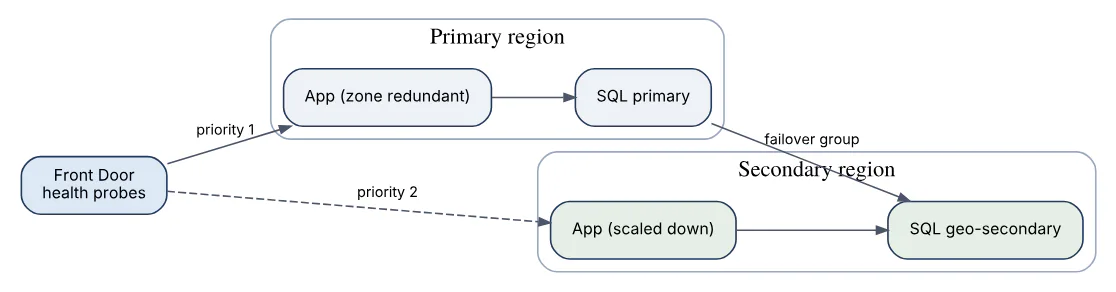
Cost is managed with Cost Management budgets and alerts, tagging for allocation, reservations and savings plans for steady compute, spot instances for interruptible work, autoscale and scale-to-zero for bursty load, right-sizing from Azure Advisor, and selecting appropriate tiers for storage and databases. The business must price an hour of downtime before the architecture chooses a pattern.
50In a real project using Microsoft Azure, how would you apply, test, or troubleshoot availability disaster recovery and costs?
Apply. For an insurance quoting platform with a 99.95 percent availability target, 15-minute RTO, and 5-minute RPO, I deploy the primary in West Europe with zone-redundant App Service Premium v3, zone-redundant Azure SQL Business Critical, ZRS storage, and Premium Service Bus. A warm standby in North Europe runs the same Bicep at one third capacity; SQL uses an auto-failover group with a read-write listener, Storage uses RA-GZRS, and Front Door with priority routing fails traffic over when health probes fail. Everything is tagged costCenter, env, and service; three-year reservations cover the baseline App Service and SQL vCores, autoscale rules cover the peak, and a monthly budget with 80 and 100 percent alerts goes to the product owner.
Test. A quarterly DR drill fails over the SQL group, scales the secondary App Service plan up with a pipeline, and measures real RTO and data loss against the objectives; results are recorded and gaps fixed. Zone failure is simulated with Azure Chaos Studio shutting down one zone’s instances. Cost is reviewed in a monthly FinOps session using Cost Analysis grouped by tag, with Advisor recommendations triaged into the backlog.
Troubleshoot. After a failover, the common failure is the application still pointing at the old server name instead of the listener, or a secret in the secondary Key Vault not replicated because the vault was region-specific; the fix is runbooks tested in the drill. Unexplained cost spikes are traced with Cost Analysis daily view filtered by resource type, and the usual culprits are log ingestion, orphaned public IPs and disks, or a forgotten load-test environment, which a nightly automation now deletes.
The important consideration is that DR capacity costs money every month while it idles; a design that cannot be funded will be quietly scaled back and then fail when needed.
Answers tailored to your resume and job description
Add your resume and the job description in CrackItX's Settings. When the interviewer asks a Microsoft Azure question, Claude suggests an answer using your real projects and the role's requirements, in real time.
See pricing →