Top 50 Docker
interview questions
Images, containers, Dockerfiles, networking, volumes and security. Open a question to read the answer.
01What is Docker?
Docker is a platform for packaging an application and all of its dependencies into an image, then running that image as an isolated process called a container. The isolation comes from Linux kernel features, not from a hypervisor: namespaces give each container its own view of processes, network and filesystem, and cgroups limit the CPU and memory it can use.
The practical result is that the same image runs identically on a developer laptop, a CI runner and a production host, because the runtime environment travels with the code. Docker consists of the Docker Engine (the dockerd daemon and containerd runtime), the docker CLI, Dockerfile-based builds through BuildKit, and registries such as Docker Hub for distributing images.
Compared with virtual machines, containers share the host kernel, so they start in milliseconds and consume far less memory, at the cost of weaker isolation than a full VM.
02What is a Docker Container?
A container is a running instance of an image: one or more processes started from the image’s filesystem, isolated by Linux namespaces and constrained by cgroups. The image layers are mounted read-only and a thin writable layer is placed on top, so writes the process makes are private to that container and disappear when it is removed unless they land on a volume.
Key characteristics:
- A container has its own PID namespace (its first process is PID 1), network namespace (own interfaces and IP) and mount namespace (own root filesystem).
- It runs as long as its main process runs; when that process exits, the container stops.
- Containers are meant to be disposable. State that must survive lives outside, in volumes or external services.
docker run -d --name web -p 8080:80 nginx:1.27
docker ps            # STATUS: Up 5 seconds
docker exec web nginx -v
docker stop web && docker rm web
The sequence above creates, inspects and destroys a container without touching the nginx:1.27 image, which can be reused for any number of other containers.
03Explain images versus containers in the context of Docker.
An image is an immutable, layered filesystem plus metadata (default command, environment, exposed ports); a container is a live process tree started from that image with a writable layer on top. The relationship resembles a class and an object: one image, many containers.
| Aspect | Image | Container |
|---|---|---|
| Mutability | Read-only, content-addressed by digest | Writable top layer, changes are ephemeral |
| Lifecycle | Built, tagged, pushed, pulled | Created, started, stopped, removed |
| Identity | Repository:tag or sha256 digest | Container ID or name |
| Storage | Shared layers in the image store | Per-container diff plus volumes |
The diagram shows several containers sharing one image’s layers while keeping their own writable layer.
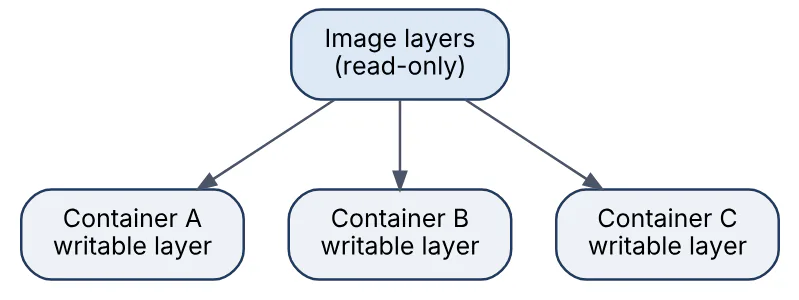
Because layers are shared, running ten containers from the same image costs ten small writable layers, not ten copies of the image. Deleting a container discards its writable layer; deleting an image requires that no container still references it.
04In a real project using Docker, how would you apply, test, or troubleshoot images versus containers?
Apply. In an order-processing service I treat the image as the release artifact: CI builds registry.example.com/orders:1.14.2 once, and every environment runs containers from that exact image with configuration injected at run time. Nothing is installed or patched inside a running container; a fix means a new image and a new container. Persistent data (uploaded invoices, the database) goes on volumes or managed services so containers can be replaced freely.
Test. The pipeline runs docker run --rm orders:1.14.2 pytest to prove the image itself is self-contained, then starts a container with docker compose up and hits /health and a smoke endpoint. Comparing docker image inspect output for the base image digest across builds catches silent base-image drift.
Troubleshoot. A classic symptom is “it works on my machine”: someone edited files inside a running container with docker exec and the change vanished on redeploy. docker diff <container> shows exactly what was changed in the writable layer, which proves the edit never reached the image. The fix is to move the change into the Dockerfile and rebuild. Disk growth from stopped containers and dangling images is diagnosed with docker system df and cleaned with docker system prune.
The important consideration is to never docker commit a running container into an image for production; it produces an unreproducible artifact that no one can rebuild.
05Explain Dockerfile layers in the context of Docker.
Each instruction in a Dockerfile that changes the filesystem (FROM, RUN, COPY, ADD) produces a new read-only layer containing only the difference from the layer below. Metadata instructions such as ENV, WORKDIR, EXPOSE, CMD and LABEL modify the image config but do not add filesystem content.
The final image is the ordered stack of these layers, unioned by the storage driver (overlay2 on modern Linux) into a single root filesystem.
Layers matter for three reasons:
- Caching. BuildKit reuses a layer if the instruction and its inputs are unchanged, so layer order controls rebuild speed.
- Size. A file deleted in a later layer still exists in the earlier one.
RUN apt-get install ... && rm -rf /var/lib/apt/lists/*in one instruction keeps the cleanup in the same layer; split across twoRUNlines it saves nothing. - Sharing. Images built from the same base share those base layers on disk and in the registry, so pushes and pulls move only new layers.
FROM python:3.12-slim              # base layers
WORKDIR /app                       # metadata only
COPY requirements.txt .            # layer 1
RUN pip install --no-cache-dir -r requirements.txt   # layer 2
COPY . .                           # layer 3
CMD ["python", "-m", "orders"]     # metadata only
docker history orders:dev lists each layer with its size, which is the quickest way to see where image bulk comes from.
06In a real project using Docker, how would you apply, test, or troubleshoot Dockerfile layers?
Apply. For a Node.js API I order the Dockerfile from least to most volatile: base image, system packages, package.json plus lockfile and npm ci, and only then the source tree. A source change then rebuilds a single small layer instead of reinstalling dependencies. Cleanup is kept inside the same RUN as the install, and build-only tooling is pushed into a separate build stage so it never becomes a runtime layer.
Test. I compare docker image ls sizes before and after each Dockerfile change and keep a budget in CI (fail if the image exceeds, say, 300 MB). docker history --no-trunc confirms that large layers are the expected ones. Running dive against the image shows wasted bytes, files that are added and later removed, which is a direct measure of bad layering.
Troubleshoot. A typical ticket is “image doubled in size after a one-line change”. docker history usually reveals a COPY . . placed before npm ci, so every build now stores a fresh node_modules layer, or a secret file or .git directory was copied in because .dockerignore was missing. Another case is a rm -rf in its own RUN that reports success yet shrinks nothing. The fix in each case is reordering or merging instructions.
The important consideration is that layer count is not the enemy; one giant RUN destroys cacheability, so group commands by how often they change rather than minimising instructions blindly.
07Explain multi-stage builds in the context of Docker.
A multi-stage build uses several FROM instructions in one Dockerfile. Earlier stages compile, test or package the application with all of the tooling they need; the final stage starts from a minimal base and copies in only the produced artifacts with COPY --from=<stage>. The runtime image therefore contains no compilers, package managers, source code or test dependencies, which makes it smaller and gives attackers less to exploit.
FROM golang:1.23 AS build
WORKDIR /src
COPY go.mod go.sum ./
RUN go mod download
COPY . .
RUN CGO_ENABLED=0 go build -o /out/orders ./cmd/orders

FROM gcr.io/distroless/static-debian12:nonroot
COPY --from=build /out/orders /orders
USER nonroot
ENTRYPOINT ["/orders"]
The flow is a pipeline of stages where only the last one becomes the tagged image.

Stages can be named and targeted individually with docker build --target build, and BuildKit skips any stage the target does not depend on.
08In a real project using Docker, how would you apply, test, or troubleshoot multi-stage builds?
Apply. For a Java payments service I use three stages: a maven stage that resolves dependencies and compiles, a test stage derived from it that runs the unit suite, and a runtime stage based on eclipse-temurin:21-jre that receives only the fat JAR. The same Dockerfile also carries a dev stage with debugging tools, which developers select with docker build --target dev. Shared stages mean one source of truth for the base image and JDK version.
Test. CI builds --target test first so a failing test stops the pipeline before any runtime image exists. For the final image I run it with --read-only plus a smoke request, and I assert in a script that docker run --rm payments:ci which mvn fails, proving build tooling was not leaked. Image size is tracked per commit.
Troubleshoot. The usual failure is COPY --from=build complaining that a path does not exist because the artifact was written to a different WORKDIR than expected; docker build --target build followed by docker run --rm -it <id> ls /src/target locates the real path. Another is a binary that works in the build stage but dies with “no such file” in scratch or distroless, which signals dynamic linking; CGO_ENABLED=0 or a glibc-based base resolves it. Missing CA certificates and timezone data in minimal bases cause TLS and date failures that are fixed by copying /etc/ssl/certs from the build stage.
The important consideration is that stages run in parallel under BuildKit only when they are independent, so keep the test stage from blocking the runtime stage unnecessarily.
09Explain COPY versus ADD in the context of Docker.
Both instructions place files from the build context into the image, but COPY does exactly that and nothing else, whereas ADD has two additional behaviours: it fetches remote URLs, and it automatically extracts local tar archives (gzip, bzip2, xz) into the destination. Docker’s own documentation recommends COPY unless one of those extras is specifically needed, because ADD ’s implicit behaviour is surprising and harder to audit.
| Aspect | COPY | ADD |
|---|---|---|
| Local files and directories | Yes | Yes |
| Auto-extract local tar archives | No | Yes |
| Fetch remote URL | No | Yes, but no decompression, no checksum by default |
--from=<stage> for multi-stage | Yes | No (use COPY) |
| Recommended default | Yes | Only for tar extraction |
COPY --chown=app:app src/ /app/src/
ADD vendor/libs.tar.gz /opt/libs/      # extracted automatically
  # Prefer this over ADD for downloads:
RUN curl -fsSL https://example.com/tool.tgz | tar -xz -C /opt
Both support --chown, and with BuildKit --chmod and --link (--exclude exists only in the labs Dockerfile frontend). For remote files, RUN curl or ADD --checksum=sha256:... (BuildKit) is safer than a bare ADD <url>, because the cached layer can be verified and cleaned up in the same step.
10In a real project using Docker, how would you apply, test, or troubleshoot COPY versus ADD?
Apply. In a data-platform repository I standardise on COPY everywhere and gate it with a lint rule (hadolint DL3020 flags ADD used for plain files). The one sanctioned ADD is unpacking a vendored .tar.gz of a proprietary JDBC driver straight into /opt/drivers, where its auto-extraction saves a RUN tar step and an intermediate copy. Downloads go through RUN curl -fsSL ... | tar xz with a pinned checksum so the layer is reproducible.
Test. A CI stage runs hadolint on every Dockerfile and fails the build on ADD outside the whitelisted path. After building, a script runs docker run --rm image ls -la /opt/drivers to confirm extraction produced the expected files with the expected ownership, since --chown on ADD applies to the extracted entries.
Troubleshoot. The most common surprise is ADD archive.tar.gz /dest leaving the original tarball in the image rather than extracting it; that happens when the file is actually a remote URL or not a recognised compression format, and docker run --rm image file /dest/archive.tar.gz reveals which. The opposite surprise is someone using ADD to copy a tarball that they wanted kept intact, and finding it exploded into the directory; switching to COPY fixes it. Cache misses on ADD <url> happen because BuildKit re-checks the remote on each build.
The important consideration is that whichever instruction is used, the source must sit inside the build context, so a path outside the Dockerfile’s directory fails for both.
11Explain RUN CMD ENTRYPOINT in the context of Docker.
RUN executes at build time and bakes the result into a layer; CMD and ENTRYPOINT are metadata that define what runs when a container starts. The two run-time instructions combine: ENTRYPOINT is the fixed executable, CMD supplies default arguments that docker run image <args> can override.
| Instruction | When it runs | Purpose | Overridden by |
|---|---|---|---|
| RUN | Build time | Install packages, compile, create users | Nothing; it is part of the image |
| CMD | Container start | Default command or default args | Arguments after image name |
| ENTRYPOINT | Container start | Fixed executable the container is “for” | docker run --entrypoint |
Each accepts two forms. The exec form ["executable", "arg"] runs the process directly, so it becomes PID 1 and receives signals. The shell form executable arg is wrapped in /bin/sh -c, which allows variable expansion but puts a shell at PID 1.
RUN useradd -r app
ENTRYPOINT ["python", "-m", "orders"]
CMD ["--port", "8080"]
docker run orders starts python -m orders --port 8080; docker run orders --port 9000 replaces only the CMD portion. If only CMD ["python", "-m", "orders"] is given, the whole command can be swapped, which is what docker run orders bash relies on.
12In a real project using Docker, how would you apply, test, or troubleshoot RUN CMD ENTRYPOINT?
Apply. For a CLI-style migration tool shipped alongside a Django service I use ENTRYPOINT ["python", "manage.py"] with CMD ["runserver", "0.0.0.0:8000"], so the same image runs the web server by default and docker run app migrate or docker run app shell for operations. When startup needs logic (wait for the database, template a config file) I write a small entrypoint.sh that ends with exec "$@", which hands PID 1 to the real process. All RUN steps that install packages are collapsed with cache cleanup and use --no-install-recommends.
Test. An integration test matrix runs the image with no arguments, with --help, and with an override, asserting on exit codes and output. docker inspect --format '{{json .Config.Entrypoint}} {{json .Config.Cmd}}' is checked in CI against the expected JSON so a shell-form regression is caught. A stop-time test measures docker stop duration; anything near ten seconds means the process is not receiving SIGTERM.
Troubleshoot. Containers that take exactly 10 seconds to stop are almost always shell-form CMD python app.py, where sh holds PID 1 and ignores the signal; switching to exec form or exec in the script fixes it. “Executable file not found” after adding a CMD usually means the exec form was written with a single string, and $VAR appearing literally in the command means exec form without a shell, which needs ["sh", "-c", "..."].
The important consideration is that ENTRYPOINT overrides require --entrypoint, which operators often forget, so prefer CMD alone for images meant to be used as general-purpose tools.
13Explain build cache optimization in the context of Docker.
BuildKit caches each layer by hashing the instruction plus its inputs (file contents for COPY / ADD, the command string for RUN) and the parent layer. Once one instruction misses, every following instruction is rebuilt, so optimisation means arranging the Dockerfile so that expensive, rarely changing steps come first and volatile steps come last.
Techniques that matter most:
- Order by volatility. Copy dependency manifests and install before copying source.
- Narrow COPY inputs.
COPY package*.json ./instead ofCOPY . .keeps the install layer stable;.dockerignoreexcludes files that would otherwise bust the cache. - Cache mounts.
RUN --mount=type=cache,target=/root/.npm npm cikeeps the package manager’s download cache across builds without storing it in a layer. - Remote cache.
docker buildx build --cache-to type=registry,ref=...,mode=max --cache-from type=registry,ref=...lets ephemeral CI runners reuse layers from the registry;type=ghadoes the same on GitHub Actions. - Stable base tags. Pin
node:22.11-slimrather thannode:latest, otherwise a base update silently invalidates everything.
FROM node:22-slim
WORKDIR /app
COPY package.json package-lock.json ./
RUN --mount=type=cache,target=/root/.npm npm ci --omit=dev
COPY . .
CMD ["node", "server.js"]
With this layout, editing a source file triggers only the final COPY, and even a lockfile change downloads nothing that the cache mount already holds. docker build --no-cache forces a full rebuild when a cached layer is suspected of being stale.
14In a real project using Docker, how would you apply, test, or troubleshoot build cache optimization?
Apply. In a monorepo with a Python API built on every pull request, I split the Dockerfile so pyproject.toml and the lockfile are copied and installed before the source tree, use RUN --mount=type=cache,target=/root/.cache/pip, and export the layer cache to the registry with --cache-to type=registry,mode=max. Each PR build pulls that cache first, so a typical build drops from several minutes to under a minute even on a fresh runner. Base images are pinned to a minor tag and bumped by Renovate so cache invalidation is deliberate.
Test. The pipeline records build duration and the count of CACHED lines in the BuildKit output; a sudden drop in cache hits on a PR that only touched source is flagged. Locally, docker build --progress=plain shows exactly which step missed. A weekly job builds with --no-cache to prove the Dockerfile still works from scratch and that no step depends on stale cached content.
Troubleshoot. When every build misses from the dependency step onward, the usual cause is a file that changes on each commit (a generated version.txt, .git) landing in a COPY that precedes the install; docker build --progress=plain plus a glance at .dockerignore locates it. A stale cache that hides a broken install (an apt-get update cached months ago) is fixed by combining update and install in one RUN. Cache mounts that appear to do nothing in CI are usually caused by a runner that discards the BuildKit state between jobs, so the registry cache is the real fix.
The important consideration is that mode=max cache exports can be large, so prune old cache refs or the registry fills up.
15Explain image tagging and digests in the context of Docker.
A tag is a mutable, human-readable pointer such as orders:1.14.2 or nginx:latest; a digest is the immutable SHA-256 hash of the image manifest, written nginx@sha256:3c4b.... The same tag can be repointed to a different image at any time, while a digest identifies exactly one manifest forever. Pulling by digest therefore guarantees you get the bytes you tested; pulling by tag gets whatever the publisher most recently pushed under that name.
| Aspect | Tag | Digest |
|---|---|---|
| Mutability | Can be moved to another image | Immutable, content-addressed |
| Readability | Semantic, e.g. 3.12-slim | Opaque 64-hex string |
| Typical use | Humans, release names, floating latest | Deployment manifests, supply-chain verification |
| Failure mode | Silent change underneath you | Must be bumped explicitly to update |
docker pull python:3.12-slim
docker inspect --format '{{index .RepoDigests 0}}' python:3.12-slim
  # python@sha256:9c1c...f3a2
docker pull python@sha256:9c1c...f3a2   # always this exact image
Multi-architecture images add a subtlety: the tag resolves to a manifest list whose digest differs from the per-platform image digests, so docker buildx imagetools inspect is the right tool to see the full tree. latest is just a conventional tag name; nothing updates it automatically, and omitting a tag simply means latest.
16In a real project using Docker, how would you apply, test, or troubleshoot image tagging and digests?
Apply. For a checkout service I push three tags per CI build: the Git SHA (orders:sha-8f3a2c1), the semantic version on release (orders:1.14.2), and a moving orders:main for convenience. Kubernetes manifests and Compose files in production reference the image by digest, written in by the deployment job after the push, so a rollback is a one-line revert of the digest. Base images in Dockerfiles are pinned as FROM python:3.12-slim@sha256:... and bumped by an automated dependency bot.
Test. A post-push step runs docker buildx imagetools inspect registry/orders:1.14.2 and asserts that the digest matches the one the build produced and that both linux/amd64 and linux/arm64 manifests are present. A deployment smoke test reads docker inspect --format '{{.Image}}' from the running container and compares it against the deployed digest to confirm no tag drift.
Troubleshoot. The classic incident is “nothing changed but production behaves differently”: a floating tag such as postgres:16 was moved by the publisher and a node pulled the new image after a restart. docker image inspect on each host shows differing digests for the same tag; pinning by digest resolves it. The opposite problem is docker pull returning “image up to date” while the registry has a new build, which means the tag was re-pushed and the local cache still holds the old content; docker pull --quiet or a remove-and-pull refreshes it.
The important consideration is that digests pin a manifest, not a build process, so reproducibility still depends on how that image was built.
17Explain volumes and bind mounts in the context of Docker.
Both attach host storage into a container’s filesystem so data outlives the container’s writable layer, but they differ in who manages the location. A volume is created and managed by Docker under /var/lib/docker/volumes/ (or by a volume plugin backed by NFS, cloud disks and so on); a bind mount maps an arbitrary host path chosen by the user. A third option, tmpfs, keeps data in memory only.
| Aspect | Volume | Bind mount |
|---|---|---|
| Location | Docker-managed, path abstracted | Any host directory or file |
| Portability | Works the same on any host or plugin | Depends on host layout |
| Initial content | Populated from image if empty | Host content hides image content |
| Typical use | Database data, uploads | Live source code in development, host config |
docker volume create pgdata
docker run -d --name db -v pgdata:/var/lib/postgresql/data postgres:16
  # bind mount for local development, read-only config file
docker run --rm -v "$PWD/src:/app/src" \
  --mount type=bind,src=./nginx.conf,dst=/etc/nginx/nginx.conf,ro nginx
The --mount syntax is more explicit than -v and is the recommended form; it also fails loudly if a bind source does not exist, whereas -v silently creates an empty directory. Volumes are the correct choice for production data because backups, drivers and permissions are handled consistently; bind mounts are for development loops and injecting host files.
18In a real project using Docker, how would you apply, test, or troubleshoot volumes and bind mounts?
Apply. In a Compose stack for a reporting application I give PostgreSQL a named volume pgdata, give the API a bind mount of ./api/src only in the compose.override.yaml used on developer machines, and mount TLS certificates read-only from a host path owned by the deployment tooling. Uploaded report files go to an NFS-backed volume created with docker volume create --driver local --opt type=nfs ... so any node in the small Swarm can serve them.
Test. A test script stops and removes the database container, starts a fresh one against the same volume, and asserts a known row is still present. For the bind mount, the test edits a source file on the host and checks the hot-reloading API serves the change within a few seconds. Backups are rehearsed by docker run --rm -v pgdata:/data -v "$PWD:/backup" alpine tar czf /backup/pgdata.tgz /data and a restore into a throwaway volume.
Troubleshoot. The most frequent failure is permission denied on a bind mount: the container process runs as UID 999 while the host directory is owned by UID 1000. docker exec db id and ls -ln on the host reveal the mismatch; fixing ownership or running with --user resolves it. An empty directory appearing where source code should be means the -v path was wrong (often relative) and Docker created it. On Docker Desktop, slow file watchers in bind-mounted source trees are mitigated with docker compose watch or by moving node_modules to a named volume.
The important consideration is that docker compose down -v deletes named volumes, so the flag must never appear in a production runbook.
19Explain container networking in the context of Docker.
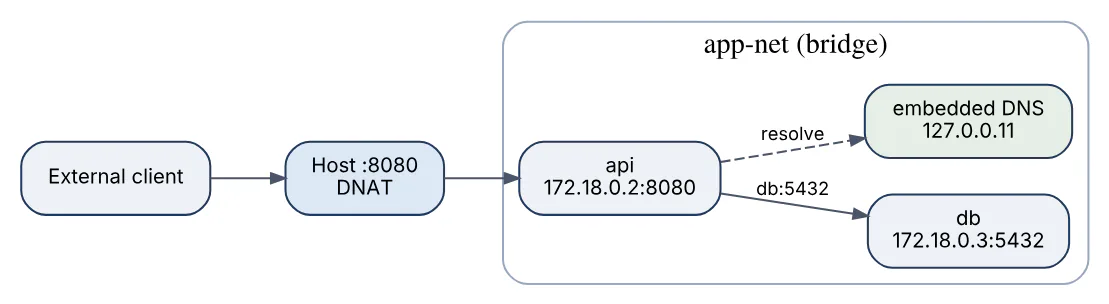
Each container gets its own network namespace with its own interfaces, IP address, routing table and ports. Docker connects that namespace to one or more networks using drivers; the default bridge driver creates a virtual switch (docker0) on the host, attaches each container with a veth pair, and NATs outbound traffic through the host’s IP. Ports are only reachable from outside the host when published with -p host:container, which installs iptables/nftables DNAT rules.
Key behaviours:
- Containers on the same user-defined network resolve each other by container or service name through Docker’s embedded DNS server at
127.0.0.11. The defaultbridgenetwork lacks that DNS, which is why user-defined networks are recommended. - Containers on different networks cannot talk unless one is attached to both.
EXPOSEin a Dockerfile is documentation; only-por--publishopens a port on the host.- Containers can reach the host via
host.docker.internalon Docker Desktop, or on Linux with--add-host host.docker.internal:host-gateway.
docker network create app-net
docker run -d --name api --network app-net -p 8080:8080 orders:1.14.2
docker run -d --name db --network app-net postgres:16
docker exec api getent hosts db     # 172.18.0.3  db
The API reaches the database as db:5432 without any published port, while only 8080 is exposed to the outside world, as the diagram shows.
20In a real project using Docker, how would you apply, test, or troubleshoot container networking?
Apply. In a Compose-based e-commerce stack I define two networks: frontend, which the reverse proxy and web app share, and backend, which the web app, worker, Redis and PostgreSQL share. Only the proxy publishes ports 80 and 443. The database is therefore unreachable from the proxy or the internet by construction, not by firewall rules. Service names from compose.yaml are the hostnames in application config, so DATABASE_HOST=db works identically in dev and staging.
Test. A connectivity test container runs nc -zv db 5432 from the backend network (expect success) and from frontend (expect failure). docker network inspect backend is asserted to list exactly the expected containers. A port-publishing test from the host confirms curl localhost:443 works while curl localhost:5432 is refused.
Troubleshoot. “Connection refused” between containers is usually the application binding to 127.0.0.1 inside the container instead of 0.0.0.0; docker exec api ss -ltn shows the bound address. “Name not resolved” nearly always means the containers are on the default bridge or on different networks; docker inspect --format '{{json .NetworkSettings.Networks}}' confirms. For deeper packet-level issues I attach nicolaka/netshoot with --network container:api and run tcpdump or dig inside the target’s namespace. Published ports that work on the host but not from other machines point at a host firewall or at Docker binding to 127.0.0.1 because of the daemon’s ip setting.
The important consideration is that Docker’s published-port rules bypass UFW-style host firewalls on Linux, so exposure must be reviewed explicitly.
21Explain bridge host overlay networks in the context of Docker.
These are three network drivers that trade isolation against reach. bridge is the single-host default: containers get private IPs on a virtual switch and talk to the outside through NAT and published ports. host removes the network namespace entirely, so the container shares the host’s interfaces and ports; there is no NAT, no port mapping and no isolation. overlay spans multiple Docker hosts by encapsulating container traffic in VXLAN tunnels, letting containers on different machines share one flat network; it is the driver used by Swarm services and can be enabled for standalone containers with --attachable.
| Driver | Scope | Isolation | Typical use |
|---|---|---|---|
| bridge | Single host | Own namespace, NAT, published ports | Default for apps and Compose stacks |
| host | Single host | None, shares host stack | High-throughput proxies, monitoring agents |
| overlay | Multi-host (Swarm) | Own namespace, VXLAN encrypted optionally | Service-to-service traffic across nodes |
The topology below contrasts the three.
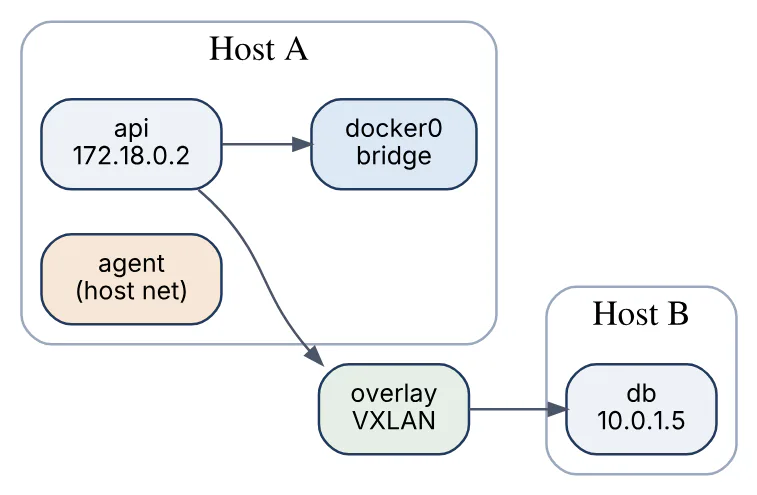
Other drivers exist (macvlan, ipvlan, none), but these three cover most interview questions. host mode is Linux-only in the full sense; on Docker Desktop it behaves differently because the daemon runs in a VM.
22In a real project using Docker, how would you apply, test, or troubleshoot bridge host overlay networks?
Apply. On a three-node Swarm running a ticketing platform, application services sit on an encrypted overlay network created with docker network create -d overlay --opt encrypted --attachable tickets-net, so the API on node 1 reaches PostgreSQL on node 3 by service name. A Prometheus node-exporter runs with --network host on every node because it needs the real host interfaces and avoids NAT overhead. Everything else, including local Compose development, stays on user-defined bridge networks.
Test. After deployment I run docker service ls and then docker run --rm --network tickets-net nicolaka/netshoot dig tasks.api to confirm DNS returns one A record per replica. A throughput test with iperf3 between two overlay containers on different nodes establishes a baseline so later regressions are measurable. For the host-mode exporter I check ss -ltnp on the host shows the process bound to 9100 directly.
Troubleshoot. Overlay traffic that works on one node pair and fails on another is almost always a firewall blocking UDP 4789 (VXLAN) or TCP/UDP 7946 (gossip) between the hosts; docker network inspect --verbose plus tcpdump udp port 4789 confirms. MTU mismatches produce the symptom “small requests succeed, large ones hang”; lowering the overlay MTU with --opt com.docker.network.driver.mtu=1400 fixes it. A host network container failing with “address already in use” is competing with a host process for the same port, since there is no mapping layer.
The important consideration is that host networking disables Docker’s port isolation entirely, so a vulnerable service in such a container is exposed exactly as if it ran natively.
23Explain Docker Compose in the context of Docker.
Docker Compose is the tool for defining and running a multi-container application from a single YAML file, conventionally compose.yaml. It declares services (each built from an image or Dockerfile), the networks that connect them, the volumes they persist to, and configuration such as environment variables, ports, dependencies and health checks. One command, docker compose up, creates everything in dependency order; docker compose down removes it.
Compose v2 is a Go plugin invoked as docker compose (with a space) and ships with Docker Desktop and Docker Engine. The older Python docker-compose v1 is end-of-life. The top-level version: key is obsolete and ignored under the Compose Specification, so modern files omit it.
services:
  api:
    build: ./api
    ports: ["8080:8080"]
    environment:
      DATABASE_URL: postgres://app:app@db:5432/orders
    depends_on:
      db:
        condition: service_healthy
  db:
    image: postgres:16
    volumes: [pgdata:/var/lib/postgresql/data]
    healthcheck:
      test: ["CMD-SHELL", "pg_isready -U app"]
      interval: 5s
volumes:
  pgdata:
Compose creates a default network for the project, so api reaches the database as db. It is designed for a single host (development, CI, small deployments); multi-node orchestration is the domain of Swarm or Kubernetes, though the same file can seed a Swarm stack with docker stack deploy.
24In a real project using Docker, how would you apply, test, or troubleshoot Docker Compose?
Apply. For an inventory system with an API, a worker, PostgreSQL, Redis and a mail stub, compose.yaml holds the production-like definition and compose.override.yaml (loaded automatically) adds bind mounts, debug ports and develop.watch rules for local work. CI uses docker compose -f compose.yaml -f compose.ci.yaml up --wait so the pipeline waits until health checks pass before running integration tests. Shared configuration such as logging options lives in a YAML anchor to avoid repetition, and profiles (--profile tools) switch optional services like pgAdmin on and off.
Test. docker compose config is run in CI to validate the merged file and catch indentation or interpolation errors early. Integration tests run with docker compose run --rm api pytest tests/integration, then docker compose down -v cleans up. A dedicated smoke job starts the stack from a clean checkout to prove no undocumented host state is required.
Troubleshoot. A service that starts “before” its database despite depends_on is missing condition: service_healthy; docker compose ps shows the health column and docker compose logs -f db shows when readiness was actually reached. Port conflicts (bind: address already in use) are found with ss -ltnp on the host. Stale images after a Dockerfile change are a docker compose up --build omission. When environment interpolation yields empty values, docker compose config prints the resolved result and shows which .env variable was missing.
The important consideration is that Compose does not reschedule containers on another machine if a host dies, so it is not a substitute for an orchestrator in production.
25Explain environment variables and secrets in the context of Docker.
Environment variables are the standard way to pass runtime configuration into a container: database hosts, feature flags, log levels. They are set with ENV in the Dockerfile (baked into the image), -e or --env-file on docker run, or environment: and env_file: in Compose, with run-time values overriding image defaults. The weakness is visibility: anything in the environment appears in docker inspect, in /proc/<pid>/environ, in child processes and often in crash logs, so it is unsuitable for passwords, API keys and private keys.
Secrets are handled differently. At build time, RUN --mount=type=secret,id=npmrc exposes a file only for that instruction and never writes it to a layer. At run time, Compose and Swarm secrets: mount each value as a file under /run/secrets/<name>, held in memory, readable only by the container’s user and absent from docker inspect.
services:
  api:
    image: orders:1.14.2
    environment:
      LOG_LEVEL: info
      DB_PASSWORD_FILE: /run/secrets/db_password
    secrets: [db_password]
secrets:
  db_password:
    file: ./secrets/db_password.txt
The application reads the password from the file path rather than from $DB_PASSWORD. Anything that must never leak belongs in a secrets mechanism or an external vault, never in ENV, ARG or image layers.
26In a real project using Docker, how would you apply, test, or troubleshoot environment variables and secrets?
Apply. In a payments gateway I separate three classes of configuration. Non-sensitive values (PORT, LOG_FORMAT, REGION) are ENV defaults in the image, overridden per environment with Compose env_file. Sensitive values are delivered as files: in Compose through secrets:, in Kubernetes through mounted Secret volumes, and the application supports a *_FILE convention for every credential. Build-time credentials for a private package registry use RUN --mount=type=secret,id=pip_conf with docker build --secret id=pip_conf,src=$HOME/.config/pip/pip.conf.
Test. CI runs docker history --no-trunc and docker run --rm image env on the final image and fails if any value matches a secret pattern. Another check greps docker inspect of the running container for the known test credential to prove it is not in the environment. Startup tests cover a missing secret file, asserting the service exits with a clear message instead of starting half-configured.
Troubleshoot. A leaked password in the image history is the common incident: someone wrote ARG DB_PASSWORD and used it in a RUN, which records the value in layer metadata. The remediation is rotating the credential and rebuilding with a secret mount, since the layer cannot be scrubbed. Empty variables at runtime trace back to a .env file not being in the Compose project directory, which docker compose config reveals. Secrets that are unreadable inside the container are usually a USER mismatch, fixed with the uid / mode options on the secret definition.
The important consideration is that ARG values are visible via docker history even if they are not ENV, so they are not a secrets mechanism either.
27Explain container resource limits in the context of Docker.
Resource limits use Linux cgroups to cap how much CPU, memory and I/O a container may consume, so one misbehaving process cannot starve the host or its neighbours. Without limits a container can use every core and all RAM on the machine.
The main controls:
--memory=512msets a hard memory ceiling; exceeding it triggers the kernel OOM killer inside the container, which exits with code 137.--memory-swapcontrols swap on top of that, and--memory-reservationis a soft limit used under contention.--cpus=1.5caps CPU time to one and a half cores using CFS quota and period;--cpu-sharessets relative weight that only matters when cores are contended;--cpuset-cpus=0,1pins to specific cores.--pids-limit=200prevents fork bombs.--device-read-bpsand related flags throttle block I/O.
docker run -d --name worker --memory=512m --memory-swap=512m \
  --cpus=1 --pids-limit=256 orders-worker:1.14.2
docker stats worker --no-stream
  # NAME    CPU %  MEM USAGE / LIMIT   MEM %   PIDS
  # worker  42.1%  310MiB / 512MiB     60.5%   18
In Compose the same settings live under deploy.resources.limits and reservations, which Compose v2 honours for standalone use as well as Swarm. Runtimes such as the JVM and .NET read cgroup limits and size their heaps accordingly, which is one reason to set memory limits even on a dedicated host.
28In a real project using Docker, how would you apply, test, or troubleshoot container resource limits?
Apply. For a batch image-processing worker that shares a host with a latency-sensitive API, I give the worker --cpus=2 --memory=2g --memory-swap=2g and the API --cpus=1 --memory=768m with a reservations entry so the scheduler guarantees its baseline. The JVM-based API gets -XX:MaxRAMPercentage=75 so the heap is derived from the cgroup limit instead of host RAM. Limits are expressed in Compose under deploy.resources so the same numbers follow the service into Swarm.
Test. A load test with k6 runs against the API while the worker is deliberately saturated, and p99 latency must stay within budget; docker stats during the run confirms the worker is throttled rather than the API. A memory test allocates past the limit on purpose and asserts the container exits 137 and is restarted by the restart: on-failure policy. Throttling is read from /sys/fs/cgroup/cpu.stat (nr_throttled) inside the container.
Troubleshoot. Exit code 137 with OOMKilled: true in docker inspect means the limit is too low or the application leaks; a heap dump or docker stats trend distinguishes the two. High nr_throttled with low average CPU points to a bursty workload hitting the CFS quota, where raising --cpus or switching to --cpu-shares helps. Memory limits that appear to be ignored are usually a cgroup v1 host without swap accounting enabled, or a Compose file whose deploy block was not applied because an older Compose was in use.
The important consideration is that a memory limit is a hard ceiling with no graceful warning, so the application must have headroom for garbage-collection spikes or it will be killed at peak load.
29Explain Docker logs and inspect in the context of Docker.
docker logs returns what the container’s main process wrote to stdout and stderr; docker inspect returns the complete JSON description of a container, image, network or volume. Together they are the first two commands in almost any container investigation.
Logging works because Docker captures the PID 1 process’s standard streams through a logging driver. The default json-file driver stores them under /var/lib/docker/containers/<id>/ and should be bounded with --log-opt max-size=10m --log-opt max-file=3 or the disk fills. Other drivers (local, journald, fluentd, awslogs, gelf) ship logs elsewhere; with some of them docker logs is unavailable unless dual logging is enabled. Applications that write to files inside the container produce nothing for docker logs.
docker logs --since 10m --timestamps -f api
docker inspect --format '{{.State.Status}} {{.State.ExitCode}} \
  {{.State.OOMKilled}} {{.RestartCount}}' api
  # exited 137 true 4
docker inspect --format '{{json .Mounts}}' api | jq
docker inspect \
  --format '{{range .NetworkSettings.Networks}}{{.IPAddress}}{{end}}' api
The --format flag takes a Go template, which is the practical way to extract a single field rather than reading a 300-line document. docker inspect also reveals the effective Entrypoint, Cmd, Env, HostConfig limits, health-check state and the exact image digest a container was started from, which answers most “why is it configured like this” questions.
30In a real project using Docker, how would you apply, test, or troubleshoot Docker logs and inspect?
Apply. In a logistics platform I configure the daemon’s /etc/docker/daemon.json with the local driver and rotation (max-size, max-file) so every container is bounded by default, and applications are required to log structured JSON to stdout so docker logs api | jq 'select(.level=="error")' works without extra tooling. For centralisation a Fluent Bit container tails the daemon’s log directory and ships to OpenSearch, keeping docker logs functional for on-host debugging. Runbooks contain docker inspect one-liners for the fields on-call engineers need most: exit code, OOM flag, restart count, health log, mounts.
Test. A CI check starts each service image and asserts that docker logs produces at least one JSON line within five seconds, which catches images that log only to files. The log-rotation setting is verified by inspecting HostConfig.LogConfig on a running container. A deliberate crash test confirms docker inspect reports the expected exit code and that the final stderr lines are present in docker logs.
Troubleshoot. A silent container (docker logs empty) is usually an app writing to /var/log/app.log; the fix is symlinking that path to /dev/stdout or reconfiguring the logger. Logs that stop mid-stream while the container runs point to a logging driver that blocks when its backend is down, which mode: non-blocking with a buffer avoids. Disk alerts on a host often trace to one chatty container with an unbounded json-file, found with du -sh /var/lib/docker/containers/*.
The important consideration is that docker logs only reflects PID 1’s streams, so processes started by a shell wrapper or a supervisor need their output forwarded explicitly.
31Explain health checks in the context of Docker.
A health check is a command Docker runs inside the container at a fixed interval to decide whether the application is actually working, as opposed to merely having a running process. The result is one of starting, healthy or unhealthy, visible in docker ps and docker inspect, and it drives behaviour elsewhere: Compose depends_on with condition: service_healthy waits for it, Swarm restarts or reroutes unhealthy tasks, and load balancers can read the state.
The check is declared with HEALTHCHECK in a Dockerfile or healthcheck: in Compose. Options are --interval, --timeout, --retries (consecutive failures before unhealthy) and --start-period, during which failures do not count, plus --start-interval for faster probing during startup (Docker Engine 25+). The command must exit 0 for healthy and 1 for unhealthy.
HEALTHCHECK --interval=15s --timeout=3s --start-period=20s --retries=3 \
  CMD curl -fsS http://localhost:8080/health || exit 1
The state machine below shows how probe results move a container between states.

Minimal images often lack curl; a small wget -qO-, a built-in /health subcommand in the binary, or pg_isready for PostgreSQL avoids adding packages. A good endpoint checks real dependencies lightly (a database ping) but must not cascade failures across the system by marking a service unhealthy because an optional downstream is slow.
32In a real project using Docker, how would you apply, test, or troubleshoot health checks?
Apply. For an order API I expose /health/live (process is up) and /health/ready (database reachable, migrations applied) and point the Docker health check at readiness with a generous start_period to cover migrations. Dependent services in Compose use condition: service_healthy, which replaced the shell-script “wait-for-it” loops we had before. The database service gets pg_isready as its check. In the final distroless image the binary exposes a healthcheck subcommand so no HTTP client needs installing.
Test. CI runs docker compose up --wait and the command’s exit status alone tells whether every service became healthy within the timeout. An integration test stops the database and asserts the API flips to unhealthy within interval * retries, then recovers after the database returns. docker inspect --format '{{json .State.Health}}' is captured in the test output so failures show the last probe’s stdout.
Troubleshoot. A container stuck in starting forever usually has a check that never exits 0 because the service listens on a different port, or curl is missing and the command fails with 127; the health log in docker inspect shows the exact output. Flapping between healthy and unhealthy under load means the timeout is too tight for a check that hits the database; relaxing it or probing a lighter endpoint resolves it. A health check that prevents a stack from ever starting is often a circular dependency where two services each wait on the other.
The important consideration is that a health check that performs expensive work every few seconds becomes a self-inflicted load problem, so keep probes cheap.
33Explain rootless containers and least privilege in the context of Docker.
Two separate ideas are often combined under this heading. Running the process inside a container as a non-root user (USER app in the Dockerfile) means that if the application is compromised, the attacker lacks root inside the container and, in combination with user namespaces, maps to an unprivileged UID on the host. Rootless mode goes further: the Docker daemon itself runs as an ordinary user, so even a container-escape bug lands in an unprivileged account rather than root on the host.
Least privilege in practice:
USERdirective and--userflag; create a dedicated UID rather than reusingnobody.- Drop Linux capabilities:
--cap-drop=ALL --cap-add=NET_BIND_SERVICEwhen a service needs port 80. --security-opt no-new-privilegesblocks setuid escalation.--read-onlyroot filesystem with--tmpfs /tmpfor scratch space.- Avoid
--privilegedand mounting/var/run/docker.sock, both of which equal root on the host.
FROM node:22-slim
RUN groupadd -r app && useradd -r -g app -d /app app
WORKDIR /app
COPY --chown=app:app . .
USER app
EXPOSE 8080
CMD ["node", "server.js"]
Rootless Docker is installed with dockerd-rootless-setuptool.sh install and uses slirp4netns or pasta for networking; it cannot bind ports below 1024 without configuration and does not support some storage drivers, which is the trade-off for a much smaller blast radius.
34In a real project using Docker, how would you apply, test, or troubleshoot rootless containers and least privilege?
Apply. On shared CI runners that build untrusted pull-request code, I run Docker in rootless mode so a malicious build cannot take over the host. In application images, every service runs as a fixed UID (10001) declared with USER, starts with cap_drop: [ALL], security_opt: [no-new-privileges:true] and read_only: true in Compose, and writes only to a tmpfs or a named volume. Services that need port 80 either listen on 8080 behind the proxy or add only NET_BIND_SERVICE.
Test. A policy test runs each image and asserts id -u is not 0, capsh --print shows an empty bounding set, and an attempt to touch /etc/test fails with a read-only filesystem error.
docker scout or Trivy misconfiguration checks fail the build when a Dockerfile lacks USER. On the runner, docker info --format '{{.SecurityOptions}}' must include rootless.
Troubleshoot. EACCES: permission denied on startup after adding USER is almost always a directory created as root in an earlier layer; adding --chown to COPY or a chown in the same RUN fixes it. A service that cannot write its cache under read_only: true needs an explicit tmpfs mount for that path. In rootless mode, “cannot bind to port 443” is expected, so the proxy maps 8443 and the host forwards, or net.ipv4.ip_unprivileged_port_start is lowered. Volume ownership problems in rootless mode come from UID remapping; /etc/subuid shows the mapping and podman unshare -style tooling or docker run --user aligns it.
The important consideration is that --privileged silently reverts every one of these controls, so it must be banned in CI linting rather than left to review.
35Explain image vulnerability scanning in the context of Docker.
Vulnerability scanning inspects an image’s layers, builds an inventory of installed OS packages and application dependencies (a software bill of materials, SBOM), and matches each component’s version against vulnerability databases such as the NVD and distribution security feeds. The output is a list of CVEs with severity, the affected package, and the fixed version if one exists.
Common tooling: Docker Scout (docker scout cves orders:1.14.2, integrated into Docker Desktop and Hub), Trivy, Grype and Snyk Container. All of them run locally or in CI and can emit SARIF or JSON for dashboards. Registries such as Harbor, ECR and GHCR scan on push.
trivy image --severity HIGH,CRITICAL --ignore-unfixed \
  --exit-code 1 registry.example.com/orders:1.14.2
docker scout cves --only-severity critical,high orders:1.14.2
Scanning is only as good as the inventory. Statically compiled binaries, vendored libraries and software installed with curl | sh may be invisible to the scanner unless an SBOM is attached to the image (docker buildx build --sbom=true or --attest type=sbom). Scanners also report many findings that are unfixable or irrelevant to the running process, so results need policy (fail on fixable critical, triage the rest) rather than a blanket zero-CVE rule. Smaller bases such as -slim, Alpine or distroless shrink the attack surface and the finding count simultaneously.
36In a real project using Docker, how would you apply, test, or troubleshoot image vulnerability scanning?
Apply. In a healthcare API pipeline I scan at three points: Trivy in the pull-request build with --exit-code 1 on fixable HIGH and CRITICAL findings, a registry-side scan on push that feeds a dashboard, and a nightly rescan of every image currently deployed, because new CVEs appear against old images. Each build also publishes an SBOM attestation with docker buildx build --sbom=true --provenance=true so auditors can query exactly which library versions shipped. Base images are refreshed weekly by an automated PR so fixes arrive without manual effort.
Test. A known-vulnerable fixture image (an old debian:bullseye tag) is scanned in CI to verify the gate actually fails, which guards against a misconfigured scanner silently passing everything. Suppressions live in a .trivyignore file with an expiry comment, and a test fails when an entry is past its date. The SBOM is validated by checking that a dependency we know is present appears in the output.
Troubleshoot. A sudden wave of failures on an unchanged image means a new CVE was published; the response is to check whether a fixed base tag exists and rebuild, or to suppress with justification when the package is not used at runtime. A scan that reports zero findings on a large image is suspicious and typically indicates a distroless or scratch base without an SBOM, where the scanner cannot see Go or Java dependencies; attaching an SBOM fixes it. Scans timing out in CI are usually database downloads, solved by caching the Trivy DB or running a local mirror.
The important consideration is that scanning finds known vulnerabilities only, so it complements, rather than replaces, minimal images and least-privilege runtime settings.
37Explain registry authentication in the context of Docker.
A registry is the HTTP service that stores and serves images; authentication is how the Docker client proves it may pull from or push to a repository there. The flow follows the OCI distribution specification: the client requests a manifest, receives 401 with a WWW-Authenticate header naming a token service, obtains a short-lived bearer token from that service using stored credentials, and retries with the token.
docker login registry.example.com stores credentials in ~/.docker/config.json. By default they are base64-encoded, not encrypted, so production machines should use a credential helper (docker-credential-osxkeychain, pass, ecr-login, gcr) that keeps secrets in the OS keystore or fetches cloud tokens on demand. For CI, use short-lived or scoped tokens: GitHub GITHUB_TOKEN for GHCR, aws ecr get-login-password, Azure az acr login, or OIDC-based workload identity rather than a long-lived personal password.
echo "$REGISTRY_TOKEN" | docker login ghcr.io -u "$USER" --password-stdin
aws ecr get-login-password --region eu-west-1 | \
  docker login --username AWS --password-stdin \
  123456789012.dkr.ecr.eu-west-1.amazonaws.com
Docker Hub applies pull rate limits to anonymous and free authenticated users, which is a frequent cause of unexpected 429 Too Many Requests in CI. Authenticating, or pulling through a mirror, lifts that limit. Pull secrets are a per-node concern on Swarm (--with-registry-auth) and a per-namespace one on Kubernetes (imagePullSecrets).
38In a real project using Docker, how would you apply, test, or troubleshoot registry authentication?
Apply. For a team deploying to AWS, I avoid stored passwords entirely: CI jobs assume an IAM role via OIDC and use amazon-ecr-credential-helper, configured in ~/.docker/config.json as "credHelpers": {"123456789012.dkr.ecr.eu-west-1.amazonaws.com": "ecr-login"}, so every docker pull and push obtains a fresh twelve-hour token transparently. Developer laptops use the same helper with their SSO profile. Base images from Docker Hub are pulled through an authenticated pull-through cache in ECR to escape rate limits and to keep a copy if upstream disappears. Swarm deployments pass --with-registry-auth so worker nodes receive the credentials.
Test. A CI job pushes a scratch image with a unique tag and pulls it back by digest, confirming push and pull permissions on every pipeline run. A negative test using a read-only role asserts docker push is denied, proving the permission boundary. A scheduled job checks token expiry handling by running a build longer than the token lifetime.
Troubleshoot. denied: requested access to the resource is denied on push with a successful login almost always means the repository name is wrong (missing namespace) or the repository does not exist yet in ECR, which requires creation first. unauthorized: authentication required on pull from a Swarm worker means the manager had credentials but --with-registry-auth was omitted. toomanyrequests from Docker Hub is the rate limit; docker login in the job or pointing the daemon’s registry-mirrors at the cache resolves it. Expired tokens mid-build show as 401 on the final push and are fixed by logging in immediately before the push step.
The important consideration is that credentials in config.json are readable by anyone with file access, so CI runners must scrub the file or use ephemeral containers.
39Explain docker build context and dockerignore in the context of Docker.
The build context is the set of files the client sends to the builder when docker build <path> runs; everything COPY and ADD can see must come from it. With the classic builder the entire directory was tarred and uploaded before the first instruction ran. BuildKit transfers files lazily and only those referenced, but it still scans and hashes the context, and COPY . . still copies everything that is present.
.dockerignore sits at the root of the context and lists patterns to exclude, using Go filepath match syntax with ** and ! negations. Excluding .git, node_modules, build outputs, local .env files and test fixtures achieves three things: faster uploads and cache checks, smaller images when COPY . . is used, and no accidental leakage of secrets or developer artifacts into image layers.
.git
node_modules
dist
*.log
.env*
**/__pycache__
!dist/keep-me.txt
Since Dockerfile syntax 1.x with BuildKit, a Dockerfile-specific ignore file is also honoured: Dockerfile.api.dockerignore applies when building with -f Dockerfile.api, which is useful in monorepos with multiple images. The context can also be a Git URL, a tarball, or - for stdin, and BuildKit’s --build-context name=path adds extra named contexts that COPY --from=name can read. A context of several hundred megabytes with no .dockerignore is one of the most common causes of slow builds.
40In a real project using Docker, how would you apply, test, or troubleshoot docker build context and dockerignore?
Apply. In a monorepo containing a React frontend, a Python API and infrastructure code, each service has its own Dockerfile and a matching Dockerfile.dockerignore so the frontend build never receives Python virtualenvs and the API build never receives node_modules. The root .dockerignore excludes .git, .env*, *.pem, coverage reports and IDE folders by default, and the pattern list is reviewed whenever a new generated directory appears. Shared protobuf definitions are supplied through --build-context proto=./proto rather than by widening the main context.
Test. CI prints the context size by running the build with --progress=plain and parsing the transferring context line; a threshold of 20 MB fails the job if someone commits large fixtures. A secret-leak test builds the image and runs docker run --rm image find / -name '*.pem' -o -name '.env' expecting no output. A lint step checks that .dockerignore exists next to every Dockerfile.
Troubleshoot. A build that sits on “transferring context” for a minute is a missing or ineffective .dockerignore, often because the file is in a subdirectory instead of the context root, or because docker build . was run from the wrong directory. COPY failed: file not found for a file that clearly exists means it was ignored by a pattern or lies outside the context, which docker build --no-cache --progress=plain and a quick git check-ignore -style review of the patterns confirm. Cache misses on every build sometimes trace to a .dockerignore that fails to exclude a timestamped build log.
The important consideration is that .dockerignore does not accept comments on the same line as a pattern and that a trailing slash changes matching, so patterns need to be tested rather than assumed.
41Explain PID 1 and signals in the context of Docker.
The first process started in a container becomes PID 1 inside its PID namespace, and the Linux kernel treats PID 1 specially: it does not receive default signal handlers for SIGTERM and SIGINT (an unhandled signal is simply ignored rather than terminating the process), and it is responsible for reaping orphaned child processes. docker stop sends SIGTERM to PID 1, waits a grace period (10 seconds by default, --stop-timeout or stop_grace_period to change it), then sends SIGKILL.
Two problems follow from this. If the application is started via the shell form (CMD python app.py), /bin/sh is PID 1, forwards no signals, and the application is killed abruptly after the grace period, losing in-flight requests. If the application spawns subprocesses and does not call wait(), the dead children accumulate as zombies because there is no real init to reap them.
The diagram shows how a stop signal travels with and without an init process.
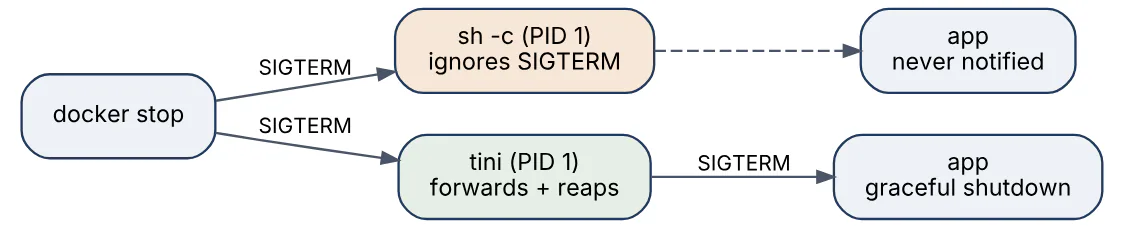
The fixes are to use the exec form so the application is PID 1 and handles SIGTERM itself, and to add a tiny init when child processes are involved: docker run --init injects tini, or Compose init: true, or ENTRYPOINT ["/sbin/tini", "--"] in the Dockerfile.
42In a real project using Docker, how would you apply, test, or troubleshoot PID 1 and signals?
Apply. For a Node.js API behind a load balancer I run the process directly as PID 1 with exec-form CMD ["node", "server.js"] and register a SIGTERM handler that stops accepting connections, drains in-flight requests, closes the database pool and exits. The Compose file sets stop_grace_period: 30s to match the longest expected request. Worker images that shell out to ffmpeg and imagemagick get init: true so orphaned helpers are reaped. Shell entrypoints that must do setup end with exec "$@".
Test. A test starts the container, opens a slow request, runs docker stop and asserts the request completes with 200 while docker inspect --format '{{.State.ExitCode}}' shows 0 rather than 137. Timing the stop command is a cheap signal: anything near the grace period means the signal was swallowed. A zombie test spawns and abandons child processes, then checks ps -eo stat inside the container for lines starting with Z.
Troubleshoot. Containers always taking exactly 10 seconds to stop and exiting 137 point to a shell-form command or a wrapper script without exec; docker exec api ps -o pid,comm showing sh at PID 1 confirms it. Rising process counts and eventual --pids-limit failures with no live work are zombies, fixed with --init. Kubernetes or Swarm rolling updates that drop requests despite a handler are usually a grace period shorter than the drain time, or the application not calling server.close() before the readiness probe flips.
The important consideration is that a SIGTERM handler must also handle SIGINT, otherwise docker run in the foreground with Ctrl-C and docker stop behave differently and the discrepancy confuses local testing.
43Explain persistent state and databases in the context of Docker.
Containers are designed to be ephemeral, so any state that must outlive a container restart or redeploy has to live outside the writable layer. For databases such as PostgreSQL, MySQL or MongoDB this means mounting the data directory on a named volume, ideally backed by a volume driver or a host disk with the performance and durability guarantees the database expects. The container then becomes a disposable process wrapper around durable storage.
The main design decisions:
- Volume, not writable layer.
postgresimages declareVOLUME /var/lib/postgresql/data, so even a forgotten-vcreates an anonymous volume, but anonymous volumes are easily lost ondocker rm -v; always name them. - One writer. Two database containers must never share one data volume; only one can own the files.
- Backups and restores.
pg_dumpviadocker exec, or filesystem snapshots of the volume, scheduled from outside the container. - Managed services where available. In cloud production, RDS, Cloud SQL or equivalent remove the operational burden; containers then hold only the stateless application tier.
The diagram separates the disposable application and database containers from the durable storage they depend on.

Schema migrations run as a separate one-shot container (docker compose run --rm api alembic upgrade head) before the new application version starts, which keeps the application image stateless and the migration auditable.
44In a real project using Docker, how would you apply, test, or troubleshoot persistent state and databases?
Apply. For a self-hosted analytics product shipped to customers as a Compose stack, PostgreSQL runs on a named volume pgdata with restart: unless-stopped, Redis uses a volume for its append-only file, and the application tier is fully stateless. A backup service runs pg_dump on a cron schedule into a second volume that customers mount to their backup location. Upgrades follow a documented order: back up, docker compose pull, run the migration container, then docker compose up -d. Major PostgreSQL version bumps use pg_dumpall and a fresh volume because the on-disk format changes.
Test. A disaster-recovery test in CI creates data, destroys the containers (not the volumes), recreates them and asserts the data is present; a second variant restores from the dump into an empty volume. Upgrade tests run the previous release, load fixtures, then upgrade to the candidate and verify the migration succeeds and queries still return expected results. I also test docker compose down followed by up to confirm no anonymous volume is silently created.
Troubleshoot. “Database is empty after redeploy” is almost always an anonymous volume replaced by a new one or a volume name that changed with the Compose project name; docker volume ls and docker inspect --format '{{json .Mounts}}' db reveal which volume the container actually uses, and the old data is usually still there to reattach. FATAL: database files are incompatible with server is a major-version jump without dump and restore. Corruption after host crashes points at a volume on a filesystem without proper fsync behaviour or at two containers writing the same directory.
The important consideration is that a container restart policy will happily restart a database into a corrupted data directory forever, so monitoring must watch the database’s own health, not the container’s running state.
45Explain troubleshooting crash loops in the context of Docker.
A crash loop is a container that starts, exits almost immediately, and is restarted by its restart policy (always, unless-stopped, on-failure) over and over. docker ps shows Restarting (1) 3 seconds ago and the RestartCount in docker inspect climbs. Docker applies exponential back-off between restarts, so the loop slows down but never stops on its own.
The diagnostic sequence is always the same:
docker logs --tail 100 <name>reads the last words of the previous attempt; most loops print the real error here (missing env variable, unreachable database, bad config path).docker inspect --format '{{.State.ExitCode}} {{.State.OOMKilled}} {{.State.Error}}'classifies it: 1 is an application error, 126/127 is a command not found or not executable, 137 isSIGKILL, usually OOM, 139 is a segfault, 143 is a cleanSIGTERM.- Bypass the entrypoint to look inside:
docker run --rm -it --entrypoint sh image, or for distroless images usedocker debug(Docker Desktop) or copy the filesystem withdocker cp. - Reproduce with
docker runusing the same environment and mounts but without the restart policy, so the failure holds still.
docker ps --filter status=restarting
docker inspect --format '{{.RestartCount}} {{.State.ExitCode}}' api  # 14 1
docker logs --tail 50 api
docker run --rm -it --env-file .env --entrypoint sh orders:1.14.2
The common root causes are a missing dependency at startup (fix with health-check-based ordering and retry logic), a configuration file bind-mounted from a path that does not exist, an exec-form command typo, and a memory limit below the application’s real footprint.
46In a real project using Docker, how would you apply, test, or troubleshoot troubleshooting crash loops?
Apply. In the on-call runbook for a logistics platform I codify the crash-loop procedure as a script that, given a container name, prints restart count, exit code, OOM flag, the last 100 log lines and the resolved Entrypoint and Cmd, so the first responder has everything in one screen. Applications are required to fail fast with a single clear log line for configuration errors and to retry transient dependency failures with back-off instead of exiting, which turns many would-be crash loops into a visible starting health state. Restart policies are on-failure:5 in Compose during development so a loop stops itself and leaves evidence.
Test. Chaos tests deliberately provoke the known classes of failure: a missing DATABASE_URL, a memory limit of 64 MB, an unreachable database at startup. For each case a test asserts the expected exit code and that the log contains an actionable message within the first five lines. The triage script itself has a test that runs it against a container exiting with 137 and checks the output flags OOM.
Troubleshoot. A recent incident was an API looping with exit code 1 and logs showing only a Python traceback ending in KeyError: 'REDIS_URL'; the Compose env_file had been renamed, which docker compose config revealed in seconds. Another was exit 126 after a Windows developer edited entrypoint.sh, giving it CRLF line endings; file entrypoint.sh showed the issue and a .gitattributes rule prevented recurrence. OOM loops are confirmed by OOMKilled: true and resolved by raising the limit after checking docker stats on a healthy replica.
The important consideration is that restart: always masks the problem from casual observation, so alerting should trigger on RestartCount increases, not merely on containers being down.
47Explain Dockerfile security best practices in the context of Docker.
Dockerfile security is about shrinking what an attacker can reach and removing anything that should not be in the artifact. The practices below are what reviewers and scanners such as hadolint, Docker Scout and Trivy check.
- Pin and minimise the base. Use a specific tag, preferably with a digest, from an official or verified publisher, and choose
-slim, Alpine or distroless over full distributions. - Run as non-root. Create a dedicated user and switch with
USERbefore the finalCMD. - Keep secrets out of layers. No credentials in
ENV,ARGor copied files; useRUN --mount=type=secretat build time and runtime secrets afterwards. - Use multi-stage builds so compilers, package managers and test tooling never ship.
- Control the build context with
.dockerignoreand explicitCOPYpaths instead ofCOPY . .. - Avoid unverified downloads. Prefer
COPYtoADD <url>; when fetching, pin a checksum. - Declare health checks and metadata (
HEALTHCHECK,LABEL org.opencontainers.image.source) so the image is observable and traceable. - Update packages in the same layer as installation and clean caches, so fixes are actually in the image.
FROM python:3.12-slim@sha256:4a5f...c21e AS runtime
RUN apt-get update && apt-get install -y --no-install-recommends curl \
    && rm -rf /var/lib/apt/lists/* \
    && useradd -r -u 10001 app
WORKDIR /app
COPY --chown=app:app requirements.txt .
RUN --mount=type=secret,id=pip_conf,target=/etc/pip.conf \
    pip install --no-cache-dir -r requirements.txt
COPY --chown=app:app src/ ./src/
USER app
HEALTHCHECK CMD curl -fsS http://localhost:8080/health || exit 1
CMD ["python", "-m", "src.main"]
Signing the resulting image with Cosign and attaching SBOM and provenance attestations extends these practices into the supply chain, letting the runtime verify that an image came from the expected pipeline.
48In a real project using Docker, how would you apply, test, or troubleshoot Dockerfile security best practices?
Apply. Across a fintech organisation’s forty services I maintain a small set of approved base images (python-slim, temurin-jre, distroless/static) rebuilt weekly with patches and published to the internal registry with digests. Every Dockerfile must start FROM one of them, use multi-stage builds and end with a non-root USER. A shared GitHub Actions workflow runs hadolint, builds with BuildKit secrets for private registries, scans with Trivy, generates SBOM and provenance attestations, and signs with Cosign using keyless OIDC. Deployment admission in the cluster rejects unsigned images or images from outside the internal registry.
Test. Policy tests written as Conftest/OPA rules run against each Dockerfile in CI: USER present and not root, no latest tag, no ADD with URL, no --privileged in Compose. A runtime test starts the image with --read-only --cap-drop=ALL and confirms it still works, which proves the application has no hidden write or capability requirements. Cosign verify is executed against the pushed digest as the final pipeline step.
Troubleshoot. The most common review finding is a pip install or npm ci that uses an ARG token, discovered by docker history showing the value; the fix is a secret mount and credential rotation. Scanner failures after a base image refresh are triaged by comparing SBOMs between the two builds to see which package regressed. A service that broke under --read-only was found writing a PID file to /var/run, fixed with a tmpfs. Signature verification failures in the cluster usually mean the image was retagged and pushed manually, bypassing the pipeline.
The important consideration is that hardening the Dockerfile is wasted if the runtime grants --privileged or mounts the Docker socket, so Dockerfile review and deployment manifest review must happen together.
49Explain containers in CI/CD in the context of Docker.
Containers appear in CI/CD in two roles. As the execution environment, each pipeline job runs inside an image that carries exactly the toolchain the step needs (a specific Node, JDK or Terraform version), so the runner fleet stays generic and “works on CI but not locally” disappears because developers can run the same image. As the artifact, the pipeline builds the application image once, tags it with the commit SHA, scans and tests it, pushes it to a registry, and every later stage (integration test, staging, production) deploys that identical digest rather than rebuilding.
The pipeline below shows the artifact flow from commit to deployment.

Practical mechanics include docker buildx with a registry or GitHub Actions cache so ephemeral runners stay fast, Docker Compose for spinning up dependencies during integration tests, and multi-platform builds with --platform linux/amd64,linux/arm64. Building images inside a containerised runner raises the question of Docker-in-Docker versus mounting the host socket; rootless BuildKit or Kaniko-style daemonless builders avoid giving jobs root on the runner.
50In a real project using Docker, how would you apply, test, or troubleshoot containers in CI/CD?
Apply. For a microservices team on GitHub Actions I structure each service pipeline as: lint and unit test inside the project’s dev build stage, docker buildx build --push with --cache-to type=gha,mode=max tagging sha-<commit>, integration tests via docker compose -f compose.ci.yaml up --wait against the just-built image, Trivy and Cosign, then a deployment job that writes the digest into the environment’s Kubernetes manifests and opens a pull request for production promotion. Builds target linux/amd64 and linux/arm64 in one invocation so Graviton nodes and developer Macs share an image.
Test. The pipeline itself is tested: a workflow_dispatch dry run builds without pushing on every change to the workflow files, and a weekly job runs with an empty cache to prove the build is reproducible from scratch. Integration tests assert against the image digest rather than a tag so a cache or tagging mistake cannot pass tests on a stale build. Deployment smoke tests compare the running container’s image digest with the one the pipeline produced.
Troubleshoot. Slow builds on fresh runners are a cache export that was never imported, visible as zero CACHED steps in --progress=plain output; fixing the --cache-from reference restores it. exec format error at runtime means an arm64 image landed on an amd64 node, caused by a missing --platform or a cache poisoning across architectures. Flaky integration jobs where the API cannot reach the database come from depends_on without health conditions. Docker Hub toomanyrequests on runners is solved with authentication or a pull-through mirror.
The important consideration is that mounting /var/run/docker.sock into CI jobs gives every pull request root on the runner, so untrusted contributors require rootless BuildKit or isolated ephemeral runners.
Answers tailored to your resume and job description
Add your resume and the job description in CrackItX's Settings. When the interviewer asks a Docker question, Claude suggests an answer using your real projects and the role's requirements, in real time.
See pricing →